


How to manually check sound quality and telephony connection
Communication quality is the foundation of stable customer interaction and business process automation. Even the most advanced telephony depends on the reliability of your internet connection. To ensure every call is crystal clear, we have prepared a simple guide on how to personally check if your network and equipment are ready for work.
Key Technical Requirements
When planning to switch to IP telephony, it is important to understand that stable and fast Internet is necessary for proper operation. To make a single call via telephony, 384 Kbit/s of incoming and outgoing traffic is sufficient, and for good sound quality, it is important that the ping value is stable, i.e., varies within 40 ms.
In this article, we will discuss universal methods for checking sound quality and connection to telephony.
Checking sound quality
For our users, there is a special test to check sound quality – the “Echo Test”. The test is performed by making a call from any internal line connected to UniTalk telephony to the short number 2000. After calling 2000, you will hear an answering machine. Just wait until the audio recording is finished and say something in response – the program will play back what you said, and you will hear yourself as your interlocutor would hear you.
If you hear yourself clearly, without interference or interruptions, it means that your Internet connection is stable and fast enough for IP telephony to work properly.
If you cannot hear yourself clearly, it means that there is a problem with the speed or stability of your Internet connection, but it may also indicate a problem with your microphone.
Checking Internet quality
To check the Internet quality in the office and/or at employee workstations and understand whether the Internet connection is fast and stable enough for telephony to connect and work properly, click on the link: – check the quality of the Internet connection to our server – and click “Go”.
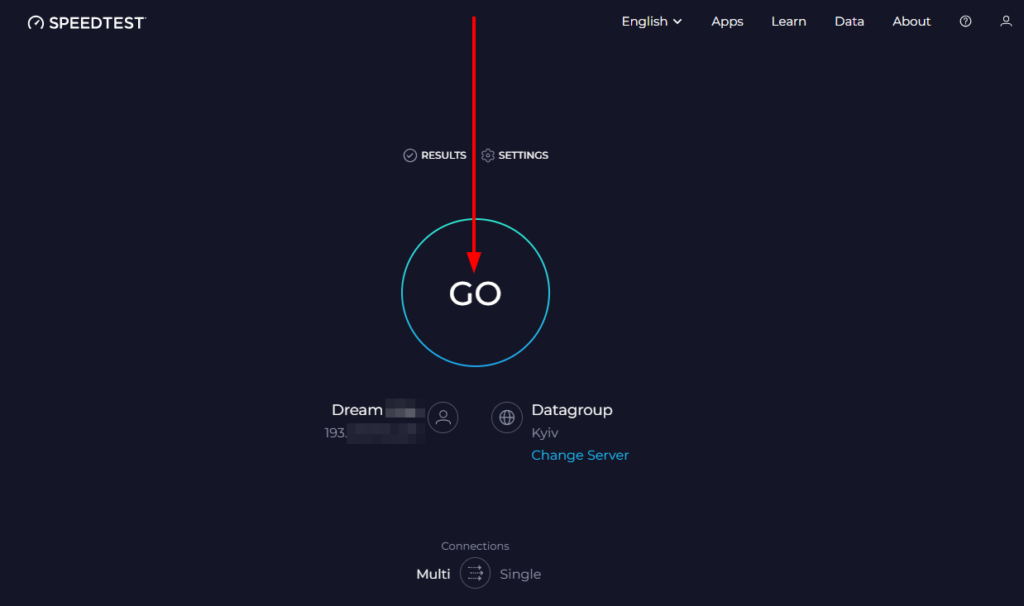
Wait for the test to complete. Based on the results, you can conclude whether your Internet connection is fast and stable enough to use the telephony system.
Examples of a stable Internet connection:
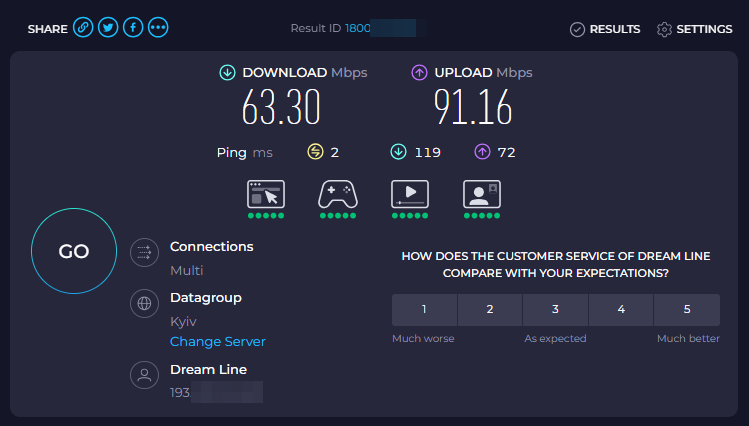
Internet connection speed above 384 Kbps, the difference between ping values does not exceed 40 ms. These values are sufficient for IP telephony to work properly.
Example of an unstable Internet connection:
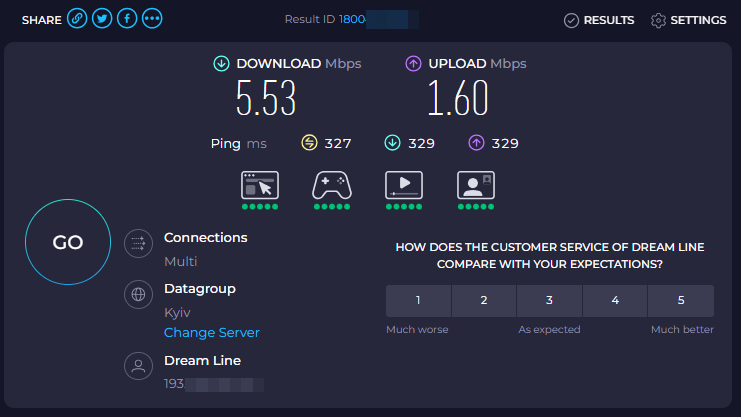
Internet connection speed below 384 Kbps, ping difference exceeds 40 ms. These indicators cannot ensure the correct operation of IP telephony.
If the quality of the Internet connection in your office leaves much to be desired, don’t despair. Just contact our managers, they will tell you how you can use IP telephony even without an Internet connection using FMC technology.
If you have any problems with testing the quality of your Internet connection or sound, or if you have any questions, please contact our technical support team, and we will be happy to help and answer all your questions.
Chat in Telegram (available in your personal account in the “Technical Support” section): 24/7 support
Regularly checking your technical parameters helps avoid missed calls and customer dissatisfaction. If your test results are sub-optimal, don’t worry. Our experts will help you configure the best setup or activate FMC technology, which ensures high-quality communication even without an internet connection.



