


PASSWORD RECOVERY FOR UNITALK PERSONAL ACCOUNT: How to Quickly Regain Access
Your Stability Starts with Access
Forgetting a password is never a problem when you know how to quickly reset it. At UniTalk, we understand how critical it is to have uninterrupted access to your personal account to keep your IP telephony running stably.
This brief guide will help you instantly restore access to all UniTalk settings, data, and features. Should you encounter any unexpected difficulties, remember: our technical support team is always ready to assist.
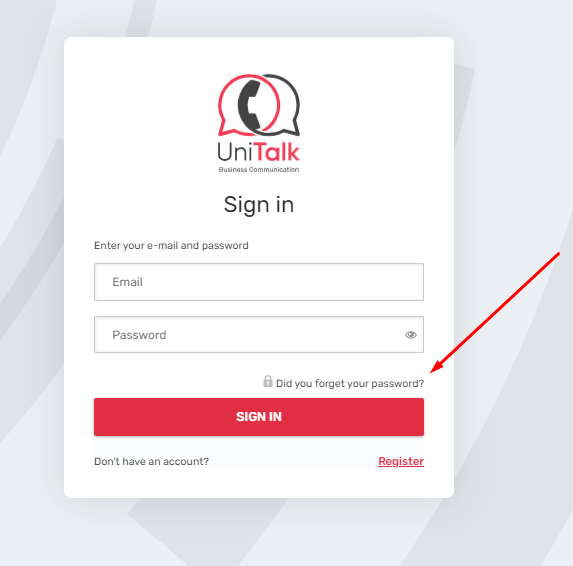
- If you have forgotten the password to enter your UniTalk personal account, when logging in you must select:
- Next, enter your email address as indicated below, and click the “Submit” button:
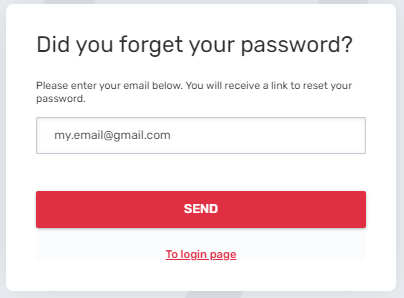
You will receive a message by email, go to the new one and enter a new password for your account account.
If, when you enter your email, the “send” button is not active, or for other reasons you are not able to renew the password to enter a special account, you can go back to the technical instructions:
Email: support@unitalk.cloud
Telegram bot, can be connected to the project section
Security and Support
You have successfully restored access to your UniTalk workspace and can continue working.
- Uninterrupted Access: The recovery process is fast and intuitive.
- Stability: You are always in control of your IP telephony system.
- Support: If the automated recovery fails, our technical support is always available.



