WhatsApp for Business: The Complete Guide to Using It in 2026
Customers are increasingly choosing messengers over phone calls to reach businesses. It lets them write at any time, reply at their own pace, and not worry about anyone overhearing the conversation. While most messaging broadcasts in the Ukrainian market are sent via SMS and Viber Business, global leadership belongs to WhatsApp: it has more than 3 billion monthly active users, and 200 million companies already use WhatsApp for Business.
Roughly one in five Ukrainians regularly communicates via WhatsApp. This means that WhatsApp has real business potential — and that potential multiplies if you want to reach other markets as well.
If you haven’t started using WhatsApp for Business yet, or haven’t fully figured it out — this guide is for you. We cover the features of a WhatsApp business account, chatbot setup, and walk you step by step through how to connect WhatsApp Business in Ukraine.
Why We Prepared This Guide
At UniTalk, we are actively expanding the business communications landscape and are preparing to launch WhatsApp for Business across two of our products.
In the near future, users will have access to:
- sending bulk broadcasts via WhatsApp, similar to SMS and Viber;
- sending WhatsApp messages to customers directly from the platform;
- connecting WhatsApp as an additional channel in UniTalk Chat for handling customer conversations.
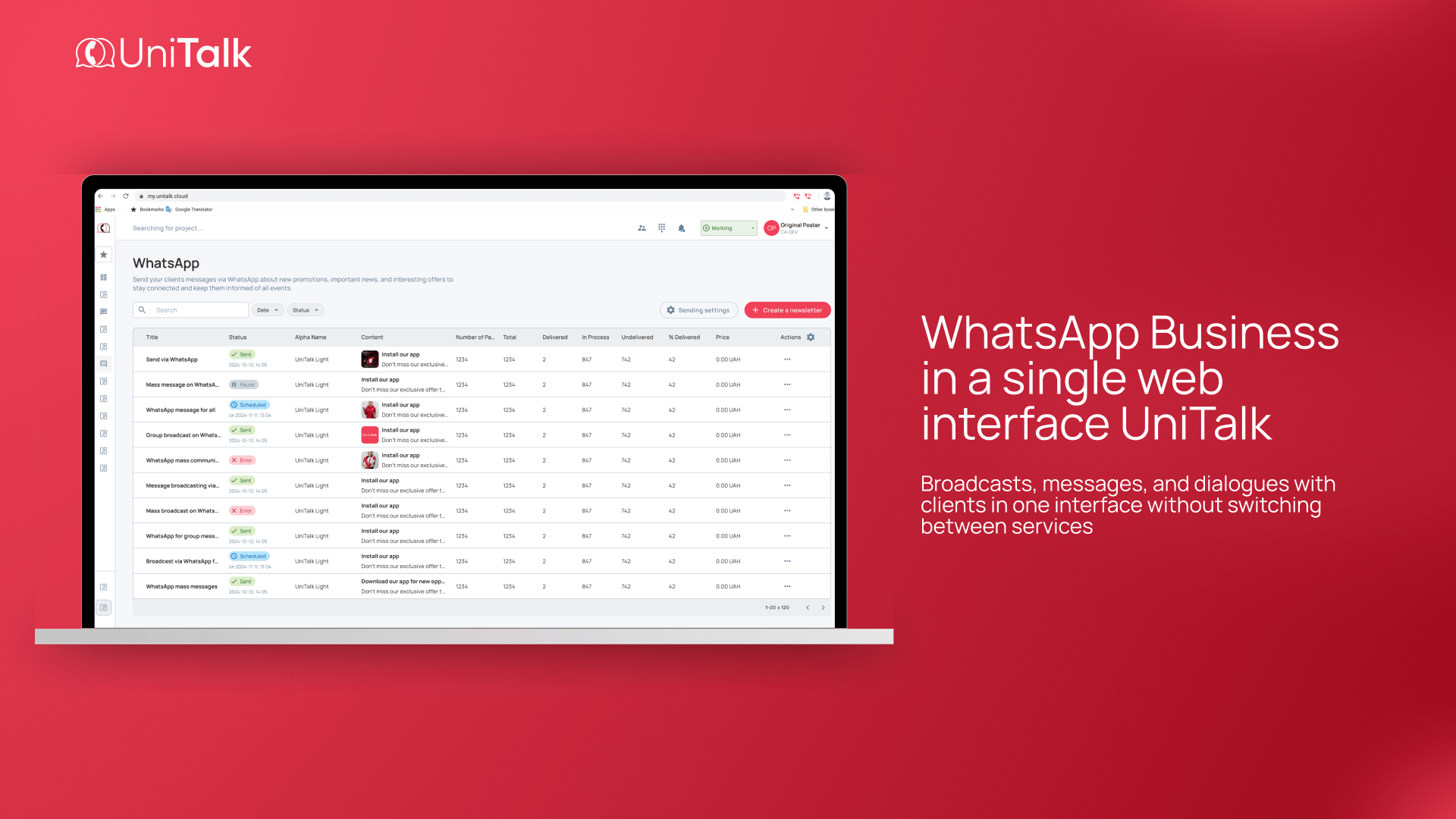
The key difference is that all communications are available in a single web interface. No need to use separate apps or switch between devices.
That is exactly why in this article we take a detailed look at the capabilities of WhatsApp for Business and explain how to use this channel as effectively as possible.
What Is WhatsApp for Business
WhatsApp Business offers business users a dedicated ecosystem of tools. Unlike the standard WhatsApp for personal messaging, it is a different product with its own features, rules, and limitations.
What is a WhatsApp business account for? It transforms the app into a 24/7 communication channel between brands and their customers. It allows you to create a professional company profile, automate responses to common questions, accept orders, segment customers, and track messaging statistics. This is already standard practice for users in India, Brazil, the United States, Turkey, Germany, the United Kingdom, and Poland — countries where WhatsApp holds a significant market share.
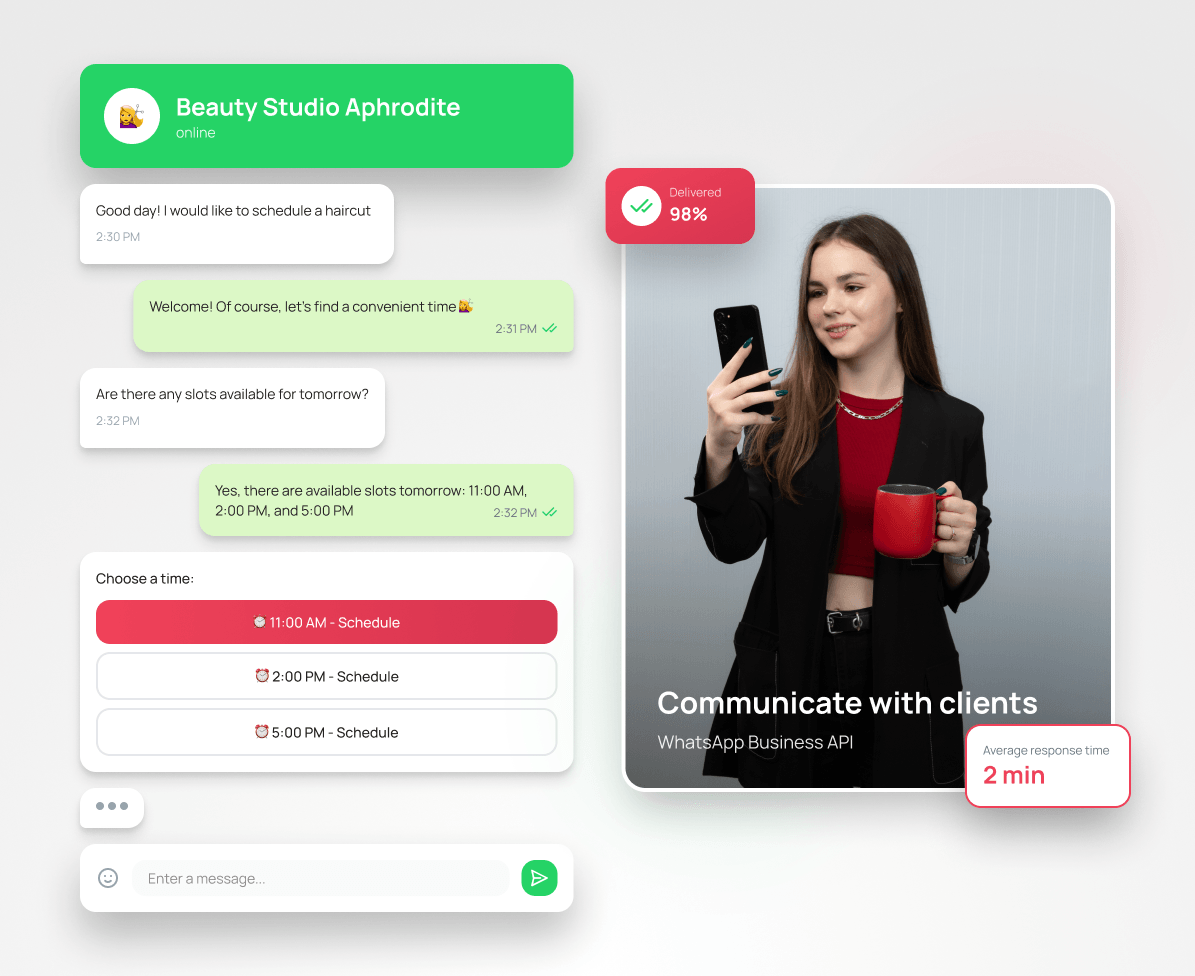
What WhatsApp Business offers compared to the standard app:
- Greater trust in the sender. When a customer sees a verified company profile instead of an anonymous phone number, they are more likely to open the message.
- Routine automation. It is easy to set up a welcome message (“Hi! We work from 10 AM to 7 PM and will get back to you shortly!”), quick replies to common questions (“How do I place an order?”), and add a product catalog.
- Analytics for decision-making. At any moment you can see how many messages were sent, delivered, and read, which templates perform better, and which ones need to be updated.
The open rate for WhatsApp messages reaches 98%, with a response rate of 45%.
In late March 2026, a global WhatsApp update was released. A single iOS device can now host both personal and work accounts simultaneously on a single iOS smartphone, while the integrated AI assistant generates real-time reply suggestions during conversations. This means a manager can respond from their work account on the same phone they use for personal WhatsApp, and handle conversations more efficiently.
WhatsApp Business App vs WhatsApp Business API: Which One to Choose?
WhatsApp offers business users two tools that sound similar but are functionally very different.
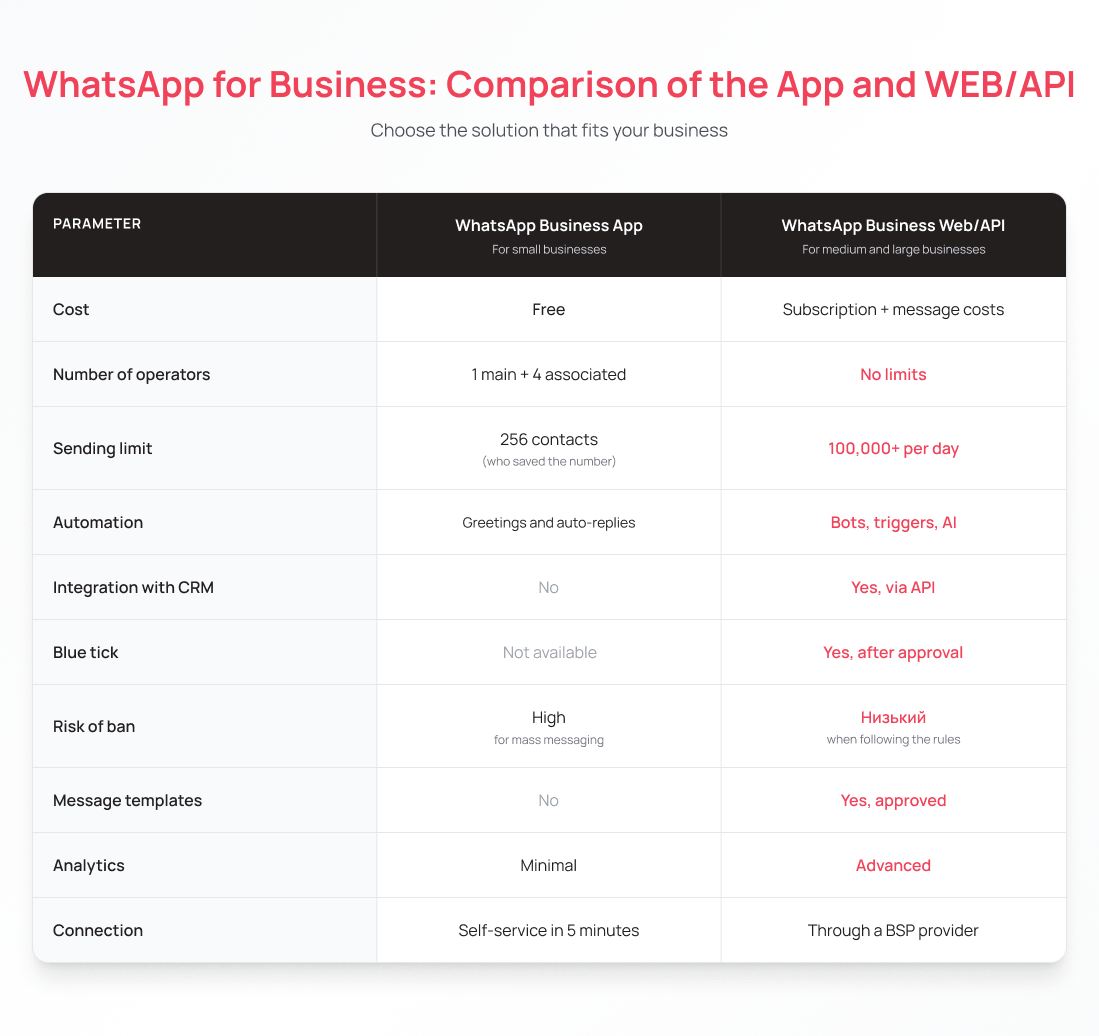
WhatsApp Business App (for small businesses)
This is a mobile app that can be downloaded for free from the App Store or Google Play. It was designed specifically for small businesses: shops, freelancers, and small service companies where one or two people handle customer conversations and the number of daily dialogues does not exceed a few hundred.
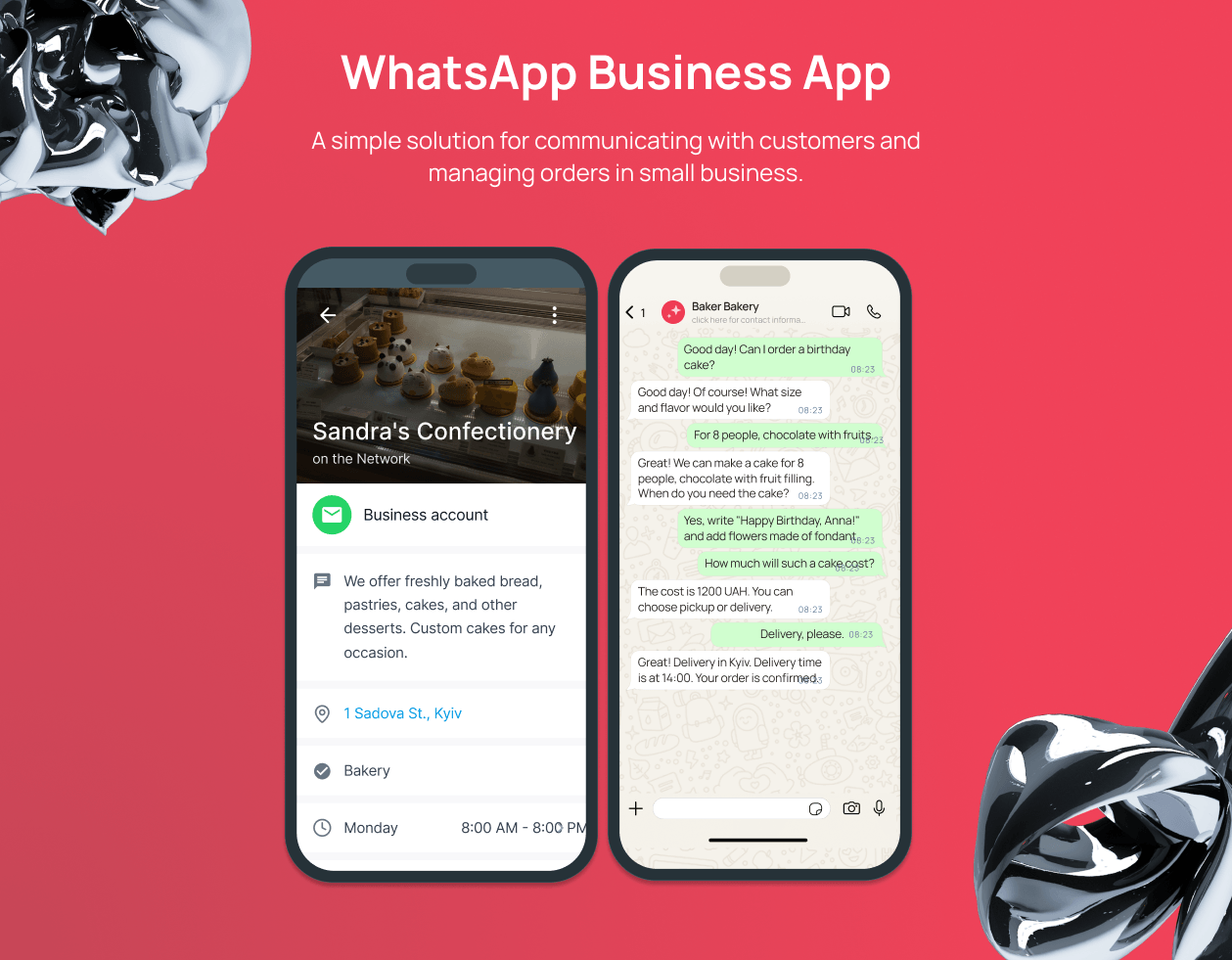
WhatsApp Business App features:
- creating a business profile with a description, address, and working hours;
- setting up a welcome message and out-of-office auto-replies;
- quick replies (shortcodes for frequently asked questions);
- a product catalog with photos, descriptions, and prices;
- small-scale broadcasts to a contact list;
- color labels and contact sorting.
Pros:
- free by default, with a paid premium version available;
- no technical knowledge required;
- can be set up in just a few minutes;
- works on a smartphone and via a web browser (WhatsApp Web).
Cons:
- one account is tied to one phone number;
- can be used simultaneously on one primary and four linked devices (up to 10 devices in the premium version);
- broadcast list is limited to 256 users who have saved your number in their contacts;
- no CRM integration or chatbot support;
- risk of being banned when sending regular bulk messages;
- single-user access (multiple managers cannot work simultaneously).
Conclusion: if you are looking for a way to work in WhatsApp and are considering the app specifically, it is a great choice for a small business — but only as a starting point.
WhatsApp Business API Platform (for medium and large businesses)
WhatsApp Business API can only be connected through certified partners, which include UniTalk. This solution is suited for online stores, service companies, banks, insurance companies, and call centers — that is, medium and large businesses with high-volume and regular communications.
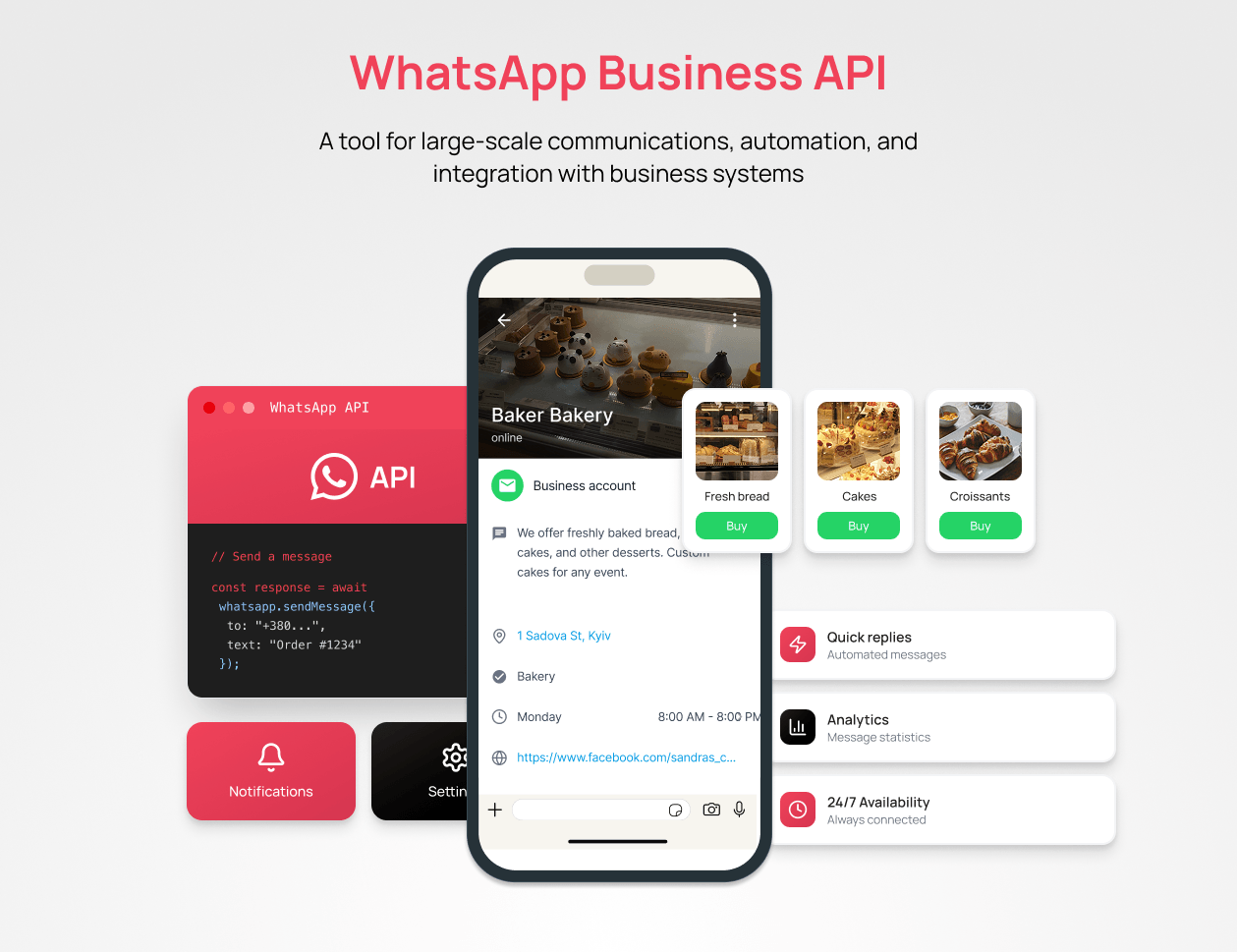
WhatsApp Business API features:
- unlimited number of operators;
- broadcasts to thousands of contacts daily;
- connecting chatbots with advanced logic;
- integration with CRM, ERP, and payment systems;
- official verification (blue checkmark).
Pros:
- unlimited number of operators;
- full automation via chatbots and trigger scripts;
- a wide range of systems available for integration;
- official status and a high level of security;
- option to verify the account;
- minimal risk of being banned when rules are followed.
Cons:
- a paid service that includes a monthly subscription fee and per-message charges by category;
- can only be connected through a provider, and setup requires in-depth technical knowledge;
- all outbound message templates must be pre-approved by Meta.
Key Features of WhatsApp Business
Let’s take a look at how to work in WhatsApp for Business through the app. Every feature here has concrete value.
Business Profile
This is the first thing a customer sees when they open your chat. Filled with information that is useful to the customer, a business profile stands out from an anonymous phone number and builds trust.
What information can be included in the profile:
- business name and description;
- address with a map snippet;
- working hours;
- email and website address;
- business category.
Welcome Message and Auto-Replies
WhatsApp for Business offers two types of automatic messages that save time and solve one of the most common problems for small businesses: a customer writes at night, gets no reply, and ends up buying from a competitor.
A welcome message is sent to the customer automatically when they message the brand for the first time or resume a conversation after a long break. Set it up once, and customers will receive it even outside of working hours or when all managers are busy.
Example welcome message:
“Hi! Thanks for reaching out to [Company Name]. We’re available from 9 AM to 7 PM. How can we help you?”
An away message is sent outside of working hours so the customer knows exactly when they can expect a reply from the company.
Example away message:
“Hi! We’re currently offline. Leave your question and we’ll get back to you first thing during business hours, from 9 AM to 7 PM.”
Quick Replies
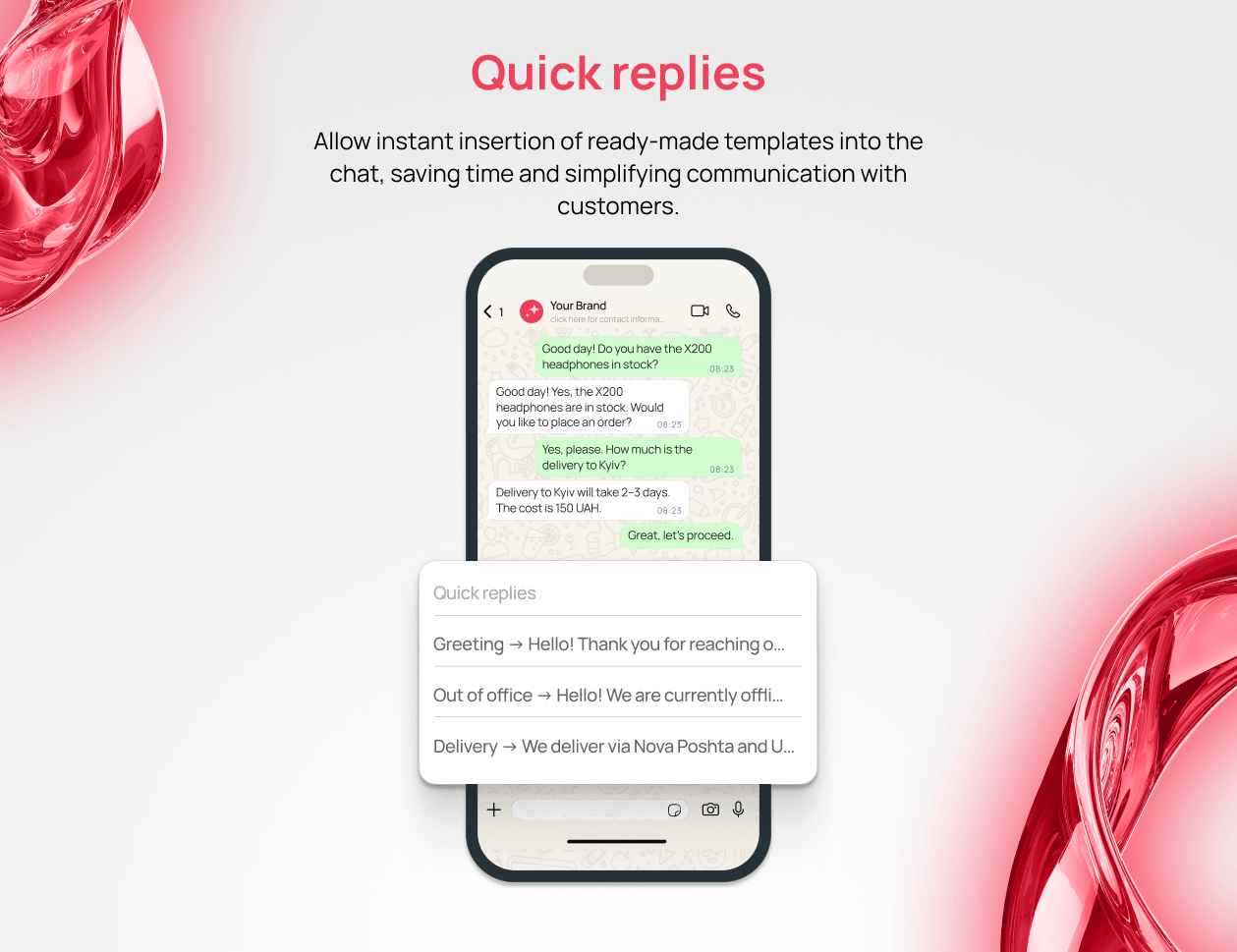
Quick replies are saved templates for frequently repeated phrases in WhatsApp for Business. A manager types “/price”, “/delivery”, “/details”, “/payment”, or “/return” in the message field, and the ready-made text is automatically inserted.
Example quick reply for the “/delivery” template:
“We ship via Nova Poshta and Ukrposhta at the carrier’s standard rates. Dispatch time is 1–3 business days. Please send us your delivery details.”
Quick replies significantly reduce the time spent on each conversation, since managers no longer need to type or manually paste the same text dozens of times a day.
Labels and Customer Segmentation
Labels are color-coded tags that can be assigned to chats or individual contacts in WhatsApp for Business. For example, yellow for new customers, red for those with pending payments, and green for completed orders. The labeling system can be adapted to your own processes. Once set up, there is no need to scroll through entire conversation histories — chats can be filtered in just a couple of clicks: see who is waiting for a reply, who has placed an order but hasn’t paid yet, or who frequently inquires but never orders.
Product Catalog
A WhatsApp business account lets you showcase products directly in the messenger, complete with photos, descriptions, prices, and SKUs. It is a virtual storefront where you can upload up to 500 products or services, so there is no need to send customers to external links on your website or a marketplace.
The product catalog works especially well for clothing and accessories stores, food and flower delivery services, handmade goods makers, and B2B suppliers. Products can be uploaded manually through the app or via Meta Commerce Manager. Choose the second option when you have a large inventory — it will save you time.
Cart and Order Placement
The cart is a natural extension of the product catalog: a customer can add an item they like and place an order right away, without extra steps or lengthy back-and-forth with a manager. The manager then simply confirms availability, clarifies the delivery address, and sends payment details.
For a small company, WhatsApp for Business becomes a fully functional store that operates directly inside the messenger, with no website or landing page required.
Short Links and QR Code
Every WhatsApp Business account is assigned a unique short link in the format wa.me/380XXXXXXXXX, where 380XXXXXXXXX is the phone number. Anyone who clicks the link goes straight to the company’s chat — no need to save the number to their contacts first. A QR code works the same way: scanning it opens the company’s chat instantly.
The QR code can be placed on product packaging, business cards, banners, or an Instagram bio. Optionally, a pre-filled message can be embedded into it — for example: wa.me/380XXXXXXXXX?text=I+want+to+know+about+delivery. The manager opens the chat, sees the message, and already knows what question to answer.
Facebook and Instagram Integration
WhatsApp for Business is part of the Meta product ecosystem and connects to a Facebook business page and Instagram profile. This enables Click-to-WhatsApp ads — when a user sees an ad on a social network, taps the button beneath it, and lands directly in a chat with your company.
The Facebook integration also makes profile management easier, since all messages from WhatsApp, Messenger, and Instagram can be handled in the unified Meta Business Suite interface.
Performance Analytics
WhatsApp Business App provides basic analytics for each account: the number of messages sent, delivered, read, and replied to. This helps gauge how effectively the channel is performing. If messages are delivered but not read — it may be time to adjust the sending time or the content. If they are read but go unanswered — the call to action may need rethinking.
WhatsApp Business API offers detailed analytics by template, broadcasts, operator, and time period. For example, you might find that a promotional template gets opened twice as often on weekdays as on weekends — and adjust your schedule accordingly.
WhatsApp Business API Capabilities
The capabilities of WhatsApp Business API go far beyond those of a standard messenger. Bulk broadcasts, smart chatbots, CRM integration, and multi-operator access within a single account turn it into a fully featured platform for sales and customer support.
Bulk broadcasts
Through the API, WhatsApp for Business can send broadcasts to tens and hundreds of thousands of contacts per day with minimal risk of account ban. The key requirement is that every recipient must have previously given their consent to receive messages (opt-in).
Bulk broadcasts are most commonly used for promotions, product announcements, and personalized offers. They can also be used for abandoned cart reminders, order status updates, or delivery confirmations.
Message Templates
To protect against spam, outbound messages are sent through templates that have been approved by Meta. Templates can include variables (customer name, order number, amount), quick reply buttons, links, and media files.
There are four template categories:
- Marketing — promotional and advertising messages;
- Utility — transactional notifications (order confirmation, delivery status);
- Authentication — OTP codes and verification;
- Service — messages within an open customer conversation.
Messages sent using marketing templates are currently billed from the first delivered message. The cost depends on the recipient’s country and the template category.
CRM Integration
WhatsApp Business API can be integrated with many popular CRM systems, including HubSpot, Zoho, Salesforce, and others. Once connected, all customer conversations are automatically logged in the system and added to the customer’s record. A manager opens the customer’s CRM profile and immediately sees the full history of WhatsApp conversations, calls, and deals. They can also message the customer directly from within the CRM interface, without switching between multiple apps.
Multi-Agent Access
Through the API, any number of operators can handle conversations from a single WhatsApp for Business number. Conversations are distributed manually or according to predefined rules. For example, new inquiries about returns can be routed to support, while pricing questions go to the sales team. A supervisor can view all conversations, join any of them, or reassign them to another operator.
Multi-agent access in WhatsApp Business API improves customer service quality: customers get fast responses from the operator who is best equipped to handle their specific question.
Chatbot Automation
With chatbots in WhatsApp Business API, it is possible to implement fully fledged inquiry handling scenarios. These are not just generic auto-replies like “we’re away,” but a tool that qualifies leads, accepts orders, and collects data without any human operator involvement.
Omnichannel Support
Customers sometimes send a message in the messenger, then call, and then follow up with questions on the brand’s Instagram. WhatsApp Business API fits naturally into an omnichannel communication strategy — consolidating all interactions into a single customer profile in your CRM.
A company operating across multiple markets can use Viber for broadcasts in Ukraine, WhatsApp for Business for international customers, and keep SMS broadcasts for the most critical notifications where guaranteed delivery is essential.
In 2026, WhatsApp Business API will become part of the UniTalk omnichannel platform, so you can manage business communications across Viber, SMS, and WhatsApp from a single interface.
WhatsApp Chatbots: How to Automate Customer Communication 24/7
A WhatsApp chatbot has the potential to become the most disciplined member of your team. It never runs late, never gets tired, and never takes a lunch break or goes on vacation. Here is how to use it to automate customer communication.
What a Bot Is For: From Lead Qualification to Payment Processing
Chatbots in WhatsApp for Business handle tasks at every stage of the sales funnel.
- First contact and qualification. When a customer writes for the first time, the bot asks a few questions and determines who it is dealing with. This could be a hot lead, someone researching the market, or a non-target contact who accidentally tapped a button. Depending on the answers, the bot selects the appropriate conversation scenario or routes the customer to a live operator.
- FAQ and support. More than half of all incoming inquiries are repetitive: “What’s the price?”, “Where is my order?”, or “How do I return an item?” The bot responds instantly and only involves a manager where it cannot handle things on its own.
- Order processing. The bot helps the customer choose a product, clarifies details, suggests delivery options, and sends payment information. The order is created automatically and pushed to the CRM or another tracking system.
- Payment processing. In some markets, WhatsApp integrates with payment systems (this feature is not available in Ukraine), where the bot generates a payment link or payment widget directly in the chat.
- Repeat sales. The bot tracks purchase history and, at the right moment, suggests restocking, trying a new product, or using a personal discount.
- Feedback collection. After an order is completed or a consultation ends, the bot automatically asks the customer to rate the experience. This is how WhatsApp for Business helps measure customer satisfaction with the channel.
- WhatsApp Flows. This technology enables interactive scenarios to be built directly inside the chat window. The customer selects an appointment time, makes a booking, or fills out a form without navigating to any external links.
Scenario Examples for Ukrainian E-Commerce
Below are a few ways to turn a WhatsApp chatbot into a new, high-performing team member for your online store.
Abandoned Cart
A customer added items to their cart on the website but did not complete the order. 1–2 hours later, the WhatsApp bot sends a message: “Hi, [Name]! You were looking at [Product Name]. It’s still waiting for you. Ready to place your order?” The customer can tap “Place Order” or “Browse More.” If they got distracted mid-purchase but still intend to buy, this reminder gives them a gentle nudge.
Order Tracking
After an order is placed, the customer receives a series of automated messages: order confirmation, handoff to the delivery service, dispatch from the warehouse, and delivery notification. Each message includes the current order status and a tracking link on the carrier’s website.
Implementing this scenario in WhatsApp for Business can dramatically reduce the number of “Where is my order?” inquiries.
Re-engaging Dormant Customers
Every online store has customers who have not made a purchase in a long time. The bot can send them a personalized message: “[Name], here’s a 15% discount on any purchase until the end of the month. Want to browse our catalog?”
How to Run Legal WhatsApp Broadcasts Without Getting Banned
WhatsApp fights spam by focusing primarily on user behavior. If users frequently block or report a company’s account, it will get banned. But this will not happen if a few key rules are followed.
Rule #1: Consent comes first
Only send messages to people who have explicitly agreed to receive them — for example, by checking a box when placing an order or filling out a subscription form. A company that uses purchased contact lists or scrapes phone numbers will eventually get banned.
Rule #2: Approved templates only
Message templates must be clear, useful, non-misleading, and approved by Meta. Trying to work around the system is pointless — smart algorithms will catch it regardless.
Rule #3: Always offer an opt-out
Every message must include an unsubscribe option — this is a platform requirement. Keep your messages relevant and avoid being intrusive, as a high unsubscribe rate can also lead to the WhatsApp Business account being banned.
Rule #4: Monitor your quality rating
WhatsApp Manager displays your Account Quality score. A green rating means everything is fine, yellow means it is worth reducing send frequency, and red means account activity will soon be restricted.
Rule #5: Use the messaging window system
When a customer messages your company’s WhatsApp chat first, a free 24-hour service window opens. During this period, any messages can be sent without using paid templates. If the customer came through a Click-to-WhatsApp ad on Facebook or Instagram, the window extends to 72 hours.
Rule #6: Personalize and segment
Do not send the same message to your entire contact list. Instead, segment customers and tailor the offer to each segment. This reduces irritation, lowers complaint rates, and improves response rates.
Rule #7: Find the right send frequency
Meta limits the number of marketing messages a single user can receive. Do not exceed this limit, or you risk triggering complaints or unsubscribes.
WhatsApp and CRM Integration
Integrating WhatsApp with a CRM makes the messenger part of a unified customer relationship management system.
Without integration, managers handle customer conversations on their personal phones, conversation history is rarely saved, and it is lost entirely if an employee leaves or moves to a different role.
With integration, every incoming WhatsApp message is automatically added to the CRM. If the number already exists in the database, the conversation is linked to the existing customer record; if not, a new lead is created. The operator communicates with the customer directly from within the CRM interface and has access to the full interaction history.
The integration works similarly across all major CRM systems. WhatsApp for Business connects to the CRM via an API connector, and all conversations sync in real time. Some tasks can be automated: if a customer sends a message containing a keyword such as “cancel” or “return,” the CRM automatically creates a task for the manager.
If you are currently choosing a CRM or planning a migration, we have put together a list of strong Bitrix24 alternatives.
Building a Subscriber Base: Widgets, Social Media, and Offline Touchpoints
Your contact list is one of your most valuable business assets in WhatsApp — without it, you cannot run broadcasts or automate tasks. But how do you build it legally?
Website widget
Add a WhatsApp button to your website. A visitor will see the familiar messenger icon, tap it, and land in your company’s chat. This is not only convenient — as mentioned above, the first incoming message from a customer opens a free communication window.
Subscription form with a checkbox
During website registration, order checkout, or newsletter signup, add a checkbox with the text: “I agree to receive messages via WhatsApp.” This protects you from spam complaints and user blocks. Importantly, the checkbox must not be pre-checked and must not be required to complete the form.
Instagram and Facebook
Click-to-WhatsApp ad broadcasts in Meta Ads can be one of the most effective channels for growing your contact list. A user sees the ad, taps “Message on WhatsApp,” and lands in your chat — skipping any intermediate steps to a website or landing page. Also add your WhatsApp link to your Instagram and Facebook profile bios. If you have an engaged audience there, a portion of them will migrate to the messenger.
Email broadcast
This can be sent to an existing contact list, inviting recipients to connect via WhatsApp. Include a link or QR code and let customers choose to receive updates where it is most convenient for them. Anyone who uses this messenger will be happy to engage with you there.
Offline touchpoints
A QR code works best here. It can be placed anywhere customers physically interact with your brand: on product packaging, receipts, business cards, signage, and marketing materials. Add a prompt next to the QR code: “Message us on WhatsApp and we’ll reply within 5 minutes.”
Messengers and bots
If you already have a Telegram bot or a Viber broadcast, invite your audience to connect via WhatsApp in exchange for a discount, a useful resource, or access to exclusive content.
How to Connect WhatsApp Business in Ukraine
The setup process differs depending on which product you choose.
Connecting WhatsApp Business App
This is free and takes just a few minutes:
- Download the WhatsApp Business app from the App Store or Google Play.
- Register using your company phone number (not a personal one).
- Verify the number via SMS or a phone call.
- Fill out the business profile: name, description, address, working hours, and website.
- Upload a product catalog (optional).
- Set up a welcome message and auto-reply.
Done — the account is fully ready to use within 10–15 minutes.
Connecting WhatsApp Business API
This is more complex, but WhatsApp for Business running through the API offers far greater capabilities. To connect, you need to work with a certified Business Solution Provider (BSP), who provides access to the platform and technical support during setup.
General steps for connecting through a BSP:
- Choose a BSP provider. Consider their experience, technical support, and ability to set up the integrations you need.
- Register your business in Meta Business Manager. If you already have one, great. If not — create a new account at business.facebook.com and complete the business verification process.
- Decide on a phone number. A number already registered with the standard WhatsApp cannot be connected to WhatsApp Business API. If you want to keep the number, delete the regular account first.
- Create a WhatsApp Business Account (WABA) through Meta Business Manager. Enter the company name (as customers will see it), the business category, and the time zone.
- Connect the number to the WABA via the provider’s interface, then verify it via SMS or an incoming call.
- Set up the profile. Upload an avatar, add a description, a website link, and a physical address.
- Create your first message templates and submit them for review. Meta typically reviews them within 1–3 business days.
- Integrate with your systems: CRM, helpdesk, and e-commerce platform.
Setup takes anywhere from a few days to 2–3 weeks, depending on how quickly Meta completes the verification process.
If your customers are based in Ukraine, Ukrainian pricing applies. If you are a Ukrainian business but serve customers in Poland, Germany, or the United Kingdom, messages will be billed at the rates set for those countries.
WhatsApp in UniTalk: Coming Soon
WhatsApp Business will very soon become part of the UniTalk ecosystem.
You will be able to:
- launch bulk WhatsApp broadcasts from a single interface;
- send service and marketing messages to customers;
- handle WhatsApp conversations inside UniTalk Chat alongside other channels;
- manage all communications in one web interface.
This will bring SMS, Viber, and WhatsApp together into a unified omnichannel system, making customer communication seamless — without any extra tools.
🚀 The launch is coming soon — stay tuned for updates.
Conclusion
WhatsApp is one of those business communication channels that can no longer be ignored — especially if you are planning to enter international markets or reach Ukrainian users who prefer this messenger. High open rates, a choice of tools suited to any company size, and a growing user base make WhatsApp for Business a solution that is well worth the investment of time.
For the best results, build your contact list only with customer consent and design scenarios that genuinely help customers without being intrusive. Use analytics data to continuously improve your communication. That way, WhatsApp Business becomes a fully featured platform for sales, support, and executing your marketing strategy.
WhatsApp is designed for personal communication, while WhatsApp Business is built for business communications. A company can describe its activities in the profile, add welcome messages and auto-replies, a product catalog, quick replies, and labels for customer segmentation, as well as view messaging statistics. The account looks professional, integrates with CRM systems, and can be managed by multiple team members simultaneously.
The cost consists of two components: a subscription fee paid to the BSP provider, which depends on the chosen plan and feature set, and per-message charges according to Meta’s pricing. The latter is tied to the template category (Marketing, Utility, Authentication, Service) and the recipient’s country. Your BSP provider will give you an accurate quote based on your customer geography and messaging volume.
With the WhatsApp Business app, one primary and four linked devices can be used, but only one manager can work at a time. With WhatsApp Business API, there are no such restrictions: any number of operators can work simultaneously from a single number via a web interface or CRM.
Yes, online stores actively use it for order status notifications, delivery tracking, abandoned cart reminders, personalized offer broadcasts, and post-sale support. The product catalog lets you showcase your inventory directly in the chat, while the cart feature allows customers to place orders without leaving the messenger.
Yes, in some countries this is available through WhatsApp Pay. It is not widely used in Ukraine or Europe, but payments can be set up through a payment provider using WhatsApp Business API. In this case, the bot sends the customer a payment link or QR code directly in the chat, the customer visits the payment page, completes the payment, and returns to the conversation.
The blue checkmark indicates that the account has been verified by the platform and is only available through WhatsApp Business API. To obtain it, you need to connect WhatsApp Business API through a certified BSP provider, verify your business in Facebook Business Manager, and enable two-factor authentication on the account. After that, you can apply for an official business account through WhatsApp Manager and wait for approval (typically 2–4 weeks; 80% of companies receive a positive response).
Stay tuned for our updates — WhatsApp Business API will soon be available to UniTalk customers.