13 Best Productivity Tools for Working Remotely: Apps and Software for Working from Home
The modern workplace is no longer confined to the four walls of an office. With the advancement of digital technology, working remotely has become a viable and often preferred option for many professionals. The right tools to maintain productivity and ensure seamless communication while working from home are crucial. This article explores the best productivity tools, apps, and software that cater to the diverse needs of remote workers.
The Need for Technology for Working Remotely
The transition to remote work has not just been a trend but a necessity for many businesses. Technology for working remotely has bridged the gap between physical office spaces and virtual work environments, enabling employees to collaborate, manage tasks, and stay connected with colleagues. Without the right remote work tools, remote work systems can become fragmented, leading to inefficiency and a lack of productivity.
Remote work has been shown to reduce costs for employers, provide flexibility for employees, and offer access to a wider pool of talent not limited by geographic boundaries. This is why the demand for remote workforce software and apps for remote work has surged, becoming a central part of the modern professional’s toolkit.
By leveraging the best technology for working remotely, businesses can ensure that their teams remain productive, engaged, and communicative, no matter where they are. This paves the way for a more adaptable and resilient workforce capable of tackling the challenges of a rapidly changing work landscape.
Why Workers Prefer Remote?
The allure of remote work lies in its flexibility and the autonomy it provides. Employees can design their work schedules to suit their lifestyles, improving their work-life balance. The absence of a commute saves time and allows for a more relaxed start to the day. Additionally, remote work productivity tools have made it easier for individuals to stay connected and productive from any location.
Remote work is not just about convenience; it’s about creating a personalized work environment. With the best apps for remote workers, individuals can customize their workstations, increasing comfort and productivity. Moreover, remote work can reduce stress and higher job satisfaction as employees feel trusted and valued for their output rather than their time spent at a desk.
However, the shift to remote work also brings challenges, such as isolation and distractions at home. This is where remote worker management software and remote working platforms become essential, helping workers to remain focused and connected to their teams and their goals.
Types of Remote Work Systems
Various systems in place cater to different aspects of remote work. These systems include software for working from home for tracking time, managing tasks, conducting meetings, and maintaining control over projects. Each system serves a unique purpose, and when used collectively, they form a comprehensive suite of best tools for working remotely.
For tracking time, time tracker tools are indispensable for freelancers who bill by the hour and teams that must manage their work hours effectively. Task management systems help organize day-to-day activities, ensuring nothing slips through the cracks. Meeting platforms replicate the conference room experience, enabling real-time collaboration and discussion, regardless of participants’ locations.
Control systems are perhaps the backbone of remote work, as they allow managers and team leaders to oversee projects, distribute workload, and track progress. Without these, maintaining productivity and meeting deadlines would be significantly more challenging in a remote setting.
Best Software for Working Remotely
Slack — useful messenger
Slack has become synonymous with workplace communication, particularly for remote teams. Its real-time messaging capability, coupled with the ability to create various channels for different topics, makes it a powerful remote work collaboration tool. Slack integrates with numerous other remote work tools, making it a central hub for notifications and updates from other apps.

Users can share files, conduct voice and video calls, and even set reminders within Slack. Its search functionality is top-notch, allowing users to sift through a sea of messages and documents effortlessly. For teams looking to streamline communication and stay connected, Slack is a top contender among the best applications for remote work.
Zoom — an online platform for meetings
Zoom is a leading remote working platform, especially for video conferencing. Its user-friendly interface allows for hosting meetings with hundreds of participants, making it suitable for small team check-ins and company-wide town halls. Zoom offers screen sharing, virtual backgrounds, and breakout rooms, enhancing the virtual meeting experience.
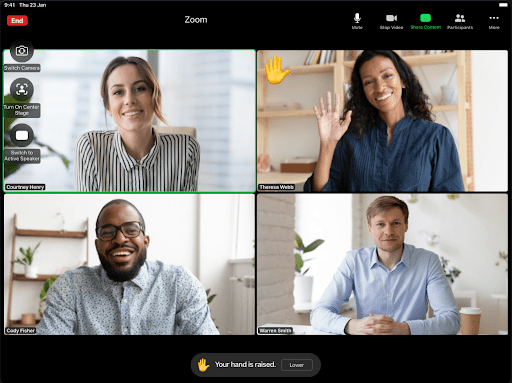
The platform’s reliability and high-quality video and audio have made it a staple in the remote work system, allowing for a semblance of face-to-face interaction in a remote setting. Whether for daily stand-ups or client presentations, Zoom is a versatile and indispensable remote work software.
Loom — for recording screencasts
When synchronous communication isn’t possible, Loom stands out as a remote work productivity tool. It enables users to record and share screencasts with ease. This tool is particularly useful for creating tutorials, giving feedback, or explaining complex tasks that require visual aid.

With Loom, videos can be recorded with just a few clicks, and viewers can watch at their convenience, providing a flexible and efficient way to share information without coordinating schedules. This makes it an excellent addition to the best software for working from home, especially for teams across different time zones.
Trello — team management multi-tool
Trello utilizes the Kanban board methodology to provide a visual overview of project tasks. This makes it an effective remote worker management tool, allowing teams to see the progress of tasks, manage workloads, and meet deadlines. Trello’s card system is highly customizable, with options to add checklists, labels, due dates, and attachments.
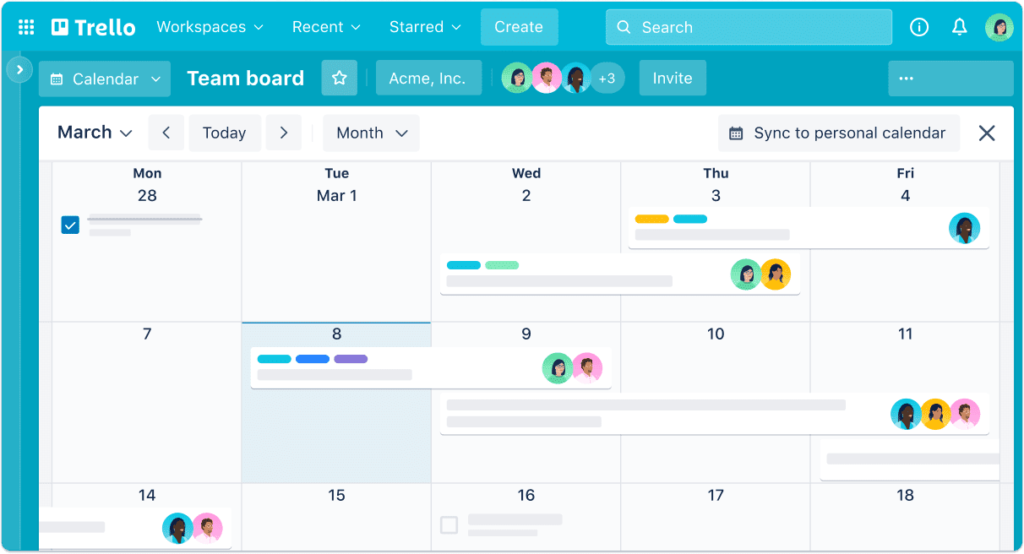
Collaboration is straightforward on Trello, with the ability to assign tasks, comment on cards, and receive notifications. For teams seeking a user-friendly and flexible project management tool, Trello is among the best remote working platforms available.
Wobbly — time and task tracker
The software for working from home is designed to optimize time, resources, and costs, all while boosting your team’s productivity. Wobbly time tracking software offers a range of features, such as tracking billable and non-billable hours, generating real-time data reports, and planning workload and tasks, which are essential in today’s remote working environment.
Furthermore, its invoicing features and the ability to create comprehensive databases for employees, projects, and clients streamline the end-to-end process of work management. Whether you’re a freelancer or part of a larger team, Wobbly’s platform empowers you to systematically manage a vast array of information from day one.

Wobbly enables planning for employees across different time zones, accounting for sick leaves and vacations, and facilitating quick task rotation. By bringing order to daily routines, it allows its users to focus on critical tasks, optimize business processes, and ultimately enhance company profits, positioning itself as a leading remote work system for contemporary business needs.
Google Services — an ecosystem of team assets
Google’s suite of services, including Google Docs, Sheets, and Drive, is integral for remote work collaboration. These tools allow multiple users to work on documents simultaneously, providing real-time updates and changes. With its cloud-based storage, Google Services ensures that all team members have access to the latest versions of documents, spreadsheets, and presentations.

Google’s services are not just about collaboration; they are about accessibility and reliability. The seamless integration across its platform makes it a one-stop shop for creating, editing, and storing all documents, solidifying its place as a cornerstone in free remote work tools.
Discord — the platform for voice, video, and text communication
Initially popular within the gaming community, Discord has gained traction as a versatile platform for voice, video, and text communication. Its server and channel system provides a structured way for teams to interact, making it a useful remote work collaboration tool. Discord’s screen sharing and streaming features are a good alternative for informal team meetings and live collaboration session.

With its easy-to-use interface and robust notification system, Discord stands out as a strong contender for teams that require a less formal yet effective communication channel in their remote work system.
Piktochart — for creating and managing visual assets
Piktochart is an online tool that simplifies creating professional-looking infographics, presentations, and printables. For remote teams that need to create visual content, Piktochart offers a vast library of templates and design elements that make it easy to produce high-quality visuals.

Whether you’re reporting data, outlining project plans, or creating marketing materials, Piktochart’s intuitive interface and collaborative features make it one of the best remote work productivity tools for managing visual assets efficiently.
GitHub — for software development collaboration
GitHub is the go-to platform for software development projects, providing a repository hosting service with version control using Git. It’s essential for developers working remotely as it enables them to collaborate on code, track changes, and merge updates from multiple contributors.

With features like issue tracking, project management tools, and GitHub Actions for CI/CD, GitHub is not just a code repository but a comprehensive remote working program for developers.
Timezone.io — for planning international teams
Working across time zones can be a logistical nightmare. Timezone.io makes it simple by keeping track of where and when team members are. It’s a straightforward yet critical tool for scheduling meetings and managing international teams.

It helps prevent the faux pas of scheduling a meeting at an inconvenient time for someone. For global teams, Timezone.io is an invaluable component of the remote work collaboration tools ecosystem.
Evernote — note-taking app
Evernote is a powerful note-taking app that is excellent for remote workers who need to keep their ideas organized. Its ability to sync across devices means you can access your notes anywhere, which is essential for the mobile professional. With features for creating to-do lists, saving web pages, and attaching files, Evernote is a digital filing cabinet for personal and professional use.

It stands out as a versatile and comprehensive remote work tool, helping individuals keep track of their tasks, notes, and reminders all in one place.
WooBoard — a platform that recognizes an employee for their good work
WooBoard is an innovative solution that addresses this challenge, serving as a critical remote worker management tool. It transforms the intangible aspects of workplace culture—appreciation, recognition, and motivation—into tangible interactions. Through its platform, team members can easily acknowledge their peers’ efforts, fostering a positive remote working environment often missing in virtual spaces.

Moreover, WooBoard’s platform is a testament to how modern remote work tools can sustain company morale and employee satisfaction. It is not only about task completion and productivity; it’s also about ensuring that employees feel a sense of belonging and achievement. In integrating such remote workforce software, businesses can nurture a culture of engagement and recognition crucial for a thriving remote work model.
LiveAgent — help desk
LiveAgent consolidates all customer communications into a single dashboard, making it an effective remote worker management software for customer support teams. It integrates with multiple channels like email, live chat, and social media, ensuring customer queries are not missed.

For remote teams, the ability to collaborate on tickets and see a unified history of customer interactions is invaluable. LiveAgent’s robust reporting and performance metrics also aid in managing a remote customer support team efficiently.
Working Remotely Tips
Adapting to a remote work environment can be a smooth transition if equipped with the right strategies and tools. Here are some essential tips to help remote workers remain productive and balanced.
- Invest in Reliable Technology
To excel in the remote working landscape, the foundation lies in investing in reliable technology. Whether a robust laptop, high-speed internet, or professional-grade headphones, your chosen tools will directly impact your work efficiency. Consider platforms like UniTalk (link to be provided), which facilitate seamless communication and collaboration among remote teams. With features that include IP telephony, virtual PBX, and various types of telephone calls and routing, UniTalk is positioned as the best technology for working remotely that can cater to many business communication needs.
Recognizing the diverse needs of the modern workforce, UniTalk strives to provide universal communication tools without strict restrictions, ensuring that businesses of all sizes can access top-tier telecommunications resources. Its commitment to maintaining honesty and openness fortifies trust and reliability, essential traits for any remote workforce software.

It’s also important to ensure that your software and hardware are up-to-date to prevent unforeseen disruptions. This not only enhances your capability to work effectively but also safeguards you against potential cybersecurity threats, which are increasingly pertinent concerns in remote work setups. UniTalk’s investment in developing its software and the high level of customer support underline its role in a remote worker’s technology suite, making it a smart choice for businesses aiming for excellence in remote communication.
2. Maintain Regular Work Hours
Setting and sticking to a consistent work schedule is crucial when working from home. This is one of the best tools for working remotely – a structured routine. By establishing clear work hours, you foster a sense of normalcy and can maintain a healthy work-life balance. Inform your team and anyone you live with about your work schedule to minimize interruptions and maximize productivity.
Having regular work hours also means you can synchronize your schedule with your colleagues, which is particularly important when dealing with remote work collaboration tools that require real-time interaction.
3. Take Breaks
Regular breaks are not just recommended; they are necessary to avoid burnout and maintain high productivity. The Pomodoro Technique, where you work for 25 minutes, followed by a five-minute break, is an example of how you can structure your time. During these breaks, step away from your workstation — stretch, hydrate, or do a quick physical activity to get the blood flowing.
4. Avoid Multitasking
Multitasking can be a productivity killer. Focus on one task at a time to ensure quality and efficiency in your work. Use apps for remote work that help you organize tasks and manage your workload effectively. When you try to juggle too many tasks at once, the quality of your work can suffer, and it might take you longer to complete your tasks.
5. Set Boundaries
Setting boundaries is essential when your home also serves as your office. Communicate your working hours to your family or roommates to minimize disruptions during work hours. Use physical boundaries, like a dedicated workspace, to separate your work from your personal life. Remote worker management software can help delineate professional tasks from personal time, ensuring that work does not spill over into personal time.
6. Stay Socially Connected
Isolation can be one of the biggest challenges of working remotely. Leverage remote work tools with social engagement features to stay connected with your colleagues. Regular video calls, virtual coffee breaks, and remote team-building activities can help maintain the camaraderie and connection you might miss in an in-office environment.
7. Seek Feedback
Regular feedback is vital for continuous improvement and motivation. Use remote working platforms to regularly check in with supervisors and peers. Feedback tools embedded in some of the best apps for remote workers can provide insights into your performance and areas for improvement. This not only aids in your professional growth but also helps in maintaining clear communication with your team.
Try the Application For Remote Work Now!
In conclusion, the transition to remote work is not just about finding the right remote work software or adopting the latest technology for working remotely. It’s also about effectively adapting one’s work habits and environment to maintain productivity and work-life balance. With the best remote working platforms and a disciplined approach to your daily routine, remote work can be just as productive — if not more so — than traditional office work. The tips and tools outlined in this article are designed to help you navigate the remote working landscape, ensuring that you stay productive, engaged, and satisfied in your professional life, irrespective of where you work.