PHONE CALL SOFTWARE: VoIP SOLUTIONS OVERVIEW
VoIP technology allows you to make phone calls over the internet using various devices. In this overview, we will cover the main types of equipment and softphones — from stationary IP phones to mobile applications — to help you choose the best tool for working with the SIP protocol.
Making a phone call is still the most popular way to communicate. The rapid development of technology has made adjustments to the usual mobile communication, forcing it to be modernized to improve quality and functionality.
One of the fundamental opportunities was the combination of classic mobile communications and the Internet in the so-called VoIP – Voice over IP (voice over IP).
VoIP allows all modern devices to send and receive phone calls via the Internet.
To use VoIP, certain connection parameters are required, which are specified in our Terms and Conditions:
“If the Customer’s equipment does not meet the technical parameters (packet transmission delay – no more than 40 ms, unevenness of delay changes (jitter) – no more than 10 ms, packet loss – no more than 0.5%), UniTalk is not responsible for the failure to provide/improper provision of services.”

In addition, the client’s router/router must have a static “white” address in the network of its provider so that the equipment connection has the correct form required for normal operation via the SIP protocol.
How to receive and make calls in VoIP telephony?
To use VoIP telephony, you need to have at least one of the following equipment/applications:
- An IP phone. allows you to send voice messages over Internet protocols. It is connected via a wired Internet connection. It works autonomously and does not require a computer.
- A computer or laptop with Internet access and an application installed to make calls. When using headphones, it is recommended to activate noise reduction.
- A mobile phone connected to a router that has a special SIP application installed.
Let’s take a look at each of these options, their advantages and disadvantages.
An IP phone looks like a regular modern telephone set and consists of a keypad, a handset, and an LCD display. The main difference from a conventional telephone set is the presence of a port for connecting an Internet cable through which Internet calls are made.
Advantages:
- Familiar appearance for most users;
- ease of use;
- some models allow you to connect more than 1 line for calls, it is possible to use different telephony providers.
Disadvantages:
- lack of mobility – this device is stationary;
- the cost of purchasing specialized equipment.
We recommend the most popular IP phone manufacturers: D-Link, Cisco, Panasonic, Grandstream, Fanvil.
Applications for PCs and laptops (SoftPhone) is a whole class of software used to make calls from a PC. This method is very widespread, as it requires a minimal set of equipment to start making calls – just headphones or a microphone and an audio output source (headphones, speakers) connected to a PC.
Each operating system has its own list of programs that have proven themselves in operation and provide up-to-date support from developers.
For the Windows operating system:
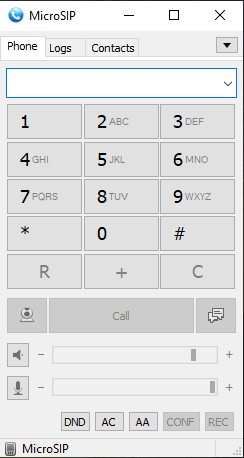
1. MicroSIP is a free program that is easy to set up and not demanding on your computer resources.
It has many different settings (STUN server, port change, choice of microphone/speaker equipment) and supports a large number of different codecs.
It supports call forwarding to other employees, do not disturb (DND) mode, answering machine (AA) mode, and call recording.
2. Zoiper is a program for making calls on the Internet in any direction. There are 2 versions of the program: free and paid. The free version has basic functionality for making calls, all further settings are available only in the paid version.

Limitations of the free version:
- only one account can be connected;
- it is impossible to record the conversation;
- no call translation function;
- inability to make calls with one click from the browser;
- lack of encryption using TLS, SRTP, and ZRTP protocols.
You can also consider applications such as Linphone and PhonerLite.
For MacOS
Apple products also have applications that allow you to make phone calls over the Internet. However, the selection is somewhat limited and only 2 apps can be recommended:
1. Telephone is an application with a minimal set of settings.

Advantages:
- support for STUN server;
- change of local port;
- call history;
- synchronization of contacts with MacOS.
2. Zoiper – the description of this program is given above.
IP phones and softphones on PCs are the best options for VoIP telephony because they usually have a more stable Internet connection, which is very important for making calls. With an unstable Internet connection, there may be interruptions in voice traffic, which leads to lulls in the call.
Smartphones:
We guarantee the quality of the services provided through the installed application on MacOS, Windows or the use of landline IP phones. We are not responsible for the functionality of standalone Android and iOS devices, and the quality of their operation depends on many factors. Therefore, we do not recommend using mobile devices for work.
Factors that affect the quality of the connection:
- White IP address of the provider.
- Registration from one specific IP address.
- Support for push notifications by the application.
- Support of the required STUN server by the application.
- The application must be paired with a smartphone, and the smartphone must not be in power saving mode.
- Support for constant registration on the server even when the smartphone is locked.
However, smartphones with different operating systems (Android, iOS) can also be equipped with a softphone to make calls.
The following applications can be found on both platforms and have proven to be stable and flexible:
1. Grandstream Wave Lite is one of the most stable applications, the advantages of which are:
- work in the background;
- support for multiple accounts;
- support for STUN server;
- call forwarding between employees;
- change of local ports.
2. Zoiper is a mobile version of the program from a company that has long been known in the VoIP telephony industry.
As in the PC version, it has paid and free features.
Advantages:
- change of local ports;
- STUN support.
Disadvantages:
- unstable operation in the background;
- only 1 SIP account;
- no PUSH notifications in the free version;
- no Do Not Disturb mode.
3. PortSIP is a minimalistic application with the basic settings you need.
Advantages:
- minimalistic settings;
- extensive audio settings (microphone sensitivity, software noise reduction);
- STUN server support;
- Do Not Disturb mode.
Disadvantages:
- unstable operation in the background;
- telephony settings can be changed only after deleting the account;
- only 1 account;
- incorrect work with TLS.
4. IT Phone is a minimalistic application with the basic necessary settings.
Advantages:
- minimalistic settings;
- the ability to add numbers to the blacklist;
- the ability to add multiple accounts;
- works in the background.
Disadvantages:
- does not support STUN;
- does not support call forwarding between employees
IP phones and PC softphones are the most reliable solutions due to their stable wired connection. Mobile apps are convenient for remote work but require careful configuration of background mode. Choose your tool based on your mobility needs and the technical parameters of your network.