What is a Customer Journey and how to create a Customer Journey Map
Customer Journey is the story of a customer’s relationship with your brand—from the very first thought about a purchase to repeat orders.
Imagine this: a customer walks into a store, can’t find a sales assistant, and leaves. Online, it looks the same: 1,000 people visit your site, but only 20 make a purchase. Where did the other 980 go? This is exactly what a Customer Journey Map (CJM) helps you understand. It’s not just a diagram, it’s a way to identify the points where customers run into a lack of structure or slow responses.
To keep this journey from turning into an obstacle-filled maze, seamless communication is essential. UniTalk, as a unified communication management solution, brings all channels together (calls, messengers, and SMS) into a single environment. When every customer touchpoint is collected in one interface, you stop guessing and start managing results.
In this article, we’ll break down real-life case studies of Ukrainian companies and share checklists that will help shorten the customer’s path to purchase and build lifelong loyalty.
What is a Customer Journey
A Customer Journey is more than just a sequence of actions. It is the context, emotions, and expectations that accompany a person from their initial interest to the moment they become a loyal customer, returning for more or recommending the brand to others.
It’s important to understand that the customer journey is not linear. A customer may take a step forward, then backtrack, postpone a decision, compare alternatives, and switch to a competitor at any moment.
This is also confirmed by a Google study. The company analyzed 310,000 real purchase journeys and labeled modern consumer behavior as the Messy Middle – «complex middle». During this phase, a person may spend weeks circling in a «exploration – evaluation» loop: moving closer to a purchase, then stepping back to explore other options again. And it is precisely at this moment that a business either retains the customer’s attention or loses it.
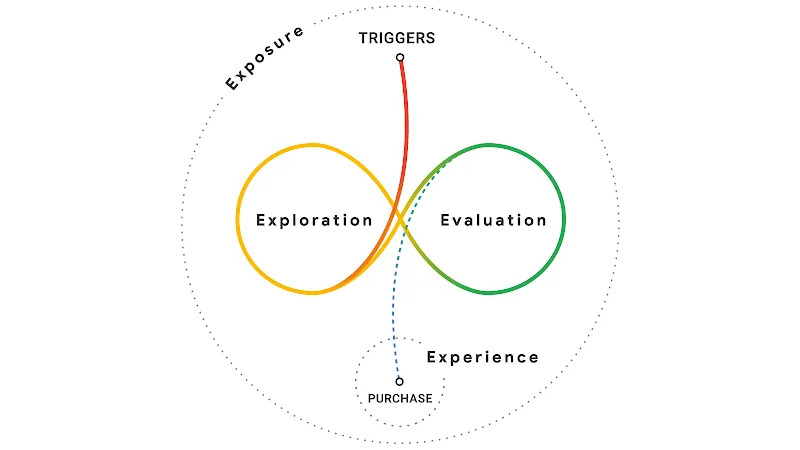
To understand what this journey looks like in practice, it is important to break down its key elements:
- Trigger – an event that sparks interest (an advertisement, a recommendation, or a specific need).
- Exploration – gathering information, reading reviews, and comparing different solutions.
- Evaluation – comparing options, terms, conditions, delivery, returns, and trust in the brand.
- Purchase – placing the order, making the payment, and receiving the product.
- Post-purchase experience – customer support, repeat business, returns, and referrals.
Understanding the customer journey provides answers to critical questions:
where leads are lost, which touchpoints are failing, and where customer expectations do not match reality. And this isn’t just about marketing anymore – it’s about the product, the service, and the operational maturity of the business.
What is a Customer Journey Map (CJM)
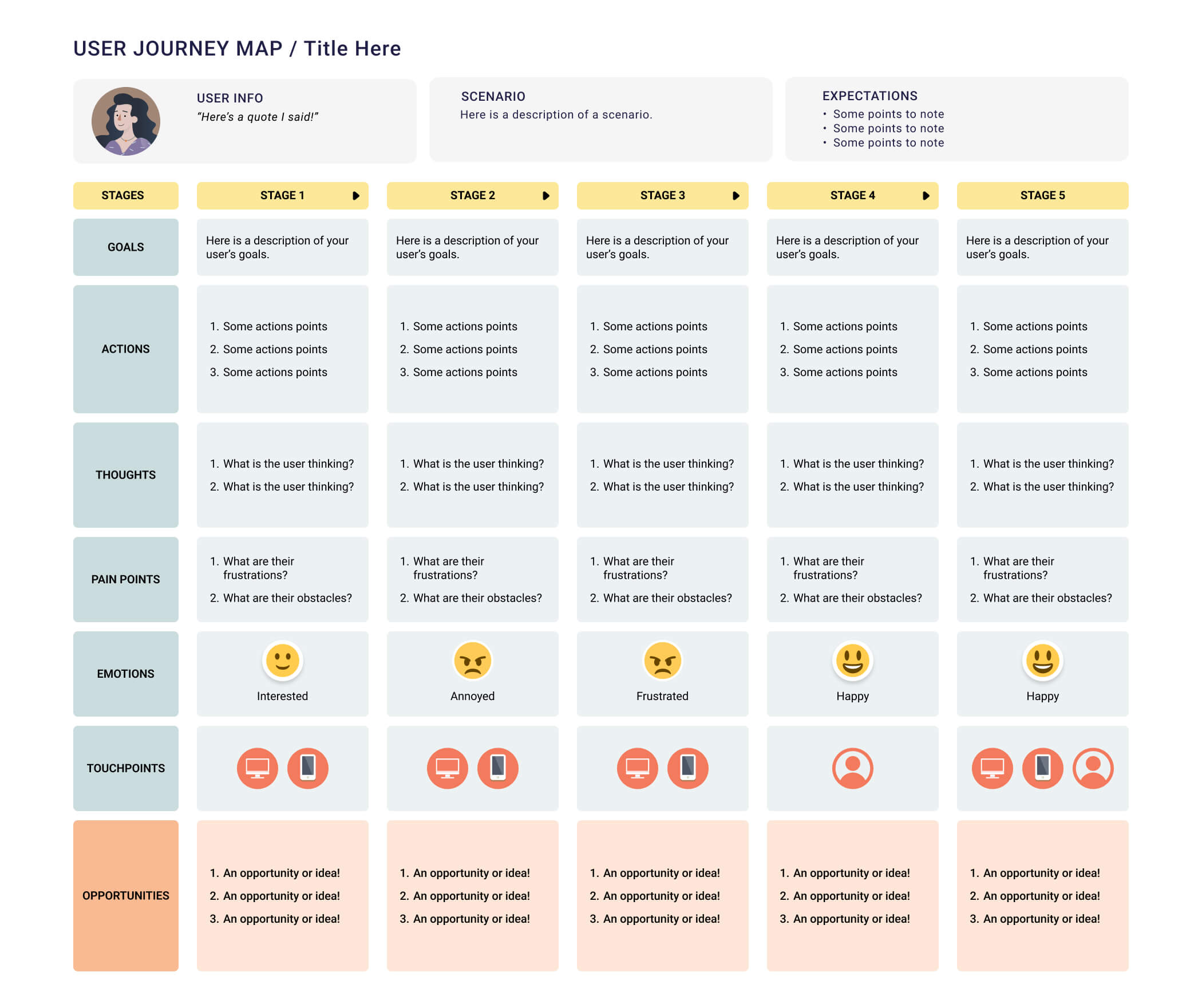
A Customer Journey Map (CJM) is a visual map of the customer’s path. It illustrates stages, actions, touchpoints, emotions, barriers, and opportunities for improvement. A CJM transforms abstract data into a clear picture that can be utilized by the entire team: marketing, product, support, and logistics.
What a CJM usually includes:
- Persona (buyer persona) — a profile of a typical customer.
- Journey stages (awareness, consideration, decision, post-purchase).
- Touchpoints (channels and interfaces).
- Customer actions and thoughts.
- Emotions and satisfaction levels.
- Pain points and drop-off reasons.
- Improvement ideas and metrics for monitoring.
Differences between CJM and a Sales Funnel
A sales funnel and a customer journey map – both are useful, but they serve different purposes.
- A sales funnel – an internal company model. It is linear and focuses on conversion: how many leads, how many deals. It helps optimize sales and advertising campaigns.
- CJM – a customer’s perspective. It is non-linear, taking into account emotions, returns, and context. It helps understand why the customer makes choices, where they experience frustration, and how to improve their experience.
While a sales funnel answers the question «how much do we sell?», a CJM explains «how does the customer buy? and why might they leave?».
How to Create a Customer Journey Map: A Step-by-Step Guide
Creating a CJM is a team effort. Below is a practical guide that can be applied to any business.
Step 1: Data Collection and Audience Segmentation
Start with facts, not assumptions. Data sources:
- Web Analytics (Google Analytics): landing pages, behavior, bounce rate.
- CRM: lead sources, interaction history, conversions.
- Call tracking reveals the pre-call history: which ad brought the person in and what they were searching for. This is the foundation of the customer journey.
- Опросы и интервью с реальными клиентами: почему они ушли, что им мешало.
- Surveys and interviews with real customers: why they left and what obstacles they faced.
- Social media and reviews: real emotions and expectations.
Once the data is collected, it’s important to interpret it correctly. Here, segmentation based on behavior and needs plays a key role, rather than formal characteristics like age or job title.
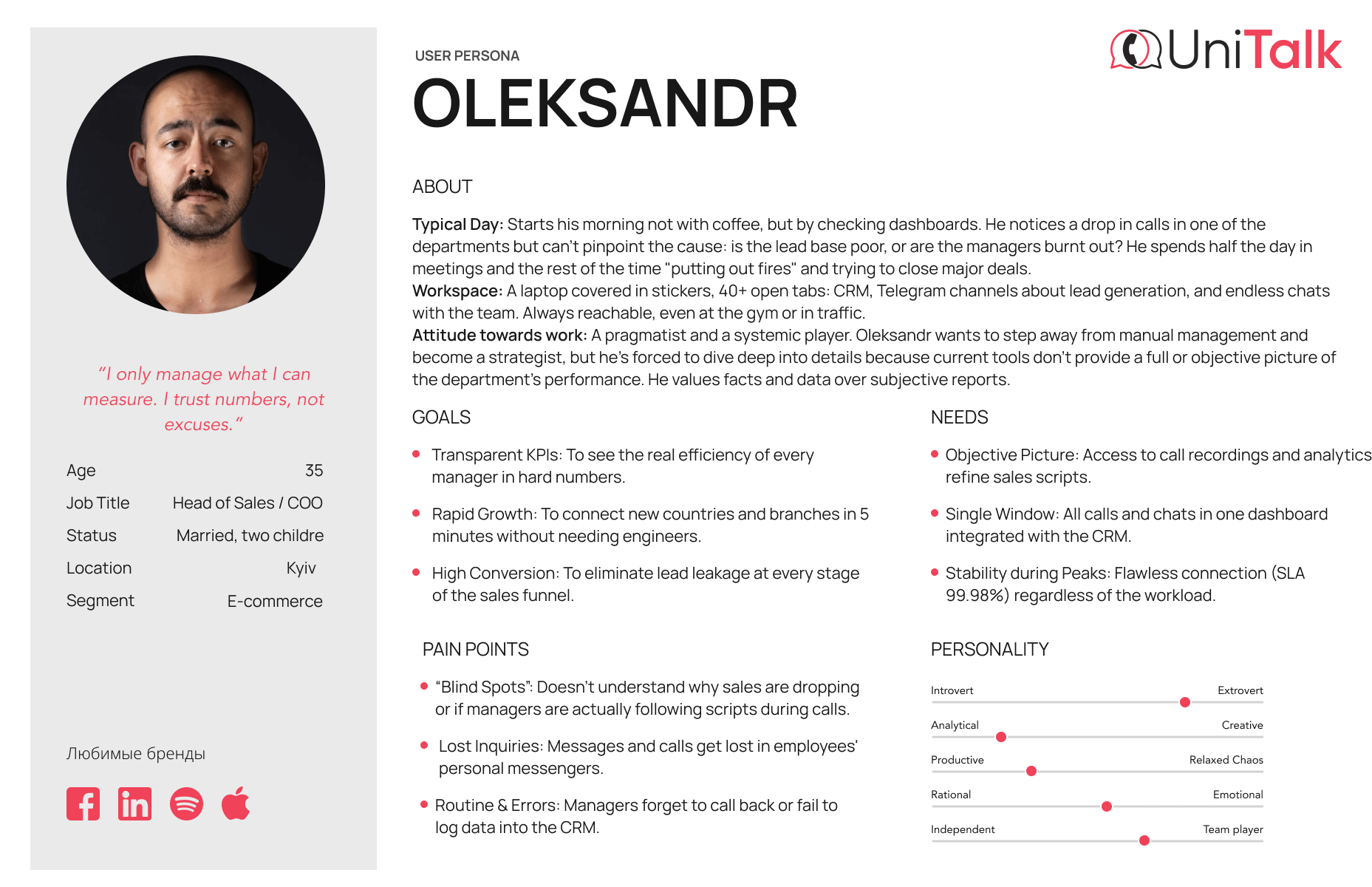
To avoid working with an abstract «target audience», we use personas (buyer personas) – generalized archetypes of real customers. A persona helps capture what truly drives a person during the decision-making process: their motivations, fears, purchase context, and preferred communication channels. Essentially, it transforms dry data into a clear human scenario.
For example, a persona might look like this:
- Oleg, 28 years old, IT Specialist.
- Motivation: to solve the problem quickly without unnecessary steps.
- Pain points: dislikes phone calls; wary of hidden terms and product ingredients (due to allergies).
- Context: usually makes purchases via phone during breaks.
Such a profile immediately suggests practical solutions: where to offer a chat instead of a call, what information to display on the first screen, and where the customer is most likely to «drop off» if the process is too complicated. It is this level of detail that marks the beginning of building a real, rather than a formal, Customer Journey.
Step 2: Defining Interaction Stages
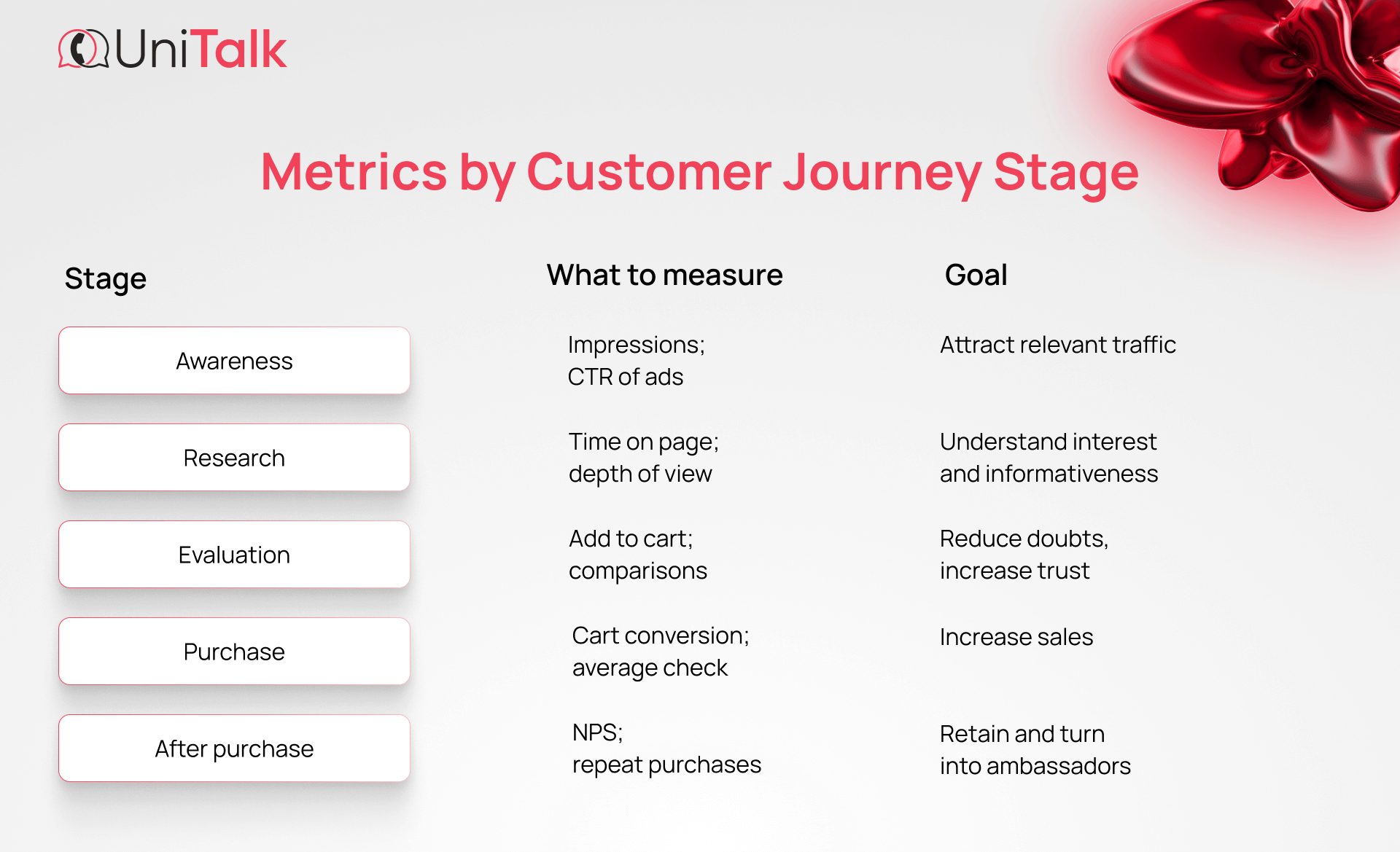
Adapt the standard model to fit your product. For most businesses, the stages look like this:
- Awareness – the customer recognizes a need.
- Research – gathers information.
- Evaluation – compares options.
- Purchase – places an order.
- Post-Purchase Interaction / Loyalty – support, repeat purchases, referrals.
For complex products (B2B, tech, or services), the journey may include additional steps: consultation, test drive, and negotiation of terms.
Step 3: Identifying Touchpoints and Channels
Create a complete list of touchpoints: website, landing page, social media, messengers, email, call center, offline locations, advertising. For each touchpoint, describe:
- What is the customer doing?
- What are the customer’s expectations?
- Which metrics can be measured? (CTR, time on page, bounce rate, chat response time).
Example: if a customer messages via Instagram Direct and receives a reply after 24 hours, that’s already a barrier.
Step 4: Analyzing Customer Barriers and Pain Points
At each stage, note what prevents the customer from moving forward. Typical barriers include:
- Unclear interface or complicated order form.
- Slow website loading.
- Lack of information about ingredients/sizes/shipping terms.
- Long wait for a response in chat or on a call.
- Complicated return process.
How to identify hidden barriers? Use Speech Analytics. It automatically analyzes 100% of conversations and highlights issues: what people complain about, and why deals fall through. These are objective insights, more reliable than any manager’s report.
Step 5: Identifying Opportunities to Enhance Customer Experience
After identifying barriers, formulate specific hypotheses and tasks:
- Simplify the order form – reduce the number of fields.
- Add a callback widget.
- Implement a chatbot for quick answers and FAQs.
- Rewrite website content in plain language.
- Integrate CRM with telephony so operators can see the customer’s history.
Each improvement should have a success metric: reduced bounce rate, increased cart conversion, shorter chat response time, higher NPS.
Tools for Visualizing a Customer Journey Map
Various tools can be used to create and visualize a CJM, depending on your needs:
- Google Sheets / Excel – quick start and data management.
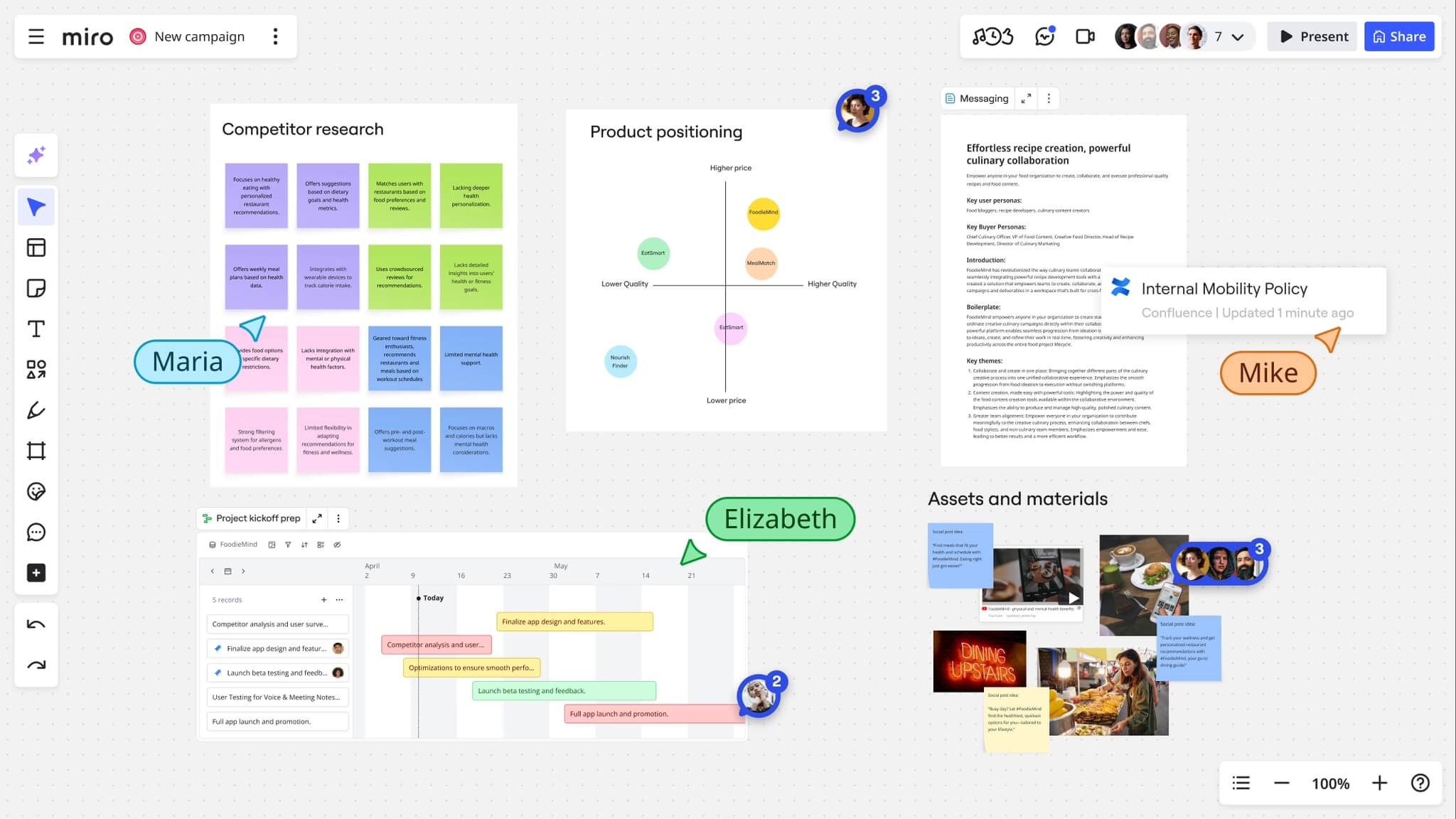
- Miro / Figma – visualization and team collaboration.
- UXPressia – specialized CJM service with templates.
- Lucidchart / Draw.io – diagrams and charts.
- Sticky notes and a board – for a live workshop and brainstorming session.
The choice of tool depends on whether you want to quickly collect data or prepare a presentation for management.
Common mistakes when creating CJM
- Mapping for the sake of mapping. A CJM should be a working tool: every identified pain point must become a task in the task tracker.
- Ignoring employees. Operators and managers know the real customer pain points — involve them.
- Creating one map for everyone. You need separate maps for key personas and segments.
- Overcomplicating the visual. A map must be clear and actionable.
- Not measuring impact. When you implement a change, set KPIs and track the results
Examples of Customer Journey Maps for different niches
Below are brief stories that demonstrate how a deep understanding of the customer journey helps brands become leaders in their fields.
Fintech: Monobank – Transformation of banking services
Monobank has become not just a mobile bank, but a beloved financial service for millions. The founding team, previously involved in large banking projects, decided to approach the product not as a «banking tool» but as a helpful everyday service. They studied user behavior in detail: what causes distrust, which steps slow down account opening, and which operations seem complicated.
Their approach is simple yet powerful: as many processes as possible are moved into the app, unnecessary steps are eliminated, communication is written in clear language, and the interface reflects real usage scenarios. Monobank demonstrates how focusing on customer convenience rather than internal procedures can turn a product into a lovemark – a brand that people don’t just choose, but use and recommend to others.
Retail: Aurora – Emotions, Experience, and a Playful Element
Aurora is not an ordinary store, but an experience people want to enjoy again and again. They understand that the customer journey begins long before the checkout: from the moment someone wonders, «what interesting things can I discover today?».
The brand’s philosophy is Win-Win-Win: a gain for the customer, the store, and the partners. Aurora has created a treasure hunt atmosphere where every visit provides an emotion, not just a purchase. The product layout is designed to encourage exploration, while unique return policies and transparent pricing remove doubts. This emotional customer journey makes the brand appealing not only for buying, but also for repeat visitsand recommendations.
Logistics: Nova Poshta – A Service That Became Part of Daily Life
Nova Poshta has become part of the everyday life of millions of Ukrainians, not just as a delivery service, but as a key element of the customer experience. For many, the customer journey doesn’t start with the product, but with how quickly and conveniently they can receive what they ordered.
The company invested in the fact that customer convenience depends on the speed, simplicity, and transparency of the process: an extensive branch network, clear tracking interfaces, convenient pickup and delivery options, well-designed notifications, and friendly support.
This is a case where a business became a leader not because it «had to», but because it understood how people live and how much they value speed, reliability, and simplicity in every interaction.
Conclusion
A Customer Journey Map is not a silver bullet, but a tool that shows exactly where and why a customer loses interest. A correctly constructed CJM helps synchronize teams, improve products and services, and ultimately increase revenue. Start small: collect data, define a persona, visualize the journey, and turn identified problems into specific tasks.
Practical challenge: try going through your customer’s journey yourself: call the call center, ask an difficult question in the chat, try to process a return. You’ll be surprised at how many insights you uncover.
UniTalk: Manage communications. Drive results.
It is the entire path of a customer: from the first thought of «I need this» to purchase, use, and recommendation. It is the sum of all impressions from interacting with a brand.
To identify and remove barriers that prevent a purchase and to make the customer journey convenient – this directly increases conversion and loyalty.
At least once a year, as well as when launching new products, changing processes, or observing significant shifts in customer behavior.
Technically, yes, but such a map would be hypothetical. It’s better to rely on real data: calls, web analytics, surveys, and interviews.