Sales Scripts in Messaging: How to Build a Template Library to Sell More from Day One
Imagine this: a potential customer messages your store on Instagram at 9:00 PM. Your manager, trying to respond quickly, ignores the structure and forgets to add a call to action. The customer reads the message, says “thanks,” and disappears. Sound familiar? When communication is chaotic, leads “leak” simply due to the human factor.
One of our clients previously lost up to 30% of requests in messengers because managers didn’t know how to properly handle the “too expensive” objection in text. After implementing a template system in UniTalk Chat, response speed tripled, and the appointment conversion rate rose by 15% within the first week.
Statistics show that 60% of customers expect a response within 5 minutes. If they don’t get it, 30% immediately look for an alternative from competitors. This proves that effective messaging scripts are not a luxury, but a business necessity.
Messaging Scripts: What They Are and Why They Sell
A script is a flexible dialogue structure, not a boring robot text. It helps a manager guide the customer from the initial greeting to payment quickly and without errors. In messaging, we operate with a modular library: instead of “reinventing the wheel” every time, the manager uses ready-made blocks that have already proven their effectiveness.
Why it matters:
- Customers expect a fast response; every delay is a direct loss of budget.
- Scripts allow even a newcomer to successfully process leads from day one.
- Managers work as a single, synchronized ecosystem rather than a disjointed team.
The Psychology of Messaging in Sales
Text in a chat works differently than voice. It is crucial to consider:
- Tone and Emotions. Use short sentences, a friendly tone, and questions that encourage continuing the conversation.
- Active Listening. Through chat, a manager must “listen” to the customer: repeat key phrases and clarify hidden needs.
- Questions instead of Monologues. Open-ended questions keep the dialogue alive and increase the final conversion.
4 Reasons Your Team Needs a Template Library
- Fast Start. New employees aren’t afraid of making mistakes because they have the company’s internal knowledge base at their fingertips.
- Unified Brand Voice. The customer receives the same high-quality service across Telegram, Viber, Instagram, and the website chat.
- Saving Managerial Time. No need to manually check every message—templates help scale results.
- Increased Sales. A structured algorithm allows you to “nudge” those who went away to think or have doubts.
Question for thought: how many minutes do your managers spend writing a single response? While they are picking the right words, the customer might already be placing an order elsewhere.
Types of Scripts for Different Situations
A template library isn’t just for greetings. It should cover all business process automation scenarios in communications:
- Cold Leads: Short, warm messages to spark interest.
- Repeat Sales / Upsell: Offers for additional products.
- Handling Objections: Ready-made arguments for “it’s expensive,” “I’ll think about it,” or “this functionality doesn’t suit me.”
- Passive Leads: Gentle follow-up messages sent after a few days.
How to Build a Template Library in 4 Steps
1. Analyze Current Dialogues
Gather all inquiries through UniTalk Chat. Analyze which phrases led to a deal and at what stage leads “froze.” Identify typical questions about price, features, and deadlines.
2. Create a Block Structure
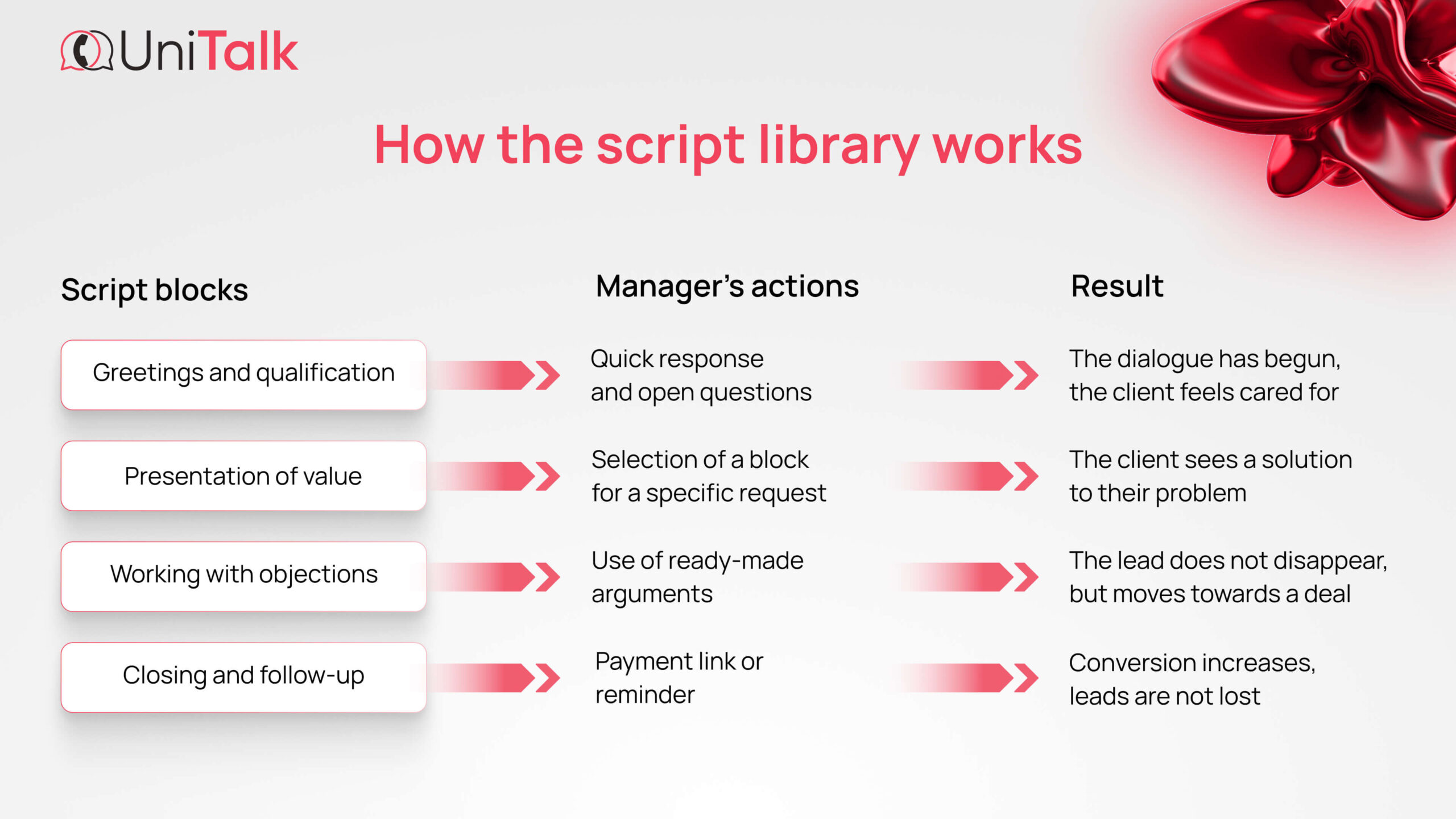
Categorize templates: greetings, value presentation (solving a problem, not just describing it), price handling, and closing the deal. This is a vital part of CRM and sales process integration.
3. Adapt to Situations
A “hot” lead needs specifics, while a passive one needs a soft reminder. If you operate in international markets, prepare templates in different languages.
4. Integrate into the Workflow
Scripts should be right where the conversation happens. In UniTalk Chat, managers can pull up the required phrase in a second via a convenient pop-up window. When choosing a template, they can still edit the message, keeping every response personalized.
Infographic: How the Script Library Works
Practice: Script Examples
- Specification Request: “Our [Product] supports [Feature], which allows you to [Benefit]. Detailed description here: [Link]. Could you tell me if you plan to use this for [Task]?”
- “I’ll think about it” Objection: “I understand, this is an important decision. Do you have any remaining questions about [Feature], or perhaps some concerns regarding the budget? I can help find the optimal option for you.”
- Follow-up: “Hello! You were interested in [Product]. We just updated our stock. Is this still relevant for you?”
Checklist: Is Your Template Library Effective?
- [ ] Do all templates end with an open-ended question or a call to action?
- [ ] Are there at least 3 response options for typical objections?
- [ ] Does finding and sending the right phrase take < 10 seconds?
- [ ] Are scripts updated monthly based on real chat data?
- [ ] Do you track which specific templates generate the most revenue?
Conclusion
Systems always beat chaos. A messaging template library is a tool that makes your sales department predictable. Managers no longer depend on memory or mood—they work with proven technology and experience.