Why Aren’t SMS and Viber Messages Getting Through?
Understanding Delivery Issues During Power Outages and How to Fix Them
We are all operating in a digital storm right now. The energy situation in Ukraine is reshaping more than just our work schedules; it is hitting the stability of client communication too.
Lately, businesses have noticed that fewer Viber and SMS messages are actually landing. When a client misses an arrival notification or a verification code, it is not just a technical error. It is lost trust, a missed sale, and ultimately lost profit.
It is crucial to understand that the main culprit right now isn’t “bad service” from mailing providers but objective infrastructure limits. Let’s break down the complex stuff into plain English, look at the situation from the inside, and see how business automation can minimize your losses.
Why Viber Struggles: The Internet Dependency Trap
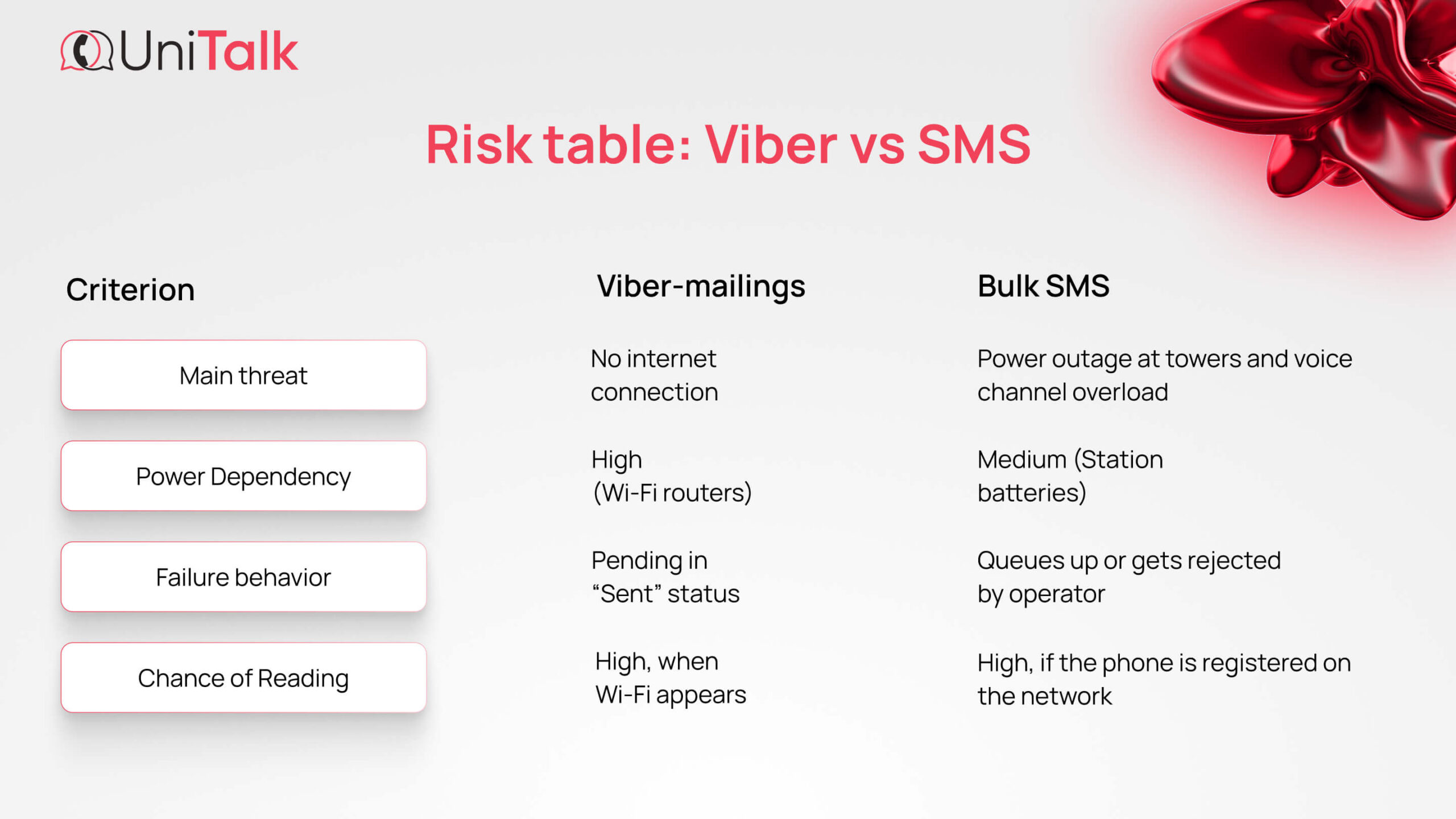
Viber relies entirely on an internet connection, whether that is Wi-Fi or mobile data traffic. The math here is simple. No electricity means no internet, which means no delivery.
The main reasons Viber messages hang:
- Routers losing power. If the power goes out at a client’s home or office and they don’t have a backup power source (UPS) for their Wi-Fi, the connection drops instantly.
- Mobile internet overload. When Wi-Fi dies, users mass-switch to 4G or 3G. The network cannot handle such a spike, so speeds crawl to near zero. The message physically hangs on the server waiting for the smartphone to get a stable data packet.
- Smartphone sleep modes. Because of long periods of inactivity when there is no internet, smartphones go into hard power-saving mode. The Viber app pauses background processes, so the message waits in line until the user manually opens the app or a stable signal returns.
Why SMS Fails: Priorities and Batteries
You might think good old SMS broadcasting would work no matter what since it doesn’t need the internet. Reality is a bit more complicated. The SMS channel depends on mobile operator base stations, which also suffer during blackouts.
Technical nuances that operators don’t talk about:
- Voice priority. Mobile networks have a strict hierarchy. Voice calls, especially emergency ones, get the highest priority. When the lights go out, people start calling en masse. Base station channels fill up, and SMS messages, which have lower technical priority, get pushed to a long waiting line.
- Dying batteries on towers. Base stations run on backup batteries for about 4 to 6 hours on average. If the lights are out longer than that, the tower shuts down and coverage vanishes.
Important nuance: Batteries need time to recharge. If the power was out for six hours but only came back for two, the batteries do not have time to charge fully. The next time the power cuts, that tower won’t last six hours. It will die much sooner. - The ghost signal. You have probably seen the situation where your phone shows full bars, but you can’t call or receive texts. This is a registration glitch. The phone thinks it is connected to a station that is actually already overloaded or shut down.
- Technical collapse upon reconnection. The moment electricity returns, millions of routers and smartphones jump online simultaneously. This creates a peak load that equipment processes with a delay.
Analytical Insight: This Is a Systemic Problem
At UniTalk, we analyze millions of transactions and see a clear trend where the graph of undelivered messages correlates with power outage schedules across different regions. This is a systemic market problem, not a glitch with a specific provider.
Delivery percentages drop during peak network load hours. However, businesses cannot simply wait for better times. There are solutions.
Decoding the Terms: Simple Explanations for Tech Concepts
You don’t need to be a tech wizard to manage campaigns effectively. You just need to grasp two key concepts.
1. TTL (Time to Live)
Imagine a courier who brought a package. If you aren’t home, how long will they wait at the door? An hour? A day?
TTL determines how long the operator tries to deliver the SMS or Viber message to a subscriber who is offline. If the time runs out and the subscriber hasn’t appeared, the message “dies” and isn’t billed (or is billed depending on operator terms), but the client won’t receive it.
2. Cascade (Smart Queue)
This is sending a message sequentially through different channels.
The Scheme: The system tries to send via Viber first because it is cheaper and more visual. If it is not delivered, the system automatically sends an SMS.
Practical Advice for Business: What to Do Right Now
How can marketing automation help you keep in touch with your client?
- Increase TTL (Time to Live).
Set the message lifespan to 24 hours (the default is often much lower). This gives the system a better chance to push the message through as soon as the client’s phone catches a signal. - Set up Cascading.
Do not rely on a single channel. Use a chain like Viber ➡️ SMS. This maximizes delivery chances. Even if the internet is down, there is a chance to get through via the cellular network. - Duplicate critical info via Email.
If the information is super important (tickets, access details, codes), add Email to the chain. Emails are “lighter” on traffic and sit safely on the mail server until the client gets internet access. - Analyze reports.
- In the UniTalk dashboard, you can see real delivery statuses. If you see mass failures in a specific region at a specific time, it might be worth rescheduling for a period when they likely have power.
A Template for Your Clients
Your clients are nervous too. Help them understand the situation by posting this explanation on your social media, blog, or FAQ.
📋 Text for an Instagram/Facebook post or Telegram channel:
Why aren’t my notifications from the store arriving on time? 🗨️
Friends, we know that sometimes our order notifications might get “lost” or arrive late. We are not ignoring you. This is happening for objective technical reasons related to the power situation:
🔸 Towers losing power: When there is no light, the mobile network runs on backup power which has a limit.
🔸 Delivery queues: Networks are overloaded with calls, so SMS sometimes get stuck in a “queue.”
🔸 Power saving: Your smartphones often turn off background data to save battery, so Viber might be “sleeping.”
💡 Life hack: If you are waiting for an important SMS (like a confirmation code), try turning “Airplane Mode” ✈️ on and off for a minute. This forces the phone to re-register on the network, potentially connecting to a less loaded tower and pulling in stuck messages.
We are always online and doing everything possible to make sure our messages reach you as fast as possible! 💙💛
Conclusion
Businesses cannot influence outage schedules, but they can adapt. Using professional tools like SMS and Viber broadcast services from UniTalk allows you to flexibly manage TTL settings and build cascade chains.
At UniTalk, we are constantly monitoring route quality and working to ensure your messages arrive as quickly as possible, regardless of external circumstances.
💬 Need help setting up cascade broadcasts? Our support team is ready to help you optimize your communication for the current conditions.