What Is Direct Traffic: Where Direct Sessions Come From and How to Analyze Them
You open your GA4 report and see 35% Direct. First thought: “Great, people know us and remember us.” Second thought, if you dig a little deeper: but where exactly from? It turns out that number hides transitions from Telegram campaigns without UTM tags, clicks from PDF proposals, links shared in corporate Slack, and several other sources that analytics simply couldn’t identify. That’s exactly what we break down in this article: where direct traffic actually comes from and how to make your data reflect reality.
Key Takeaways
- Direct is not “direct sessions” — it’s “unidentified sessions.” The channel works as a catch-all bucket for traffic without a source.
- According to Practical Ecommerce, 20% to 60% of website traffic ends up in this channel, and a significant portion of attribution is inaccurate.
- Dark social traffic (links shared via messengers and private chats) accounts for up to 84% of all social shares, according to RadiumOne.
- If your direct share exceeds 30%, check your analytics setup rather than celebrating “brand awareness.”
- A healthy direct level for most B2B projects is 10–20% of total traffic.
What Direct Traffic Means in Analytics
In Google Analytics 4, every session receives source attribution. If the browser didn’t pass information about where the user came from, GA4 automatically assigns it the Direct / (none) channel.
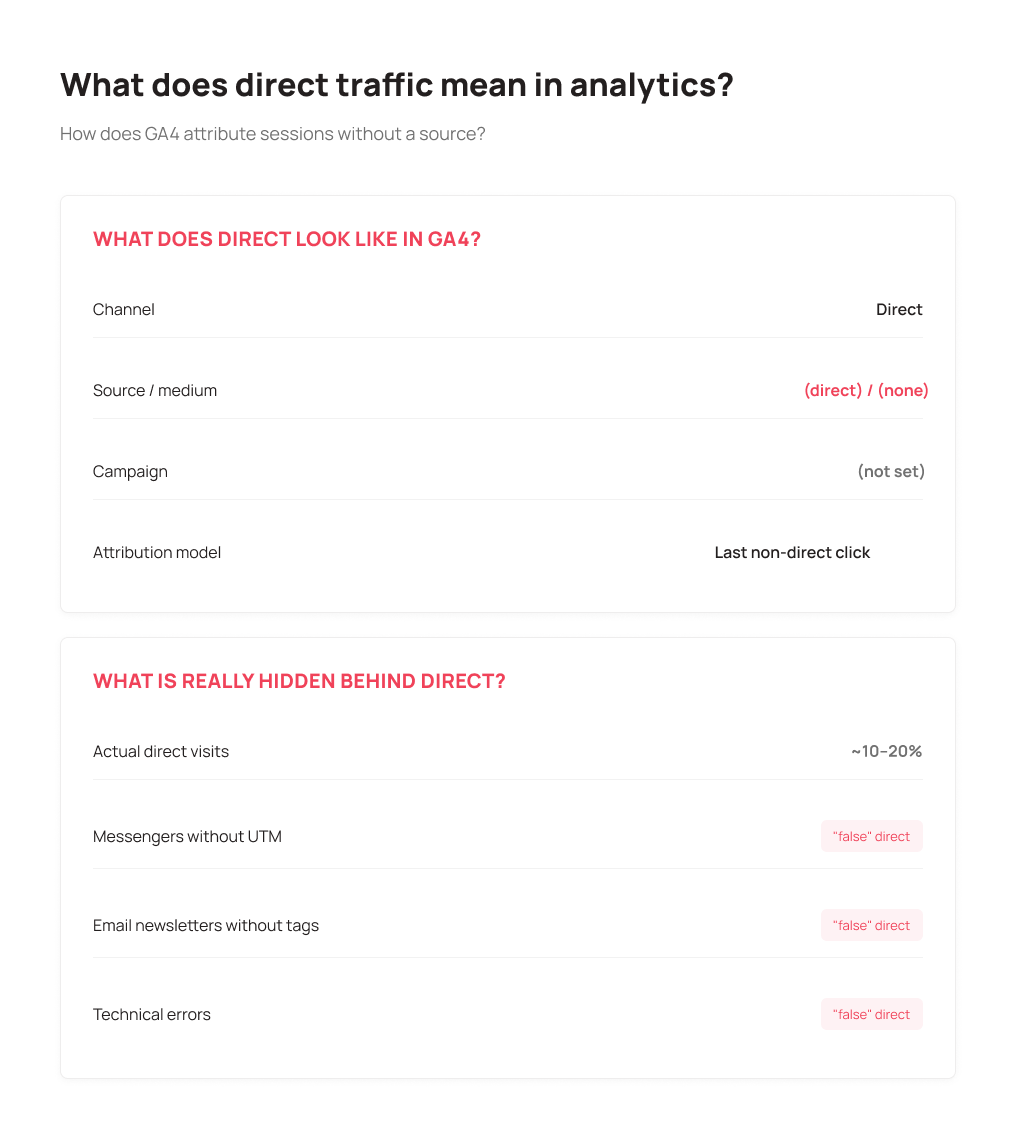
This happens when the referral header (HTTP Referrer) is absent. That’s a line in the request code that tells the system which page the user came from. Without it, analytics can’t identify the source and drops the session into the direct “bucket.”
In GA4 reports, direct traffic looks like this:
- Channel: Direct
- Source/medium: (direct) / (none)
- Campaign: (not set)
An important nuance: GA4 uses “last non-direct click” logic. If a user came from Google, closed the tab, and then opened the site from bookmarks 20 minutes later, that last session will be counted as Direct. But the first-touch attribution stays with organic search.
Main Sources of Direct Traffic
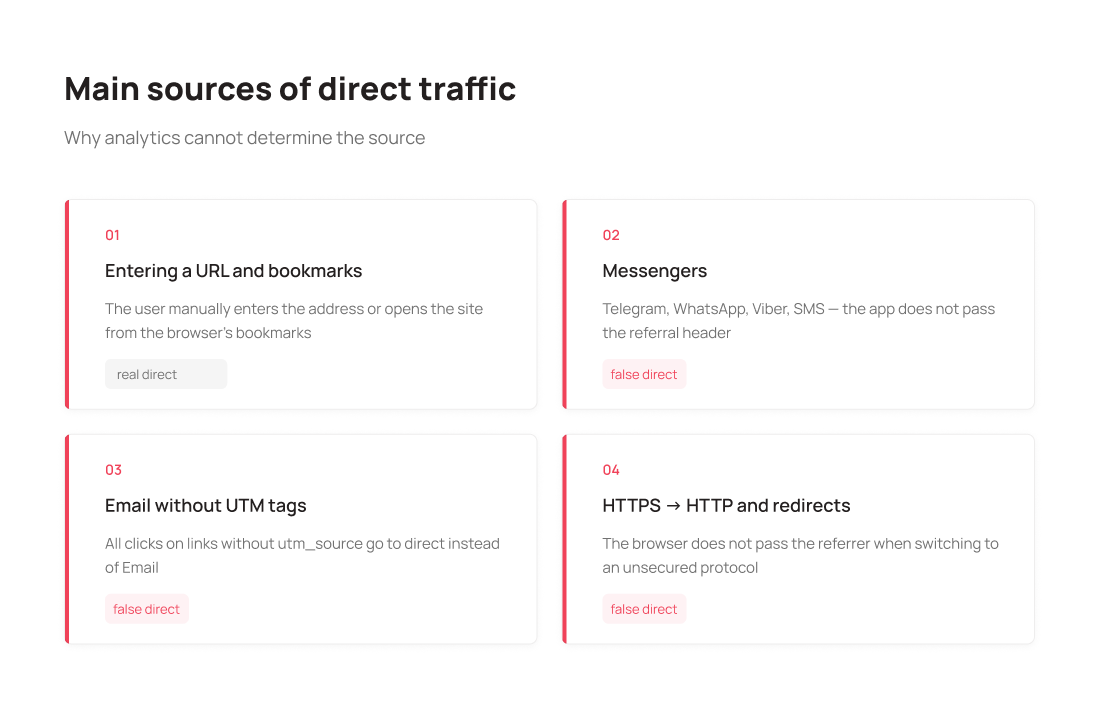
URL Entry and Bookmarks
This is the only truly “direct” traffic. The user either types the address manually or opens the site from saved browser bookmarks.
For example: a procurement manager visits your portal through a Chrome bookmark every day to check order status. For GA4, this is a direct session — even though they became a client three months ago through paid search.
That’s why a high direct share often points to a loyal audience, but doesn’t always mean that audience is large.
Transitions from Messengers and Offline Documents
This is the main source of “false” direct. When a user receives a link via Telegram, WhatsApp, Viber, or SMS and clicks it, the mobile app opens the URL in a browser without passing the referral header. The browser simply doesn’t know where the transition came from.
The same applies to links in Word documents, PDFs, and Excel spreadsheets. If you send proposals with clickable links, all clicks will land in direct.
According to SparkToro research, 100% of clicks from Slack, Discord, and WhatsApp show up in analytics as direct sessions (source). This phenomenon is called dark social. According to RadiumOne, 84% of all global content shares happen through private channels — direct messages, not public posts (source).
HTTPS to HTTP Transitions
If a user moves from a page on a secure protocol (https://) to a page on your site running on an unsecured one (http://), the browser intentionally doesn’t pass the referral header for security reasons.
If even part of your site runs without an SSL certificate, you lose attribution for all transitions from secured external resources.
Broken Redirects and Pages Without Analytics Code
If a page doesn’t contain the GA4 tracking code (a forgotten landing page, a form submission confirmation page, an old blog section), the session is recorded separately without source data. When the user moves to the next page, GA4 starts a new session and marks it as Direct.
The same happens with long redirect chains: each intermediate step potentially resets the referral header.
Why Direct Traffic Isn’t Always “Direct”
The name itself is misleading. A more accurate term would be “traffic of unknown origin.”
Here are concrete false direct scenarios in B2B:
Email newsletter without UTM tags. You send a newsletter announcing a new pricing plan. All recipients click the link and land in direct instead of the Email channel. Your email marketing investment becomes invisible.
Click on a link from a corporate chat. A marketer shares your blog post in a team chat. Five people click through, and all five sessions go to direct.
Offline advertising without UTM. You printed a URL on business cards or in a conference presentation. Visitors type it manually. This is real direct, but tied to a specific offline activity that can’t be tracked.
Corporate browser with a custom homepage. If employees at a client company have your site set as their browser’s start page, their visits will constantly be recorded as direct.
Why a High Direct Percentage Isn’t Always Good News
Direct sessions partly signal that people know you. But if the direct share has spiked or consistently exceeds 30–35%, that’s a signal of analytics configuration issues, not brand growth.
Direct traffic “steals” attribution from real channels. If email campaigns aren’t tagged with UTM, all their traffic goes to direct. Email marketing looks ineffective, and direct looks disproportionately large.
A practical test. Open the landing pages report in GA4 for direct traffic. If you see many internal pages (product cards, blog posts, service pages) — that’s a clear sign of dark social or unnoticed email clicks. Users don’t manually type random internal URLs.
Growth in direct sessions on deep pages alongside rising organic visibility in Search Console is an indicator of misattribution, not real direct visits.
How to Use Direct to Measure Brand Awareness
Real direct traffic still carries valuable information.
Brand strength. If users type your domain without a search prompt, they remember you. In B2B this is especially telling: decisions are made slowly, and a client returning directly is likely in an active consideration stage.
Audience loyalty. Regular direct visits to the homepage or product pages indicate existing clients monitoring for updates.
Offline activity effect. You spoke at a conference, mentioned your domain in a podcast, handed out business cards — watch direct traffic dynamics over the following few days. There won’t be a direct correlation, but you’ll spot the trend.
For a more precise assessment, add segmentation: compare direct by device (desktop vs mobile), time of day, and behavioral metrics. Real brand traffic typically shows higher engagement than technical “false” direct.
How to Analyze Direct Traffic in Google Analytics 4
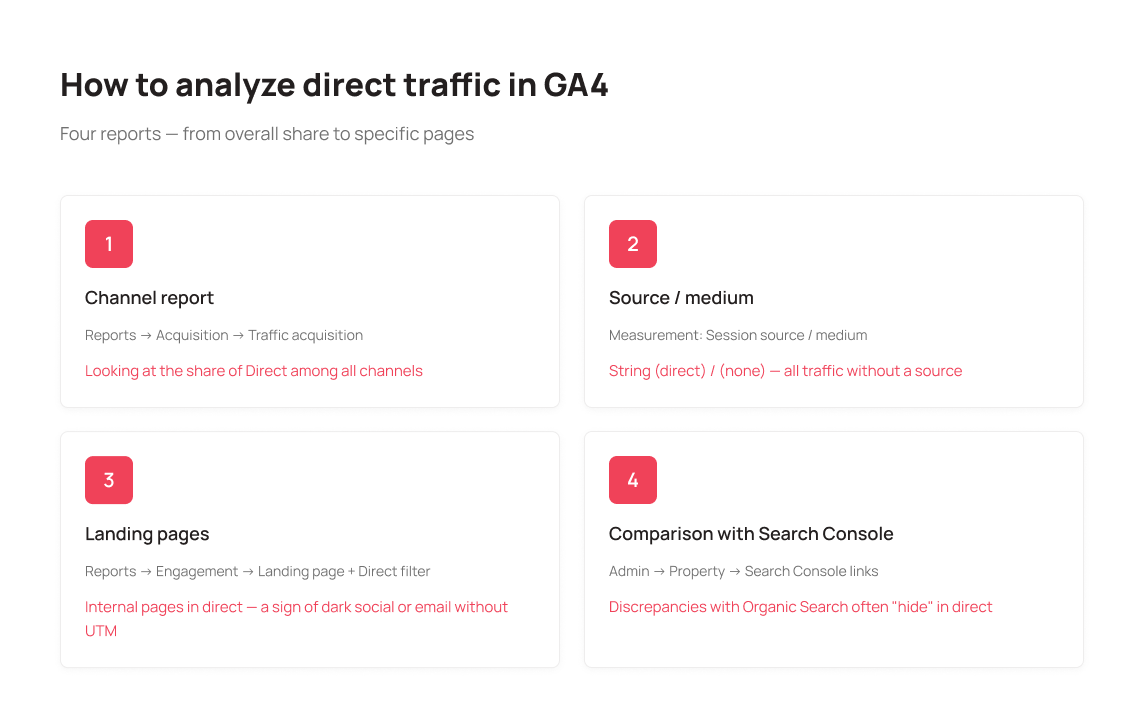
Standard channel report. Path: Reports → Acquisition → Traffic acquisition. In the dimension, select Session default channel group — here you’ll see Direct’s share among all channels.
Source/medium breakdown. Change the dimension to Session source / medium. The row (direct) / (none) is all traffic without an identified source.
Landing page analysis. Path: Reports → Engagement → Landing page. Add a secondary dimension of Session default channel group and filter by Direct. Deep internal pages in direct are a warning sign.
Comparison with Google Search Console. Connect Search Console via Admin → Property → Search Console links. If real organic traffic diverges from Organic Search data in GA4, the difference may be “hiding” in direct.
Check for bots and internal traffic. Path: Admin → Data Streams → Configure tag settings → activate internal traffic filtering by IP. Many short sessions with zero engagement in direct are likely bots or your own employees.
How to Reduce “False” Direct Traffic
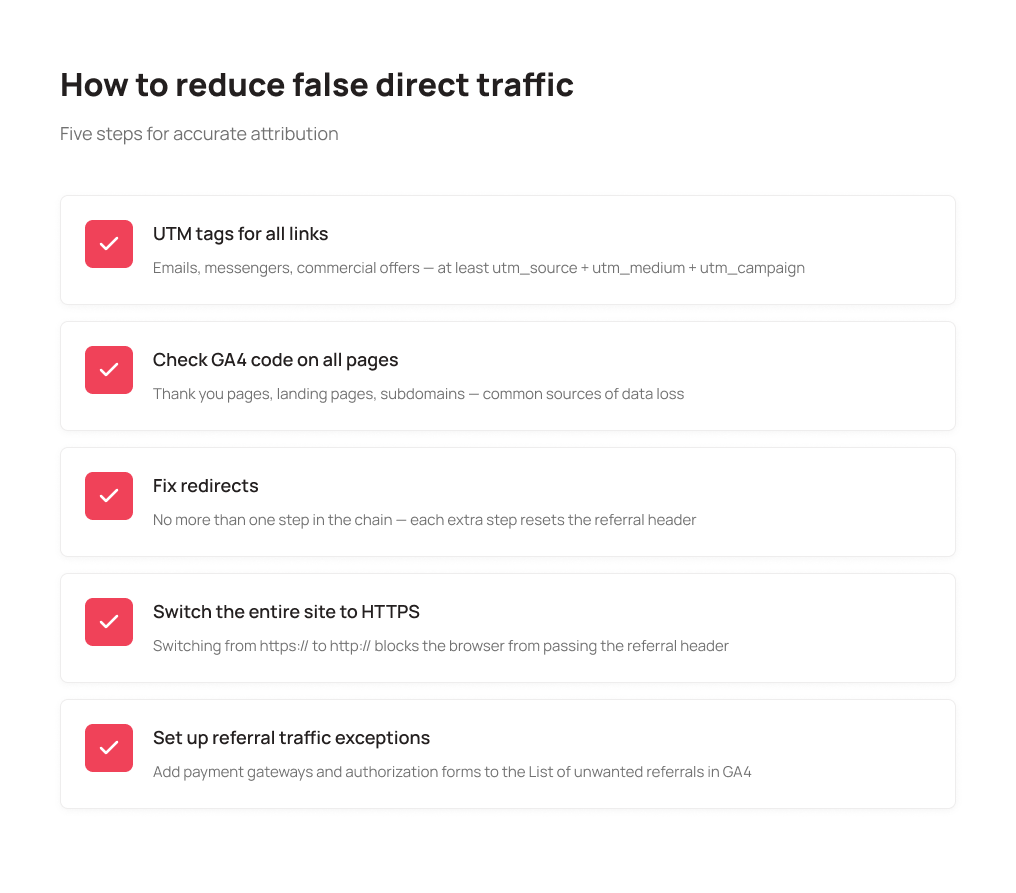
You can’t eliminate direct entirely — and you shouldn’t. But reducing it to an honest minimum is very achievable.
UTM tags on every link, no exceptions. Any link outside the site (in a newsletter, messenger, proposal, or email signature) must include UTM parameters. Minimum: utm_source, utm_medium, utm_campaign. Use Google Campaign URL Builder to generate them.
Check analytics code on every page. Run a crawler (Screaming Frog, Netpeak Spider) and verify that GA4 code is present on every page. Pay special attention to form submission confirmation pages, landing pages, and subdomain pages.
Fix redirects. Make sure no redirect chain is longer than one step. Every extra step means losing the referral header.
Force HTTPS sitewide. The entire site should run on a secure protocol. Check that all internal links use https://, not http://.
Configure referral exclusions. If users pass through a payment gateway or a third-party auth form, add those domains to the exclusions list in GA4 (Admin → Data Streams → Configure tag settings → List unwanted referrals). Otherwise, the return from the payment page will be attributed as a new direct session.
Set up subdomain tracking correctly. If the site uses subdomains (e.g., app.company.com and company.com), make sure they’re added as a single domain via Cross-domain measurement in GA4 settings.
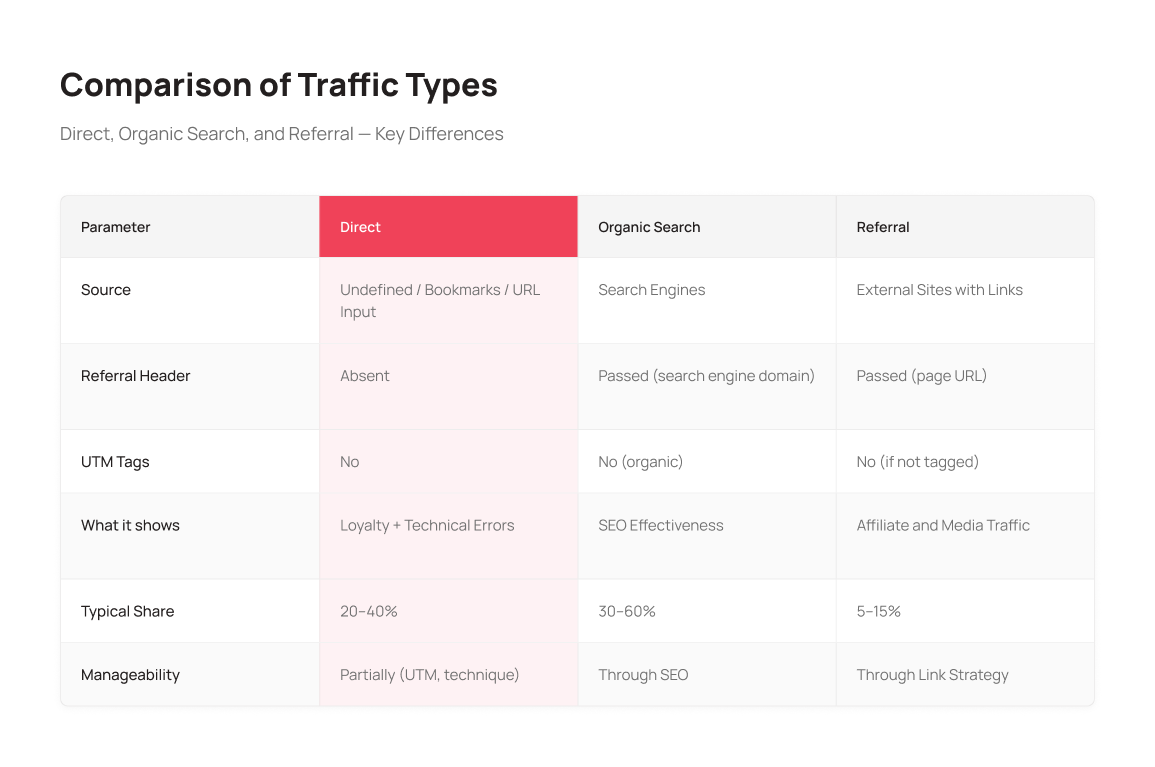
Direct vs Organic vs Referral: Channel Comparison
To understand how direct differs from other channels and how to manage them, here’s a comparison by key parameters:
Conclusion
Direct traffic is one of the most ambiguous channels in analytics. Behind “35% direct sessions” could be genuine audience loyalty, a few technical errors, or unnoticed messenger activity.
The right approach: don’t panic over a high direct share and don’t ignore it either. Start with an audit — check UTM tagging, GA4 code presence on all pages, and redirect accuracy. Then analyze the landing pages in your direct traffic. That will answer how “honest” the data actually is.
Real growth in direct visits to the homepage and product pages means your brand is working. Direct growing on product cards and blog posts means it’s time to sort out UTM tagging in newsletters and messengers.
Got your analytics sorted — time to bring order to your communications.
UniTalk: Manage communications. Drive results.
Yes, if ad links aren’t tagged with UTM parameters. If you use short links in social media or messengers without tags, all clicks will land in direct instead of Paid Social or Paid Search. A particularly common mistake is advertising in Telegram channels and Viber campaigns without UTM.
For most B2B sites, 10–20% of total traffic is considered healthy. If the figure is higher, it’s worth checking your analytics setup and UTM tagging. High direct can be justified for brands with a very loyal audience or strong offline presence, but that’s the exception rather than the rule.
Google doesn’t directly use GA4 data as a ranking factor. However, direct sessions indirectly reflect brand strength, and branded search queries are a direct signal to Google about domain trust. High branded traffic typically comes with better behavioral metrics, which positively impacts rankings.
You should reduce false direct — the kind that appeared due to technical errors or missing UTM tags. Real direct doesn’t need reducing; it’s your most loyal audience. The goal is data accuracy, so you can see each channel’s true contribution to conversions.