What Is Remarketing: How to Win Back Customers and Grow Sales
A user visits your website, browses a product, adds something to the cart, and leaves. No purchase, no inquiry, no explanation. This is far from unusual: according to the Contentsquare Digital Experience Benchmark Report 2026, the average website conversion rate sits at around 2.35%, meaning nearly 98% of visitors leave without taking any action. Remarketing gives you a second chance: it brings those people back through targeted advertising and turns “almost customers” into real buyers. In this article, we break down how remarketing works, what types exist, how to set up campaigns in Google Ads and Meta Ads, and which mistakes are worth avoiding.
Key Takeaways
- Remarketing shows ads to people who have already interacted with your website or app. This audience is significantly more purchase-ready than cold traffic.
- Retargeting and remarketing are different words for a similar concept, but technically differ by channel: remarketing is more common in the Google context, retargeting in social media.
- There are several types: standard, dynamic, search-based (RLSA), and video remarketing. The choice depends on your business goal.
- To get started, you need a tracking pixel or tag on your site and a formed audience: at least 100 users for Google Ads, 1,000 for Meta.
- The most common mistakes: ad frequency that is too high, irrelevant creatives, and no audience segmentation.
- Key metrics to watch: ROAS, CTR, conversion rate, cost per conversion, and impression frequency.
Remarketing vs. Retargeting: What Is the Difference?
These two terms are often used interchangeably, and in most cases that is fine. But if you want to be precise, there is a nuance.
Remarketing is a term introduced by Google. Technically, it refers to the mechanism of re-reaching users through the Google advertising network: banners in the Display Network, ads in Gmail, and videos on YouTube. The foundation is cookies or user lists collected via Google Ads or Google Analytics.
Retargeting is a broader term, widely used in the context of Meta (Facebook/Instagram) and other advertising platforms. The mechanism is the same: a user visits your website, their data is captured by a pixel, and the platform then “recognizes” them the next time they open their social feed.
In practice, the line is blurry. Marketers use both terms freely, and that is not a mistake. What matters more is understanding the concept: both are about making repeated contact with an already warm audience, rather than reaching out to strangers.
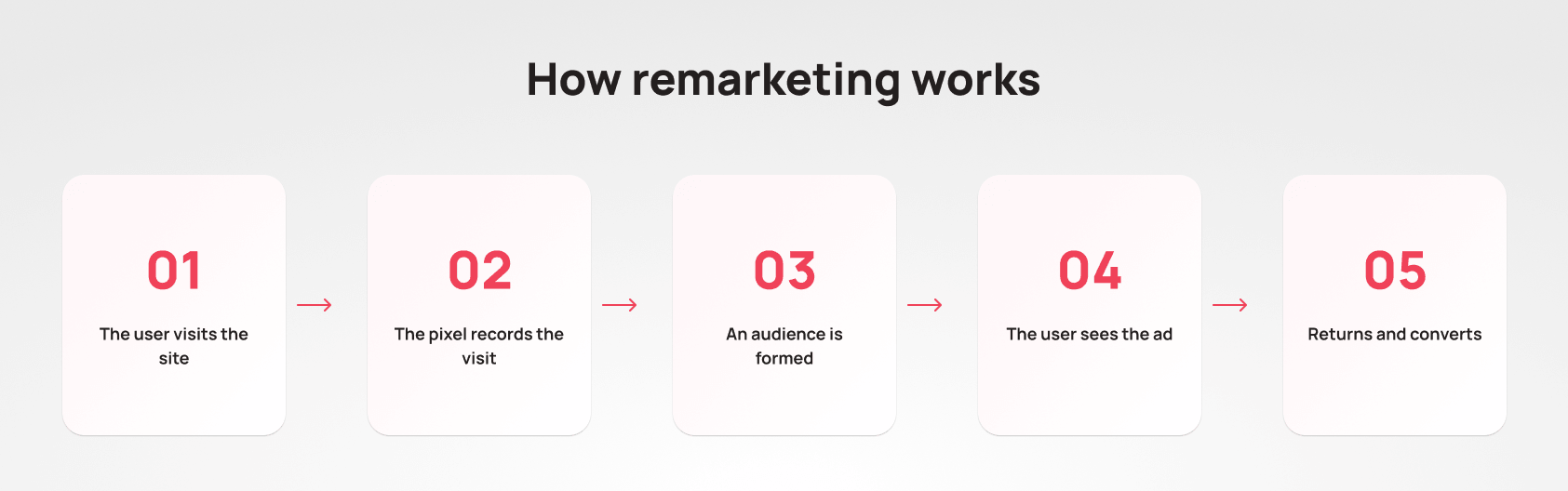
How Remarketing Works: The Technical Process
Behind every “right banner shown to the right person” is a simple but well-structured chain of steps.
Step 1. Installing the pixel or tag. A small piece of code is added to your site: a Meta pixel or a Google Ads tag. It fires every time a user visits a page and logs the visit using a browser cookie.
Step 2. Building the audience. The pixel creates a list of visitors: people who browsed specific pages, added items to their cart, started checkout, or already made a purchase. Each segment is a separate audience with a different level of intent and warmth.
Step 3. Uploading the audience to the ad platform. The accumulated list is passed to Google Ads or Meta Ads. The platform then “recognizes” these users when they open their browser, watch YouTube, or scroll through their Instagram feed.
Step 4. Showing the ads. The user on the list sees a pre-prepared ad: a banner, a video, a dynamic product card, or a text ad in search. The ad content can be personalized based on their behavior on your site.
Step 5. Conversion. The user clicks the ad, returns to your site, and completes a target action: a purchase, a form submission, or a registration.
One important detail: modern ad platforms increasingly rely on machine learning algorithms to determine the optimal timing, frequency, and format for each impression. Human input still matters, but the algorithm handles much of the routine automatically.
Types of Remarketing
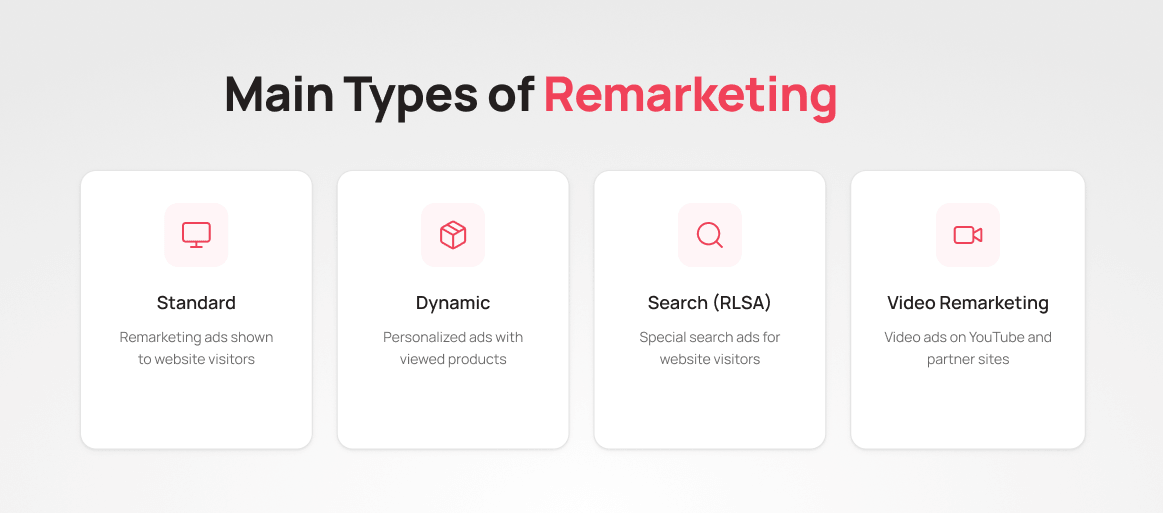
Standard Remarketing
The simplest and most common format. Ads are shown to people who previously visited your site while they browse other websites in the Google Display Network or scroll through their Meta feed.
Best for: brand reminders and bringing back users who browsed product categories or pages but did not convert.
Dynamic Remarketing
A smarter and more effective option for e-commerce and SaaS. Ads are assembled automatically based on what a specific user viewed on your site. If someone was looking at a particular laptop model, they will see that exact product, not a generic banner with your store’s logo.
To run it, you need a data feed: a file containing information about your products or services (names, prices, images, URLs). Google automatically pulls the relevant items and builds a personalized ad for each user.
Best for: online stores, marketplaces, booking services, and travel platforms — anywhere with a large catalog and varied offerings.
Search Remarketing (RLSA)
RLSA stands for Remarketing Lists for Search Ads. The mechanics differ from the classic format: ads appear not in the Display Network but in Google search results for specific queries.
For example, a user who already visited your site searches Google for “buy CRM for business.” You can set a higher bid for them or show a different, more specific ad with a personalized offer.
Best for: B2B with long decision cycles, high-ticket products, and niches with strong competition in search.
Video Remarketing
This format shows video ads on YouTube to users who have interacted with your website or YouTube channel. It can be a pre-roll before a video, a short bumper ad, or an in-feed placement.
Video works where a static banner falls short: it helps explain a complex product, build an emotional connection, and remind users of your brand through storytelling.
Best for: SaaS products, educational projects, and brands with a visually strong product.
Where Remarketing Is Used
Remarketing works across virtually every channel with paid advertising:
Google Ads: the Display Network (banners on partner sites), search ads (RLSA), Gmail, YouTube.
Meta Ads: feed and Stories on Facebook and Instagram, Audience Network (partner apps).
TikTok Ads: retargeting via the TikTok pixel, especially relevant for B2C audiences under 35.
LinkedIn Ads: retargeting based on site visitors and content interactions, effective in B2B.
Programmatic platforms: DSP systems (demand-side platforms) that work with a broad network of sites and apps beyond the Google and Meta ecosystems.
Email remarketing: a separate type, where emails are sent to users who took specific actions on your site (abandoned a cart, registered but did not activate their account). Technically this is not paid remarketing, but the logic is the same: bring them back and close the deal.
Benefits of Remarketing for Business
Working with a warm audience. A person who has already been on your site knows your brand. The trust barrier is lower, and the likelihood of conversion is higher. Research shows that returning visitors convert 2-3 times better than new ones.
Lower cost per acquisition. CPA for remarketing campaigns is generally lower than for cold traffic: with the same budget, you get more conversions.
Behavioral personalization. Show someone who viewed the Pro pricing plan an ad focused on key features. Show someone who abandoned their cart a reminder with that specific product. This is not mass advertising — it is a precise, contextual touch.
Built for long sales funnels. In B2B, and in high-ticket B2C niches (real estate, cars, expensive tech), the decision cycle stretches over weeks. Remarketing keeps you visible to the potential customer throughout that time.
Increasing LTV and upsells. Remarketing is not only about acquisition — it also drives retention. You can show existing customers relevant upsell offers, invite them to repeat purchases, or notify them about promotions.
Effective Remarketing Strategies
Abandoned Cart
An e-commerce classic. A user added an item to their cart but did not check out. The standard approach: show them an ad featuring that product, possibly with an added incentive: free shipping, a small discount, or a limited-time offer.
Timing matters: the highest effectiveness is in the first 1-24 hours after the user leaves. After 3-7 days, interest drops sharply.
Funnel-Depth Segmentation
Not all users who leave are the same. Someone who spent 10 seconds on the homepage and someone who studied your pricing page and started registration are entirely different people with different needs. Each segment needs its own ad.
A practical segmentation example:
- Visited the blog → show a product ad with an educational angle
- Browsed pricing → show a plan comparison or a demo offer
- Started registration but did not finish → show a simplified CTA with a direct link
Look-alike Audiences from Converters
Once you have built a list of real buyers or clients, the ad platform can find similar users based on behavioral characteristics. This is not pure remarketing, but it naturally extends the strategy of working with warm audiences.
Upselling to Existing Customers
Upload your existing client contact list to Meta or Google Ads — the platforms will match them with user accounts. You can then show them ads for complementary products, announce updates, or offer a plan upgrade.
Reactivating Dormant Users
Segment users who have not visited the site in more than 90 days and launch a separate campaign with a softer touch: valuable content, a product update, or a special offer with a “we’ve missed you” tone.
How to Set Up Remarketing in Google Ads
Setup follows several sequential steps.
Step 1. Installing the Google Ads Tag
In your Google Ads account, go to Tools → Audience Manager. The “Your Data Sources” tab may be hidden: click the > arrow at the right end of the tab row. In the “Google Ads Tag” block, click Details → Tag Setup → Install It Yourself. Google will generate the tag — copy it and paste it into the <head> section of every page on your site. Alternatively, use the new interface path: Tools → Data Manager → Google Tag. To add the tag via Google Tag Manager, select Use Google Tag Manager and copy your Conversion ID.
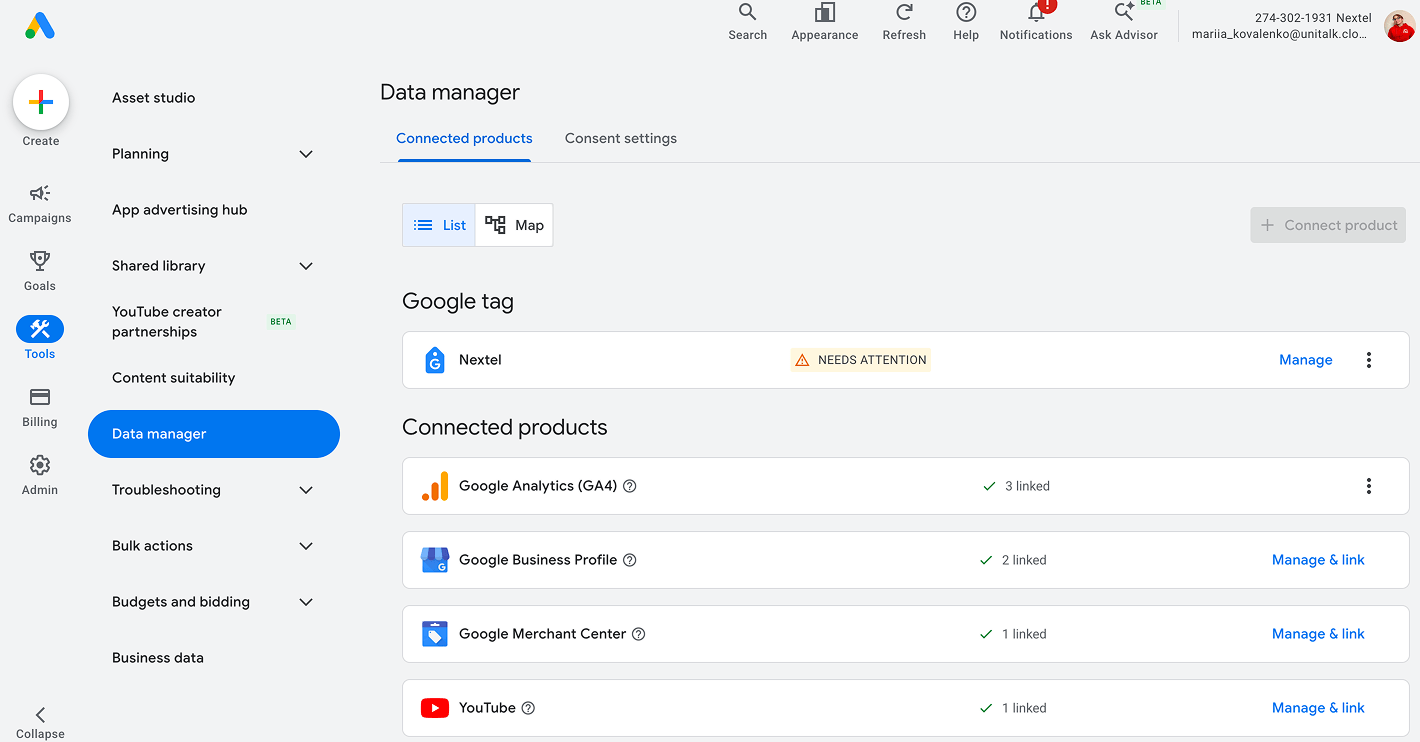
Step 2. Creating an Audience
In the same Audience Manager, go to the Audiences tab and click “+”. Choose the “Website Visitors” audience type and set your parameters — for example, users who visited /cart in the last 30 days. Minimum audience size to run a campaign: 100 users for the Display Network, 1,000 for Search.
Step 3. Creating a Campaign with a Remarketing Audience
Create a new campaign (type: Display Network or Search) and at the ad group level, in the Audiences section, select Targeting mode and add your audience. Set bids, scheduling, geography, and upload your creatives.
Step 4. For Dynamic Remarketing — Connect a Feed
In Tools and Settings → Data Hub, upload your product feed in Google Merchant Center format or directly through Ads. Make sure your tag passes the ecomm_prodid parameter or a similar identifier: this links each user to the specific product they viewed.
How to Set Up Remarketing in Meta Ads
Step 1. Installing the Meta Pixel
Go to Meta Business Suite → Events Manager → Connect Data Sources → Web. Create a pixel, copy the base code, and paste it into the <head>. of every page on your site. For advanced event tracking (add to cart, initiate checkout, purchase), add additional events: either manually or through a platform integration (Shopify, WooCommerce, and others).
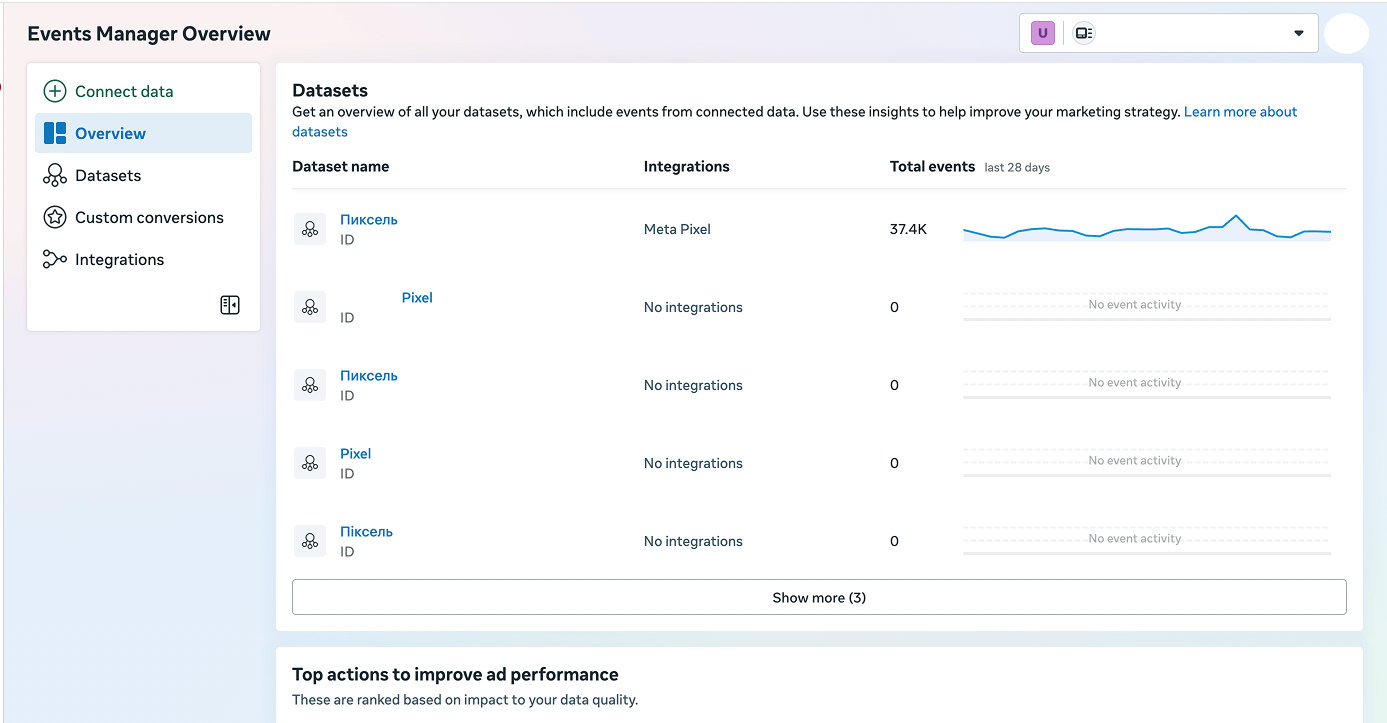
Step 2. Creating a Custom Audience
In Meta Ads Manager, go to Audiences → Create Audience → Custom Audience. Set the source to “Website,” choose an event type (for example, “Add to Cart”), and set a time window (1 to 180 days). After saving, the audience will update automatically, provided your Pixel or Conversions API is correctly passing events.
Step 3. Creating a Campaign
The right campaign objective depends on your goal: use “Sales” for an online store, “Leads” for form submissions. If you simply want to bring users back to the site, “Traffic” works, but for remarketing aimed at purchases or sign-ups, choose a conversion-focused objective. At the ad set level, in the Audience section, add your Custom Audience. For dynamic remarketing, use the Advantage+ Catalog Ads format and connect your product feed through Meta Commerce Manager.
Step 4. Exclude People Who Already Converted
This is a mandatory step that gets overlooked often. Create a separate audience of users who triggered the Purchase event and add it as an exclusion — otherwise the platform will keep serving ads to people who already converted, burning your budget for nothing.
Measuring Performance and ROI
Use the following metrics to evaluate your remarketing campaigns:
ROAS (Return on Ad Spend): the ratio of ad revenue to ad spend. Formula: Revenue / Spend × 100%. The benchmark varies widely by industry, but remarketing campaigns should consistently outperform campaigns targeting cold audiences.
CTR (Click-Through Rate): the percentage of clicks relative to impressions. A low CTR with a high impression volume points to problems with your creative or ad relevance.
Conversion Rate (CVR): the percentage of users who completed a target action after clicking. If CVR is low but CTR is healthy, the issue is likely on the landing page.
CPA (Cost per Action): the cost of one target action. Compare it to your CPA on cold traffic: the gap will show you the real value of remarketing.
Frequency: the average number of impressions per user over a given period. High frequency (more than 5-7 per week) leads to banner blindness and audience fatigue. Keep this number in check.
Common Remarketing Mistakes
Ad frequency that is too high. People start seeing the same ad everywhere and feel followed. Set a frequency cap: a general rule of thumb is 3-5 impressions per user per week.
No audience segmentation. Showing the same ad to everyone who ever visited your site is an inefficient use of budget. Segment your audience by behavior, funnel depth, and time since their last visit.
Irrelevant ads. If someone looked at a specific product and you show them a generic brand banner, that is a missed personalization opportunity.
Ads continue showing to people who already converted. Showing “buy now” ads to someone who already bought is at best wasteful, at worst annoying. Always add your buyer audience to exclusions, or move them into a separate upsell campaign.
Audience window that is too wide. Someone who visited your site six months ago is no longer a warm lead. For most niches, the optimal remarketing window is 7-30 days. For high-ticket, long-consideration products — up to 90 days.
Ignoring mobile traffic. A large share of visitors arrives from mobile devices. Make sure your ads are optimized for smaller screens and that your landing page renders correctly on a phone.
Conclusion
Remarketing is one of the most cost-efficient tools in digital marketing because it targets people who have already shown interest, not a generic audience. Well-built campaigns help lower acquisition costs, increase conversion rates, and keep customers engaged throughout their lifecycle.
The key to success is segmentation: different people at different funnel stages need different messages. This is where analytics and communication tools make a real difference. When you have a full picture of how customers interact with you — through calls, messages, and site visits — personalizing your remarketing becomes much simpler.
UniTalk: Manage communications. Drive results.
Remarketing is advertising aimed at people who have already visited your website or interacted with your product but did not complete a target action. A simple analogy: a shopper walks into a store, looks around, and leaves. Remarketing is like having the ability to “catch up” with them around the corner and casually remind them of what caught their eye.
Dynamic remarketing is the automatic personalization of ads for each individual user. If someone viewed three products in your store, the ad will be assembled from exactly those three items: with photos, prices, and links. No manual work needed — the system does it automatically based on your product feed.
Yes, and it is often more effective for small businesses than for large brands. Small businesses typically work with limited budgets, and remarketing allows them to stop spreading that budget thin on cold audiences and focus instead on people who already know the offering. The minimum threshold to get started: at least 100-1,000 users in your audience.
Ads appear wherever the advertising platform can reach its users: in the Google Display Network (millions of partner sites and apps), in Google search results (RLSA), on YouTube, in the Facebook and Instagram feed and Stories, on TikTok, LinkedIn, and other channels depending on the platform you use.