Cloud Services for Business: How to Choose the Right Model for Your Company’s Scale
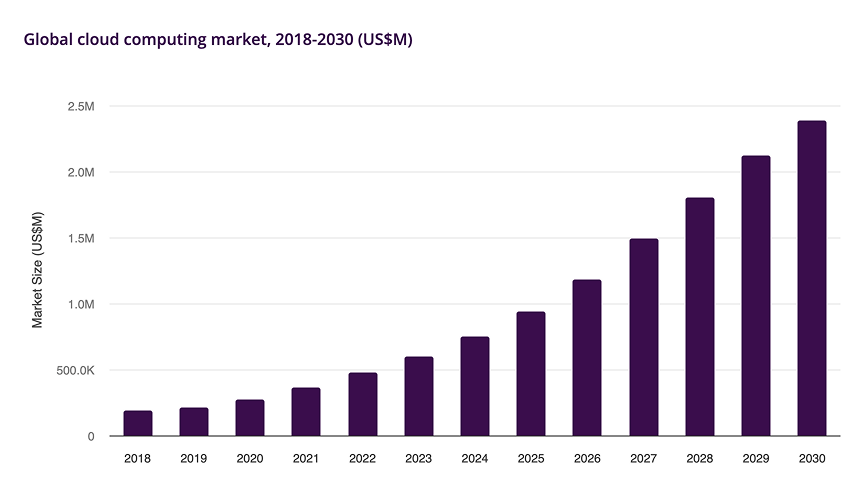
Fifteen years ago, only corporations with large IT budgets could store data in the cloud — today, mid-sized businesses and even three-person startups can do the same. Companies that want to move fast, stay flexible, and avoid capital expenditure on their own infrastructure are choosing the cloud. Email, PBX, data storage, development and analytics platforms — if these services used to be deployed on on-premises servers, they are now running in the cloud. Gartner projects that the cloud services market will grow 21.3% by the end of 2026 and reach $1.48 trillion by 2029.
The most popular cloud models today are IaaS, SaaS, and PaaS. Here is how each one works — and which to choose depending on your company’s scale.
What Are Cloud Services and How Do They Work
Any cloud is essentially someone else’s servers that you access over the internet and pay for only the resources you actually consume. The service provider purchases the necessary hardware, updates and maintains it, and ensures the required infrastructure: power supply, cooling, and data transmission channels. Clients bear no capital expenditure — only operational costs, paying regularly for rented computing resources, development platform components, or user access to specific tools.
Put simply, cloud services are access to computing power, platforms, and applications over the internet — without purchasing or maintaining any hardware.
Core Cloud Models for Business
Let’s look at the main types of cloud services based on the resource delivery model.
SaaS (Software as a Service)
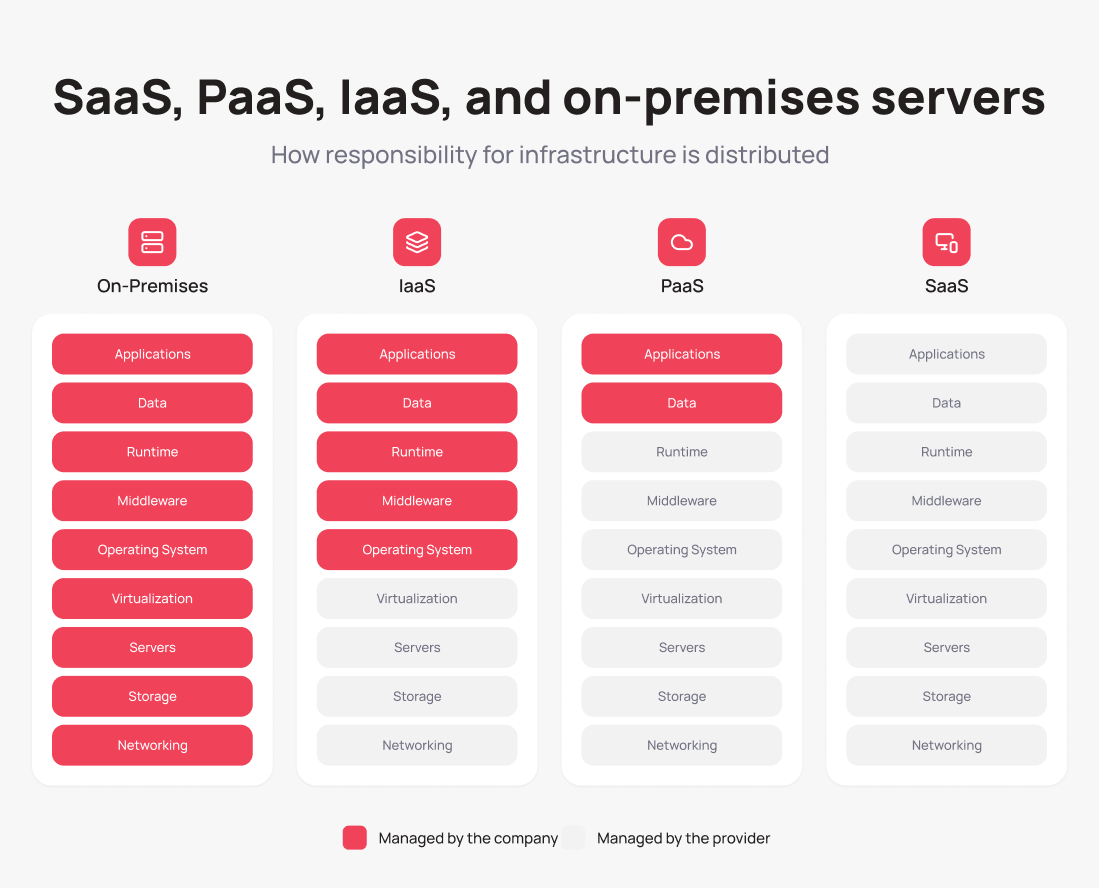
SaaS is ready-to-use software delivered by subscription. You don’t purchase a license, handle updates, or install anything on an office server or employee computers. With SaaS, all you need to do is open the service link in a browser, sign in, and start working. You can customize the workspace to fit your needs — for example, add new modules or disable ones you don’t need — but the provider handles everything else.
Most online services you use every day operate on the SaaS model: Google Workspace, Microsoft 365, Salesforce, Notion, Slack, Zoom. They share a low barrier to entry, predictable costs, and the ability to get started almost immediately after registration.
SaaS is the undisputed leader among cloud software solutions for business. The average modern company simultaneously uses up to 106 SaaS applications, according to BetterCloud.
PaaS (Platform as a Service)
PaaS is a cloud platform for developing, running, and managing applications. The provider supplies a complete on-demand working environment that includes servers, networks, storage, operating systems, databases, and development tools. Developers can either pay as they go or pay a fixed amount for a fixed volume of resources. This allows teams to build, update, and scale applications much faster than on a self-hosted platform — meaning PaaS saves time on both writing code and maintaining infrastructure.
PaaS is offered by all leading cloud providers: Amazon Web Services (AWS), Google Cloud, IBM Cloud, and Microsoft Azure. You can get started in a single day: after registration, you can immediately begin working in a free trial environment with a fixed resource allowance.
IaaS (Infrastructure as a Service)
IaaS is a cloud model in which the client receives computing resources without being tied to physical infrastructure. The provider manages all infrastructure components, while the client is only responsible for installing and configuring the OS and their own applications. Resources can be provisioned in minutes and released just as quickly when no longer needed — for example, ahead of Black Friday or peak sale seasons.
IaaS is built on virtualization: in the provider’s data center, physical servers are divided into multiple isolated virtual machines using a hypervisor. Each client manages their own “slice” of resources through a web console or API. This approach enables flexible, on-demand resource allocation.
The main IaaS cloud providers are Amazon Web Services, Google Cloud, Microsoft Azure, IBM Cloud, and Oracle Cloud. Getting started requires only registering an account, selecting the required virtual machine configuration, and launching it.
Benefits and Drawbacks of Cloud Systems for Business
IDC found that companies using IaaS optimize operational costs and accelerate innovation. SaaS and PaaS users also report cost savings — and that is not the only argument in favor of the cloud.
Benefits of Cloud Solutions for Business
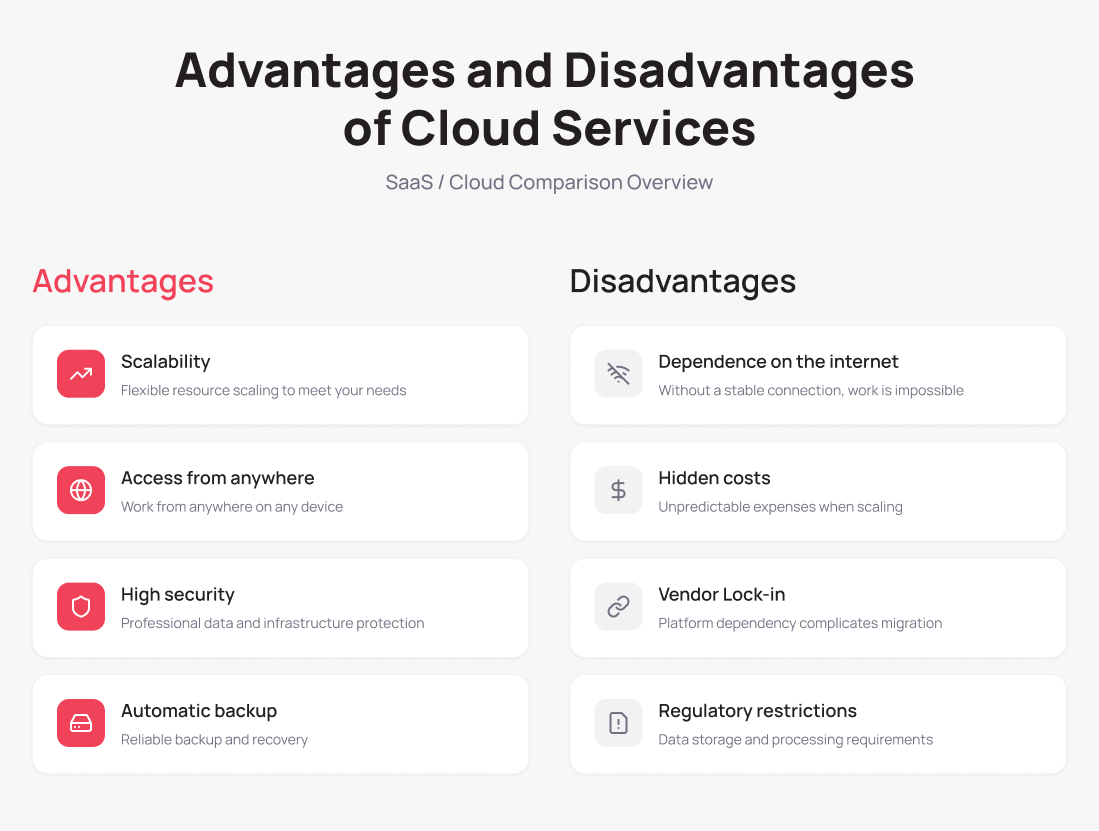
Scalability. Without spending on physical infrastructure, you can get additional resources or tools at any time to meet new business requirements — whether the company launches a new line, opens another office, or hires new staff.
Access from anywhere in the world. You can work with cloud storage, a SaaS service, or a development platform from anywhere — all accessible from any device with an internet connection.
Security. Cloud system providers monitor threats, use modern AI-powered tools, and hire top security experts.
Data loss protection. Backup and disaster recovery features help prevent data loss caused by hardware failure, cyberattacks, or human error.
Drawbacks of Cloud Solutions for Business
Internet dependency. Without a connection, access to data and applications is impossible. The issue can be resolved by connecting backup data transmission channels.
Hidden costs. Part of the cloud system budget is spent on excess resources, storing old system snapshots, or unused virtual machines and licenses. FinOps —a cloud financial management methodology for tracking spending, decommissioning unused resources, and selecting optimal pricing plans — can help here.
Vendor lock-in. In some cases, switching from one provider to another is difficult, costly, and risky due to downtime. A multi-cloud approach (primarily applicable to IaaS) — where IT services are distributed across multiple providers — can serve as a solution.
Regulatory and other constraints. Many governments prohibit storing personal, medical, and banking data outside the country. A hybrid infrastructure — where sensitive data is kept on-premises and the rest resides in the cloud without a fixed physical server location — addresses this challenge.
Popular Cloud Solutions for Different Business Scales
A startup, a mid-sized company, and a corporation operating in international markets differ not only in budget but also in objectives and security requirements. At the same time, cloud resources can be used by both a large bank and a five-person micro-bakery — just in very different ways.
Small Business (Startups, Sole Traders, Small Teams)
Small businesses aim to operate without an in-house IT team, launch quickly, with no capital expenditure and minimal operational payments. SaaS tools on entry-level plans fit these requirements perfectly, without lengthy setup or training.
Cloud services for small business cover several key areas:
Email, documents, and video communication. The undisputed leader is Google Workspace. Over 11 million organizations worldwide rely on Google Workspace for email, Drive, video calls, and productivity apps.
Accounting. Applications such as QuickBooks, FreshBooks, and Xero let you manage bookkeeping, submit tax reports, and send invoices — for sole traders and legal entities alike.
CRM. Among cloud solutions for small business, standout options include NetHunt, HubSpot CRM, Pipedrive, and Zoho CRM. More options are available in the article “Top 10 CRM Systems for Business“.
Project management. Trello and Notion help synchronize teams in real time: creating tasks, assigning owners, tracking progress, and visualizing results.
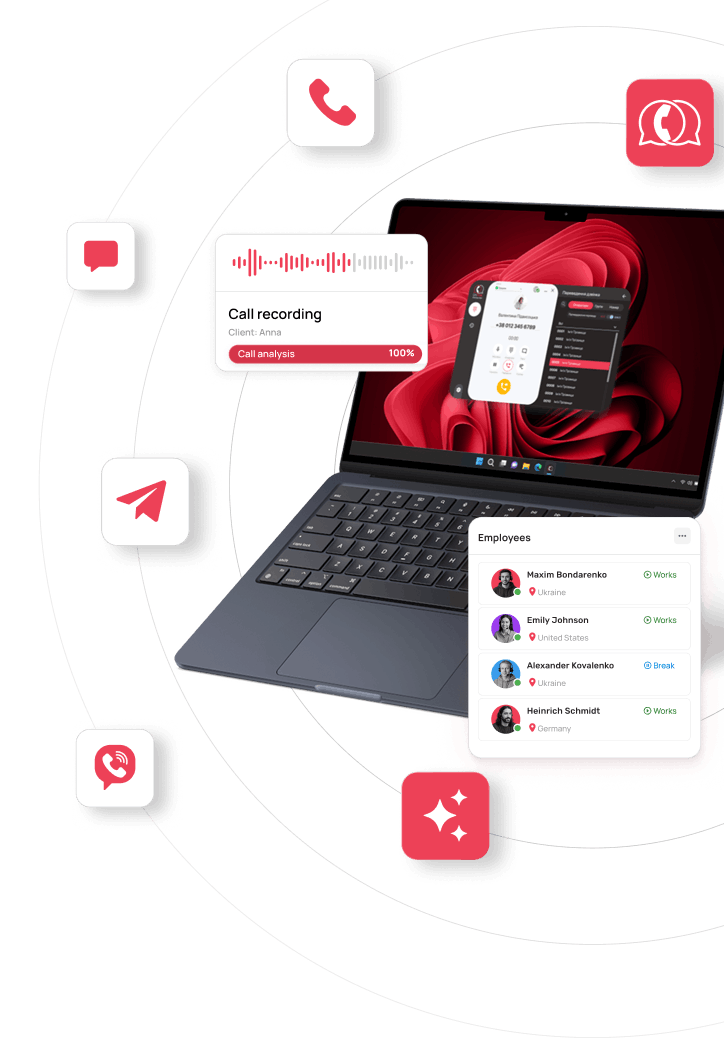
Communications and telephony. VoIP telephony has become an essential tool even for small businesses that cannot afford to miss a single customer inquiry. UniTalk brings calls, chats, and all customer interaction channels into one interface — and works for small teams and growing businesses alike.
Mid-Sized Business (Growing Companies)
Mid-sized businesses look to automate processes, gain access to analytics, and scale quickly. They can manage with several standalone SaaS applications, but without integrations, efficiency suffers.
Cloud systems for mid-sized businesses may take the form of integrated SaaS applications or a combination of SaaS with IaaS/PaaS platforms.
CRM. Mid-sized businesses with an active sales team will benefit from the low-code platform Creatio, or from HubSpot on the Western market side.
ERP. Odoo unifies sales, inventory, finance, and logistics in one system. For those already working within the Microsoft ecosystem, Microsoft Dynamics 365 Business Central (alongside Microsoft 365 and Azure) is a natural fit.
HR. HURMA automates recruitment, onboarding, time tracking, and goal management.
Analytics. Microsoft Power BI and Google Looker Studio integrate with most cloud services and aggregate data from CRM, telephony, and ad platforms into a single dashboard.
Communications. Mid-sized businesses are increasingly turning to omnichannel communications. UniTalk serves as both a single control point for customer interaction quality and a source of analytics.
Large Business (Enterprise Segment)
Corporations need to comply with regulatory requirements (GDPR, PCI DSS), manage large teams and thousands of customers, and minimize downtime risk. For this reason, large businesses often choose a hybrid infrastructure — keeping some data on their own servers while moving the rest to the cloud.
Cloud infrastructure. Microsoft Azure is preferred by clients already working with Windows and Microsoft 365. Google Cloud Platform draws enterprises with its AI/ML tools and analytics, while AWS offers access to an extensive catalog of ready-made solutions.
ERP. SAP and Oracle Cloud cover financial management, manufacturing, logistics, and supply chain in a unified system.
CRM. In the enterprise segment, Salesforce, Microsoft Dynamics 365, HubSpot, and Oracle CX are the most in-demand solutions.
HR. Workday has become the standard for talent management in international companies. A strong alternative is SAP SuccessFactors.
Analytics and data. Microsoft Power BI remains widely adopted; Google Looker is in use to a lesser extent.
Security. Palo Alto Cortex Cloud is a CNAPP platform for protecting cloud-native applications.
Communications. While Microsoft Teams leads in internal communications, UniTalk handles external communications at enterprise scale: it offers a contact center for handling thousands of customer interactions, voice AI agents, and 40+ ready-made integrations.
How to Choose a Cloud Solution for Your Business Scale
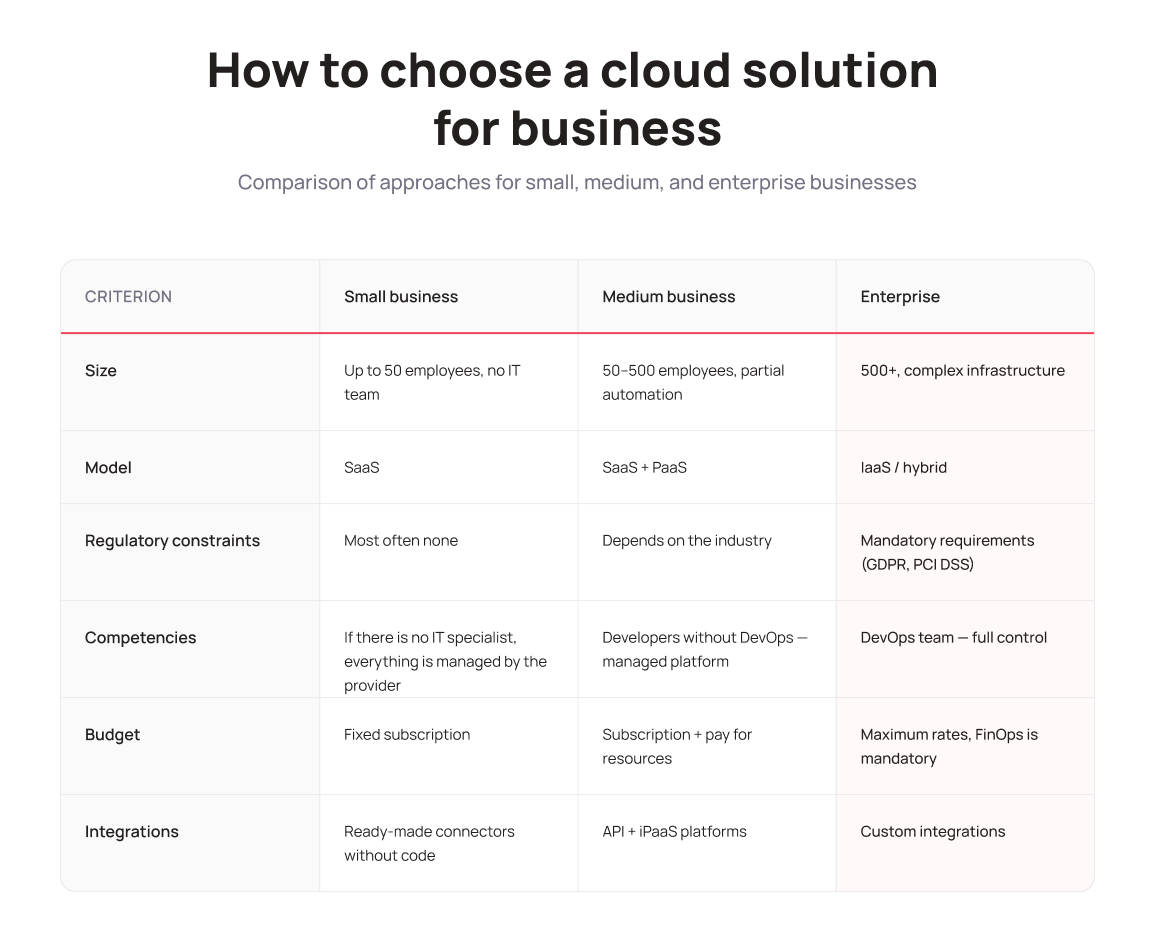
1. Company size and maturity. Small businesses and startups look for accessible solutions with a low barrier to entry — SaaS or, in some cases, managed hosting. Mid-sized and large businesses prefer enterprise-grade products and place greater demands on provider reliability, SLA availability, and customer support quality.
2. Regulatory constraints. European companies must comply with GDPR, while businesses in other markets face local data protection requirements. Financial and healthcare companies cannot store sensitive data outside their country, so they choose providers with local server placement or a hybrid infrastructure model.
3. Team’s technical expertise. Working with IaaS requires server management skills, network configuration, and other sysadmin competencies. If no such specialist is on the team, starting with SaaS or PaaS — fully managed by the provider — is the right move.
4. Budget and the actual cost model. It is important to compare not just the monthly subscription price but also associated costs: traffic and storage billing, and team training expenses.
5. Integration with existing systems. The best service is the one that can exchange data with your CRM, accounting software, HR tools, and other systems already in use — without custom development work. Without this, operational efficiency will drop, so choose a solution that supports open APIs or ready-made integrations.
Cloud Security: Myths vs. Reality
What are the biggest fears holding businesses back from cloud computing — and how justified are they?
“Data in the cloud is less secure than on an on-premises server”
Myth. Major cloud providers invest billions of dollars in cybersecurity, encryption, and compliance with international standards, and they hire highly specialized security professionals.
Important: the provider secures the infrastructure, while the client is responsible for the data and access to it. In IaaS, the client is responsible for OS and application security; in PaaS — for data and integrations; in SaaS — only for user account management.
“If the cloud gets hacked, we’ll lose access to our data”
Also a myth. Most cloud incidents are not caused by breaches but by misconfigured access permissions and employee errors. Encrypting sensitive data, enabling multi-factor authentication, and enforcing access controls remain the client’s responsibility — just as they would with on-premises servers.
“If the provider shuts down, our data will disappear”
Myth again. Reliable providers back up data and, in some cases (as a paid add-on), store it across data centers in different regions to improve fault tolerance. That said, clients still bear responsibility for backing up business-critical data and, where needed, arranging a disaster recovery site for worst-case scenarios.
What to Control When Using Cloud Solutions for Business
- Encryption of sensitive data — personal, financial, and medical information.
- Access management — each user receives only the permissions required for their specific role.
- Cyberthreat monitoring — anomaly alerts can be configured using the monitoring tools provided by the vendor.
- Team training — human error remains the leading cause of cloud incidents; regular security hygiene training can significantly reduce risk.
Conclusion
What all cloud services have in common — regardless of business size — is that they reduce operational routine and free teams to focus on what actually creates value for their company. AWS, Google Workspace, Salesforce, and Microsoft Azure became popular because they solve common business problems better than the alternatives and offer broad customization for specific needs.
If you want to start using cloud services in your business, begin with an audit. Which processes consume the most time and drag down efficiency? Where does your team lose data or lose track of customer communications? What can be automated right now to free up team capacity?