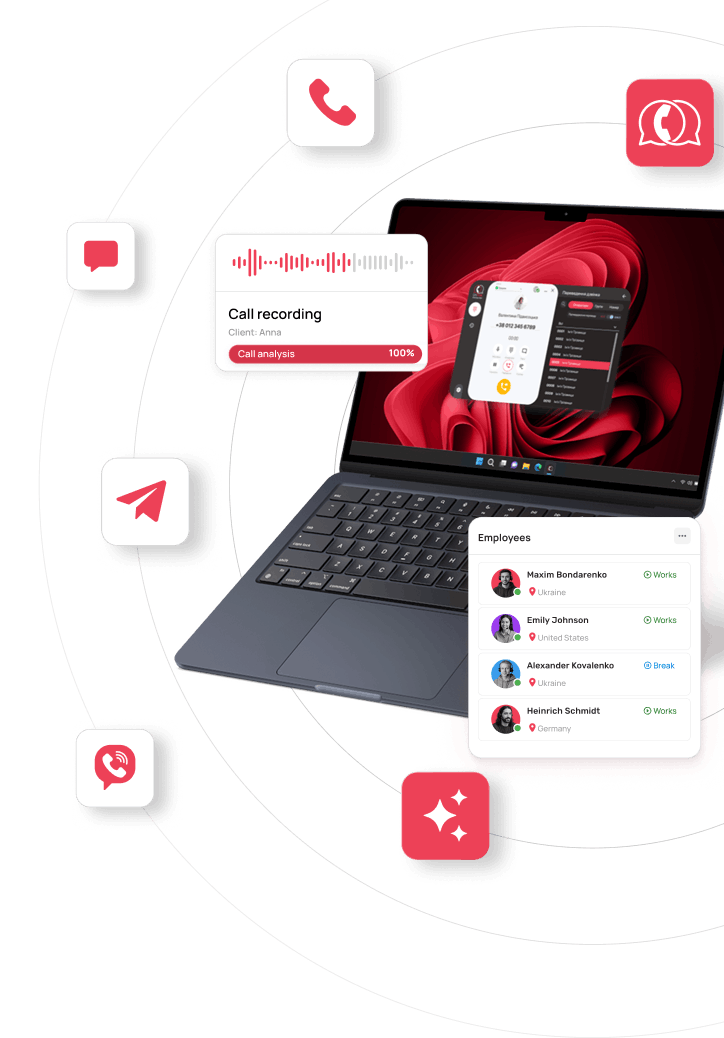
How to protect your client base: CRM telephony integration, number masking and recording every call
A manager quits, and within a month some of their clients are buying from a competitor. A new hire photographs the phone numbers in your CRM. A client calls back and hears: “Sorry, could you remind me what we agreed on?” A manager promised a discount that doesn’t exist and now says they never did.
All of these stories have one cause: the channel to the client belongs to the manager, not to the company. The number they called from, the chats and the agreements stay on their personal phone.
Below we go through how to close each leak scenario technically, how to switch to the new setup in a week and how to choose a telephony provider. Protecting your client base doesn’t get in the way of sales, and your managers’ work actually gets easier.
How a system where the company owns the client base works
All calls go through a cloud PBX from company numbers, and every conversation, with its recording, automatically lands in the client card in your CRM. The whole history of communication with the client then stays in the company’s system, no matter which manager spoke to them.
The setup has five links:
- The client calls the company number and sees that same number when the company calls them.
- The cloud PBX receives the call and routes it to the right manager. A cloud, or virtual, PBX is a phone system that runs over the internet, so you don’t need servers or cables in the office.
- The manager talks in a work app: in a browser, on a computer or on a smartphone.
- The CRM (the system where you keep clients and deals) receives the call details.
- The recording, call length and outcome appear in the client card.
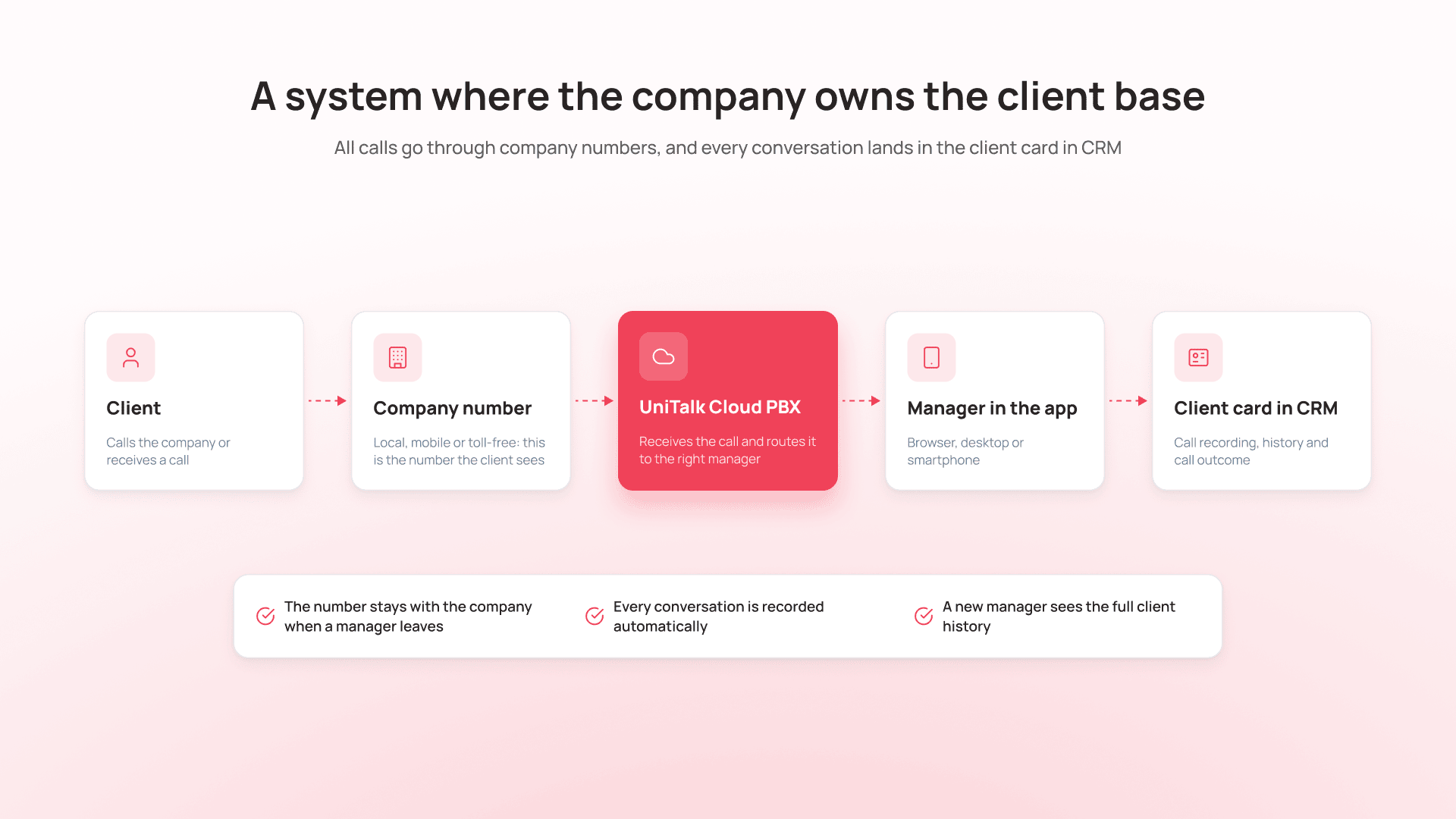
IP telephony makes this possible: calls go over the internet, so a manager can work from home and even from their own smartphone. They call through the work app, though, so their personal number never shows up in conversations with clients.
Managers call from personal phones: move them to company numbers
The client should see the company number on their screen. Caller ID controls this: it is the number displayed to the client during a call. When it is the company number, the client calls back to the same number and reaches the manager in charge.
What this changes for the business:
- When a manager leaves, the number stays with the company, and clients keep calling it.
- The client doesn’t save “Oleh, sales” with a personal number that makes it easy to lure them away later.
- Remote managers don’t have to give clients their own number, so work and personal life stay separate.
In UniTalk IP telephony, local, mobile and toll-free 0800 numbers work in one account. Managers call from a browser, the desktop app or the UniTalk mobile app, and the client sees the company number.
If clients already know your number, you don’t have to change it. You can connect it to UniTalk if it works over SIP (the protocol that carries phone calls over the internet) or your provider offers a SIP connection.
A client calls back and a new manager asks everything from scratch: a client card on every call
Integrate telephony with your CRM so that on an incoming call the manager automatically sees the client card with the deal history and recordings of previous calls. The client doesn’t have to explain again what they ordered, and the manager picks up the conversation where it left off.
To be useful, the card should show:
- who the client is and which company they work for;
- the deal stage and what has already been agreed;
- previous calls with recordings;
- chat and email history;
- the manager in charge.
This matters most where clients come back again and again. In an online store, a client calls about a return and the manager sees the order right away. In a clinic, the receptionist sees which doctor the patient visited last time. On top of that, a call from a client who is already in the CRM goes to their assigned manager, even if others are free.
UniTalk’s CRM telephony integration links calls to contacts, leads and deals in real time, and in many CRMs it links chats too. The call recording is saved in the deal history, and incoming calls are routed to the manager in charge of the client. Ready-made telephony integrations are available for 50+ CRM and ERP systems, including KeyCRM, SalesDrive, SendPulse CRM, NetHunt, HubSpot, Pipedrive and Creatio. The roles are simple: the CRM knows who the client is, and UniTalk sends it what you talked about.
How to hide client numbers in your CRM and call in one click
The manager sees the client’s name, history and a call button, while the number is only partly visible: +380 67 *** ** 42. They call from the card in one click (click-to-call: the manager presses a button in the CRM and the phone system dials the number), so there is nothing to copy or dial by hand.
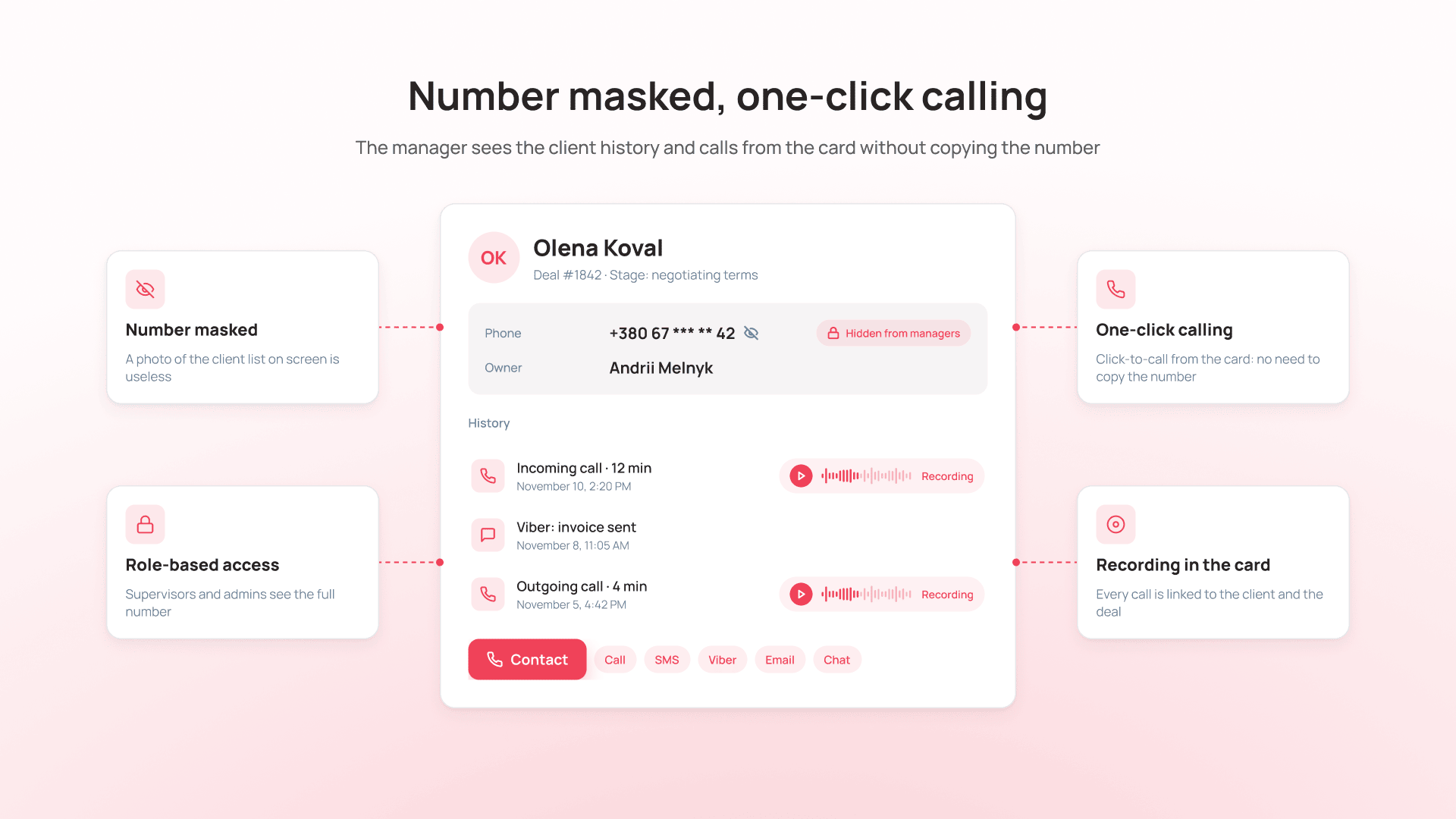
This closes two leak scenarios: photographing numbers off the screen and moving a client to a personal messenger. You can only photograph what is on the screen, so a photo of a list with hidden numbers is useless. Adding a client on a personal Telegram or Viber won’t work without their number either. And when you message clients in work chats connected to the CRM, there is no reason to switch to a personal messenger.
Access rights in the CRM usually decide who sees the full number. For example, managers see it masked, while the sales head and the admin see all of it.
In UniTalk, the client card in your CRM has a “Contact” button. The manager picks a call, SMS, Viber, email or chat and reaches the client without dialing the number by hand.
Managers promise clients unrealistic terms: record every call and give supervisors oversight
All incoming and outgoing calls should be recorded automatically, without a “Record” button, and linked to the client card. A supervisor can then open the deal and listen to the call where the manager “never promised anything like that.”
Without a recording, an “I never said that” dispute is settled in favor of whoever the supervisor trusts more. With one, a few minutes of listening give the answer. The recording also protects the manager: if a client insists they were promised free delivery, the call shows what was actually said.
UniTalk Virtual PBX records every call automatically and saves the recording in the client card in your CRM. The supervisor sees all team calls on a dashboard, including missed ones. Nobody can listen to every call manually, so UniTalk Speech Analytics turns calls into text, analyzes them against the criteria you set and flags conflict conversations. The supervisor only listens to the calls that need attention.
Clients must be told the call is being recorded. Usually a short voice message plays at the start of the call. In Ukraine, the processing of personal data is governed by the Law of Ukraine “On Personal Data Protection”; agree the exact wording with your lawyer.
How to block client base exports and hand over clients when a manager leaves
You need CRM access roles, a ban on bulk exports for regular managers, an activity log and a clear procedure for the manager’s last day. Then the person leaving takes neither the database nor the channel to your clients.
A basic role setup looks like this:
- a manager sees and handles only their own clients;
- a sales head sees their team’s clients;
- an admin has access to the whole database and to exports.
The activity log shows who opened, changed or exported data. If a manager viewed several hundred other people’s cards in the week before leaving, you will know.
On the manager’s last day, follow these steps:
- Revoke the manager’s access to telephony and the CRM.
- Reassign their clients and open deals to other managers.
- Check that call recordings and client history are in place.
- Route incoming calls from their clients to the new owner.
- Review the manager’s recent activity in the CRM.
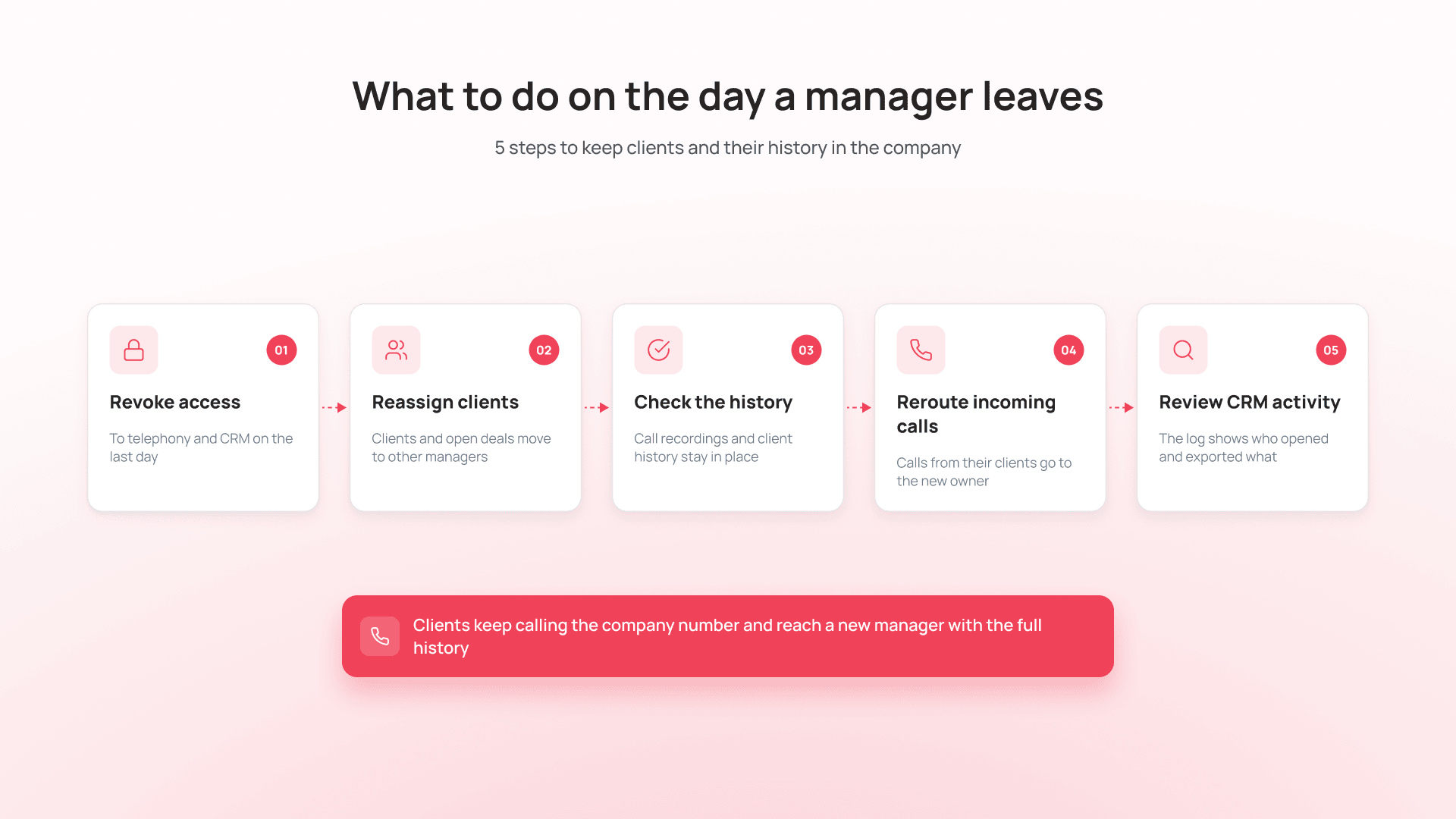
In UniTalk, you add users, numbers and access roles in the admin panel, and when the team changes, access is switched off in a minute. You see the access rights and activity logs of every employee.
This approach has limits. No system can stop someone from copying a few numbers by hand. The goal is different: to make bulk extraction of the database hard and visible, while clients still call the company number and reach a new manager with the full history.
How to roll this out in a week without pausing sales
You can make the switch in seven working days with no break in sales:
- Day 1: audit. Count your managers and find out which numbers they call from, which CRM you use and where client chats happen.
- Day 2: numbers and Virtual PBX. Connect company numbers and create a user for each manager.
- Day 3: CRM integration. Set up the client card on calls, routing to the manager in charge and one-click calling.
- Day 4: recording and access. Turn on automatic recording and the recording notice, set up roles and the export ban.
- Day 5: team training. Show the app and the call button in the CRM.
- Day 6: pilot with part of the team. Collect everything that is inconvenient and fix it.
- Day 7: the whole team works in the system. Give key clients the company number.
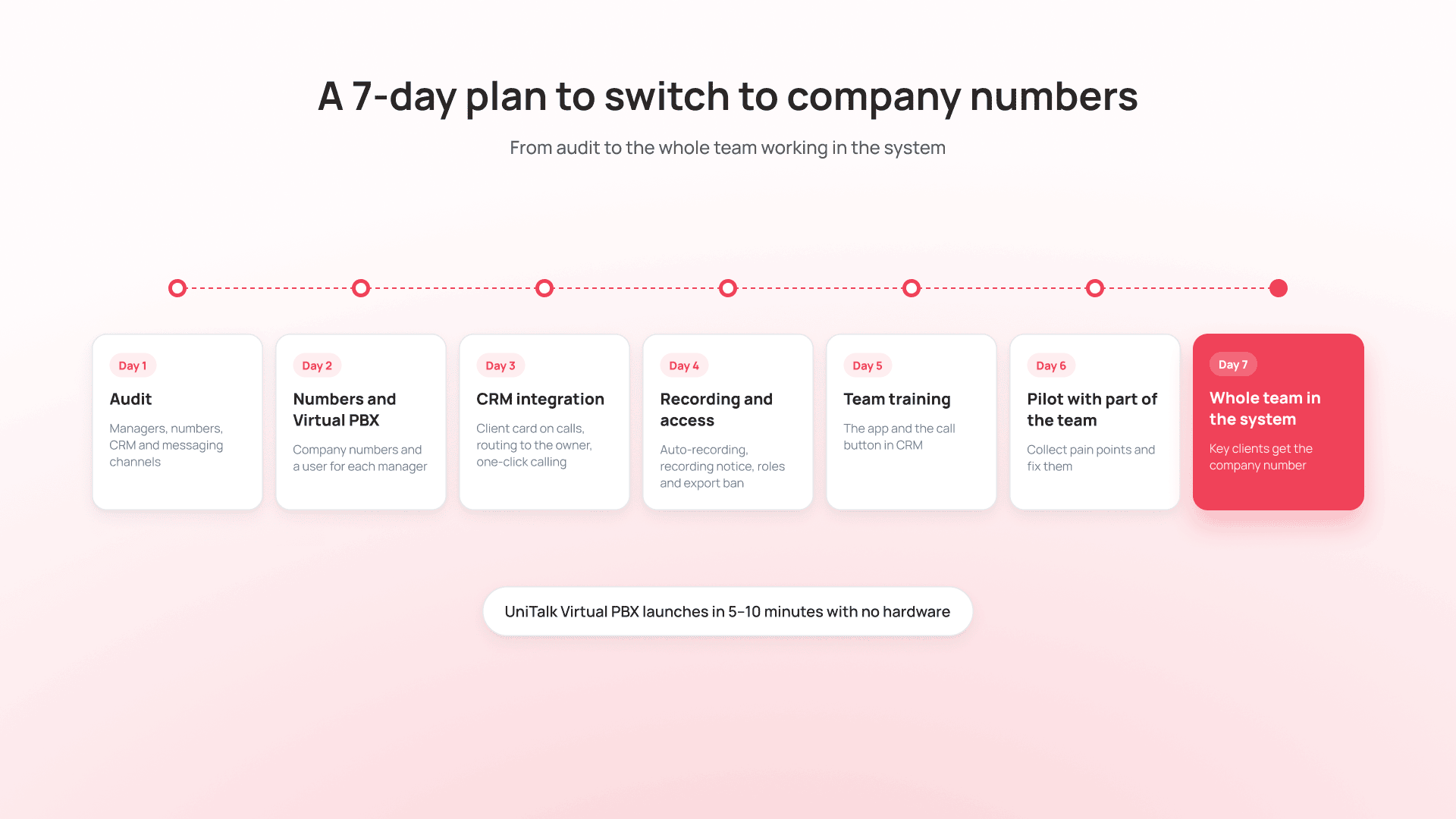
UniTalk Virtual PBX launches in 5–10 minutes and needs no hardware or IT department. Support works 24/7 and responds in 150 seconds on average, and if needed connects remotely and helps with the setup.
Most questions during the switch will come from the team. If you present the change as control, managers will read it as distrust. Talk about convenience instead: their personal number is no longer exposed, the client history is right in front of them, and they can call from the CRM in one click.
How to choose a solution to protect your client base
Choose business telephony by whether it covers all five leak scenarios. Here are the criteria to check:
- company numbers and calls from any device;
- two-way integration with your CRM: client card on calls, calling from the card, recording in the card;
- automatic recording of all calls;
- routing of incoming calls to the manager in charge from the CRM;
- access separation and, where needed, number masking;
- messengers in the same system, because clients are also lured away through personal Telegram and Viber;
- quick launch with no hardware and support that helps you set things up.
UniTalk is a single solution for managing communication with your clients. Calls, messengers, SMS and analytics work in one environment. UniTalk IP telephony gives you company local, mobile and 0800 numbers, automatic recording of every call and work from a browser, computer or smartphone. The CRM integration sends calls and recordings to contact, lead and deal cards and routes incoming calls to the manager in charge. Supervisors see a dashboard and missed calls, and Speech Analytics tells them which calls to listen to.
What actually protects your client base
Your client base is as much a company asset as the money in your account, and it deserves a system to protect it. When numbers, recordings and history belong to the company, a manager leaving stops being a risk to sales, and the team works more comfortably than before.
Want to see how to move your sales team to company numbers without a pause? We’ll show you on your own CRM.
Connect company numbers to a virtual PBX and give managers a work app. They call from their own smartphone or computer, but the client sees the company number.
Yes. CRM access rights hide the number, and the call goes from the client card with a click-to-call button, so the manager doesn’t need the number.
Integrate your telephony with the CRM. The system recognizes the number and opens the card with the deal, recordings and chat history.
Yes, if the client is told about the recording and the data is processed in line with the Law of Ukraine “On Personal Data Protection.” Agree the wording with your lawyer.
No, if there is a ready-made integration for your CRM. UniTalk has 50+ of them.
The Virtual PBX launches in 5–10 minutes, and CRM integration takes from 15 minutes to a few hours. Moving the whole team over is realistic within a week.