Branching Scripts in UniTalk Contact Center: Operators See the Right Step at the Right Time
Customer conversations rarely go exactly as planned. The same question can get very different responses: a customer may agree, refuse, ask a follow-up question, request a callback, or bring up a completely different need.
We previously covered why linear scripts do not always work in live conversations and what happens when a conversation moves away from a predefined scenario. This article takes the topic further and shows how to handle these scenarios at the system level.
In these situations, having a ready-made text in front of the operator is not enough. The operator needs to know what to do after each response, which question to ask next, what information to capture, and how to bring the conversation to the right outcome.
UniTalk Contact Center now offers a new way to work with scripts. A scenario can branch based on the customer’s response, with each answer taking the operator to a different next step. Forms can also be added to the relevant stages so operators can capture the necessary data during the conversation.
As a result, operators do not have to keep the entire process in their heads. They simply follow the right path in the Contact Center workspace.
One scenario. Different paths. All the actions and data needed in one process.
Branching Scripts: The Next Step Depends on the Customer’s Response
A branching script is a scenario that does not follow a single predefined path.
A manager or process owner defines the conversation steps and possible customer responses in advance. Each response can then lead to its own next step.
The principle is simple:
question → customer response → relevant branch → next step.
For example, the operator asks:
“Could you please tell me whether you currently use home internet?”
The customer may answer “yes,” “no,” or say that they are not interested in the offer at all. A different continuation can be created for each option.
This means the operator does not have to search through dozens of pages or remember every possible way the conversation can develop.
What It Looks Like in the Builder
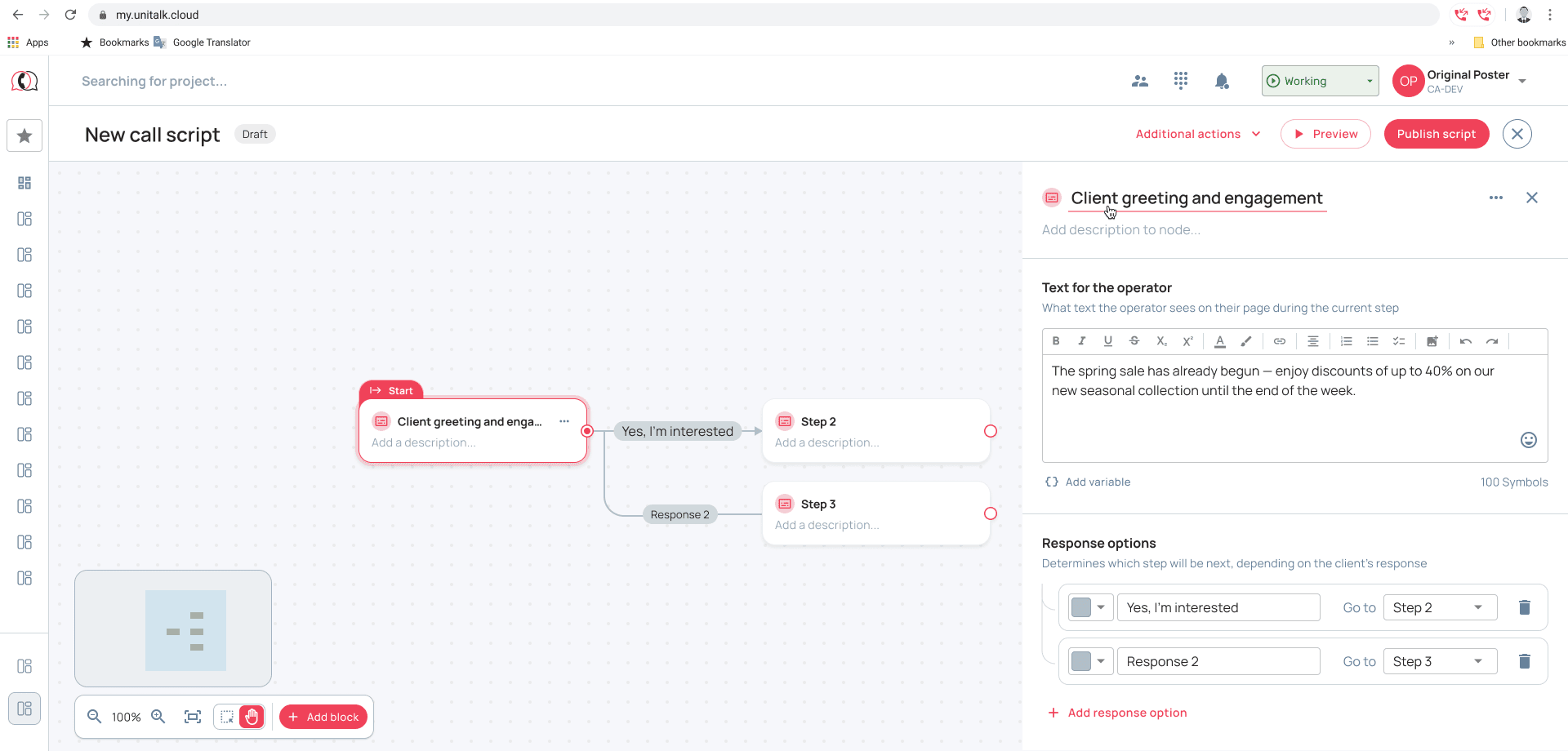
The scenario consists of individual blocks. Each block can include text for the operator, a step description, and possible customer responses. Each response can lead to its own next step.
The text can be formatted using the built-in editor with bold, italics, underlining, color highlighting, links, and tables. Team notes can also be added to individual steps.
You can create as many branches as the process requires.
One Scenario Can Contain Dozens of Different Paths
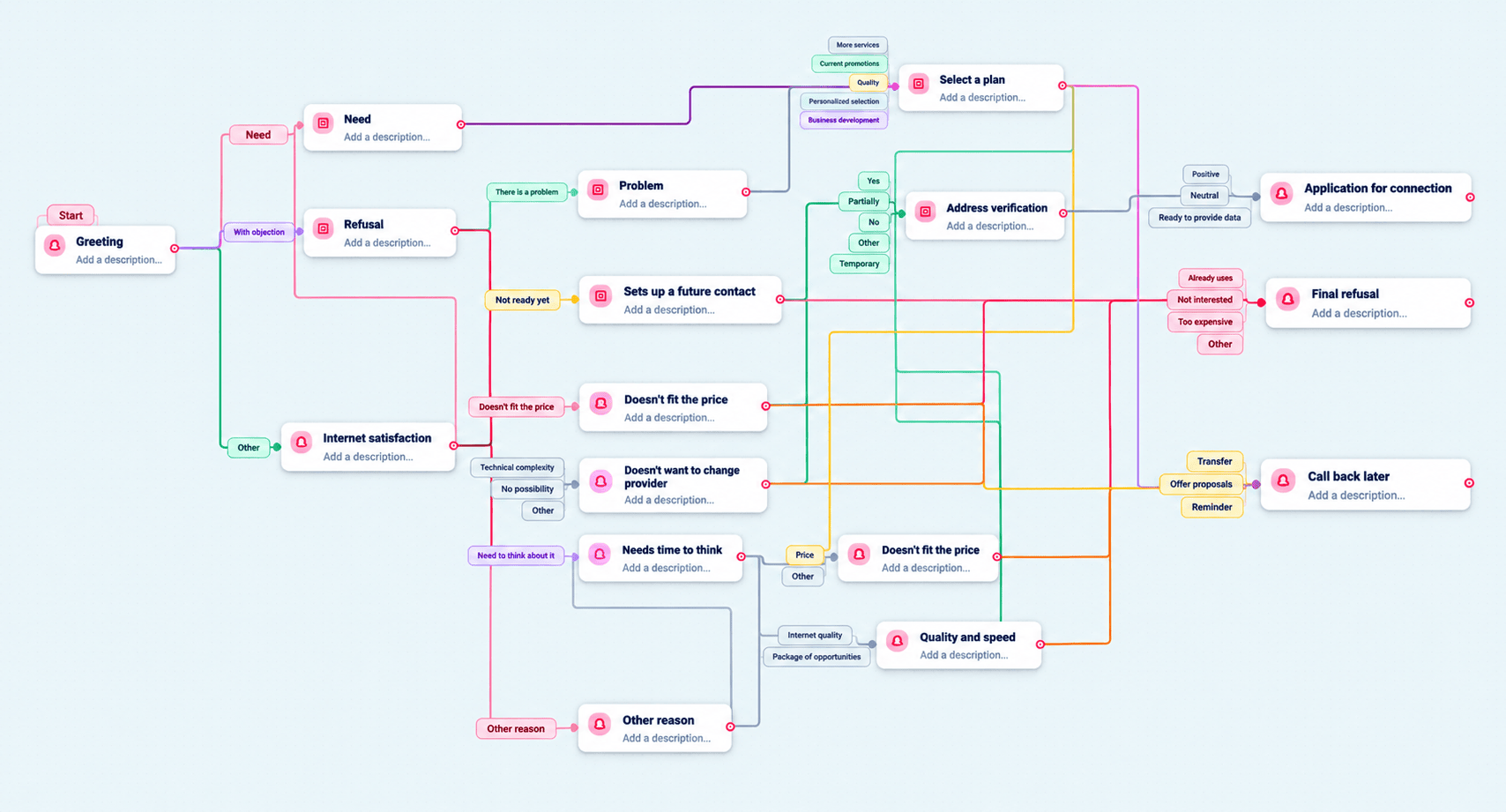
Let’s take a simple example of selling home internet.
The operator starts with a greeting and asks whether the customer currently uses home internet. If the customer says “yes,” the next step is to ask how satisfied they are with their current connection.
From there, several new paths can open up:
- everything works well → follow a different conversation path;
- there are problems → find out what exactly is wrong;
- partially satisfied → ask additional questions.
The scenario can then lead the operator to making an offer, handling an objection, checking the address, and submitting an application. Another branch may end with a refusal, while another may lead to a callback at a later time.
This means a single scenario can cover many possible conversation paths and lead to different outcomes.
Managers See the Full Logic. Operators Work Only With the Relevant Step
The builder allows managers to define the process logic once. During the call, the operator does not work with the entire decision tree. They see the step that is relevant at that moment.
The operator hears the customer’s response, selects the appropriate option, and moves on.
For example:
“Are you satisfied with your current internet connection?”
The customer answers: “No, there are some problems.”
The operator selects “there are problems” and immediately sees the next step:
“What exactly is not working for you?”
The operator then selects the relevant option again and continues through the scenario.
The manager can see the full scenario structure, while the operator does not have to keep the entire logic in mind during the call. They simply work with the step that is relevant right now.
This is especially useful for complex processes with many conditions, exceptions, and possible outcomes.
A Script Is Not Just Text for the Operator to Read
A script should not be viewed simply as a set of ready-made phrases.
In a complex process, the operator needs to know more than what to say. They need to understand what to do after the customer’s response: ask the next question, provide information, move to another branch, record the result, or schedule the next action.
That makes a script a guide through a business process:
what needs to be clarified → what to do next → what to record → what outcome to reach.
This helps standardize the process itself rather than forcing every operator to use exactly the same words.
An experienced operator may know most scenarios by heart. A new operator needs time to learn them. A branching script moves part of that logic into the system and shows the operator what to do next at the right moment.
Script + Form: One Workflow Instead of Separate Tools
Even when an operator knows exactly what to do next, they still need to work with data during the conversation.
For example, they may need to confirm an additional phone number, add a comment, record a reason for refusal, enter information provided by the customer, or schedule the next action.
That is why branching scripts in UniTalk Contact Center can be used together with forms.
The form remains available to the operator throughout the conversation, while the script can guide them on when and what information to enter.
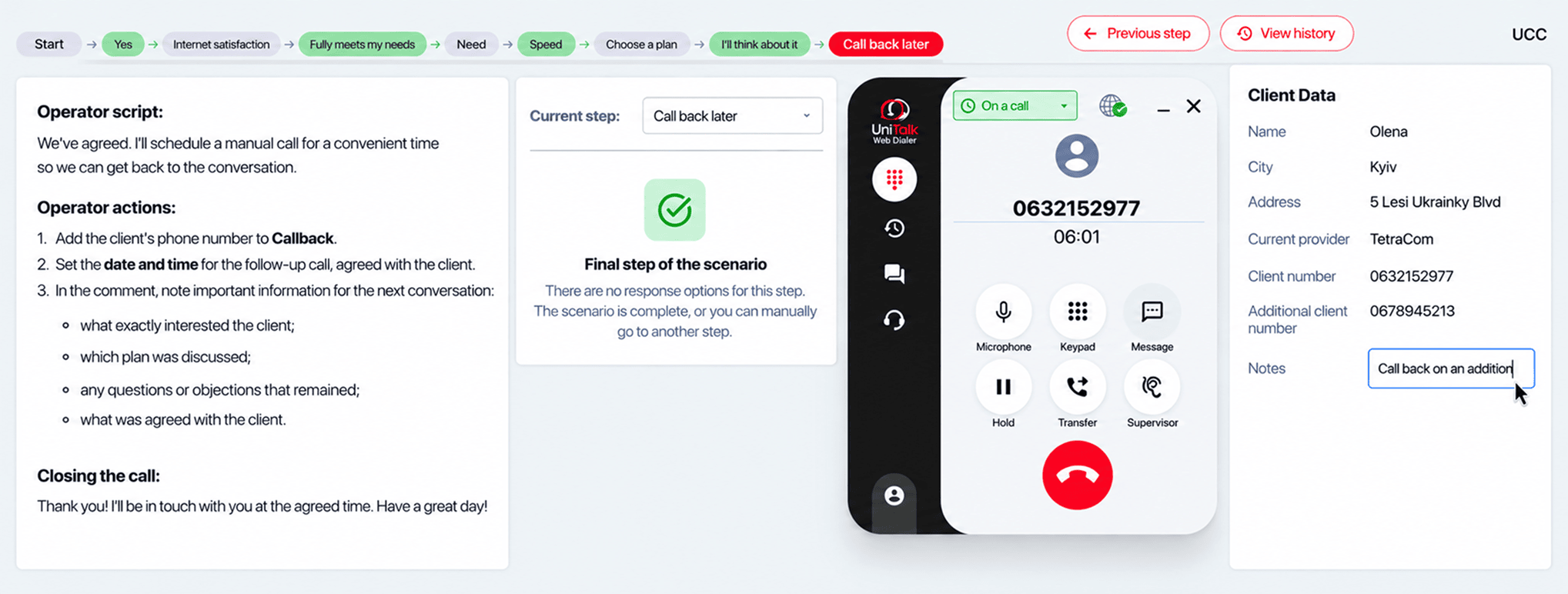
For example, a customer asks to be called back on another number. The scenario takes the operator to the relevant branch and prompts them to enter the additional number in the appropriate form field. The operator records the number and continues through the scenario.
Or the customer agrees to the connection. The script takes the operator to the final step and prompts them to enter the data required in the form to complete the process.
The operator therefore does not have to conduct the conversation first and reconstruct its outcome in documents afterward.
They follow the scenario and capture the necessary data along the way.
Form Data Can Be Used Together With CRM
Forms in UCC can work with CRM data through a configured integration.
UCC remains the operator’s workspace. This is where the call takes place, the script is opened, and the form is completed. Through the integration, the system can receive the necessary data from the CRM and send back the information the operator records during the conversation.
For example, an operator can use the form to enter an additional phone number, conversation outcome, comment, or other information required for a particular process.
The exact data available for exchange depends on the configured integration.
Importantly, the script is not embedded into the CRM. UCC remains the operator’s working environment, while the external system exchanges the required information through the integration.
A Scenario Can End With a Specific Action, Not Just a Phrase
A good scenario should guide the operator to a clear outcome:
- the customer accepts the offer → the operator submits an application;
- the customer refuses → the operator records the outcome and, if needed, the reason;
- the customer cannot talk right now → the operator agrees on another time and schedules a callback.
In this case, the callback becomes part of the process itself. The operator moves to the relevant branch, schedules the callback in UCC, and continues working in the same workspace. If needed, information about the scheduled call can also be sent to the CRM through the integration.
The scenario therefore helps the operator not only conduct the conversation but also bring it to a specific next action.
Where Branching Scripts Can Be Used
Branching logic is useful far beyond sales. It works for any process where the next step depends on the customer’s response or the situation.
Sales
The customer is interested → the operator identifies their needs → presents the offer → handles objections → submits an application, schedules a callback, or records a refusal.
Support
The customer describes the issue → the operator asks clarifying questions → takes the required action based on the response → resolves the issue or escalates it → records the outcome.
Surveys
The customer answers a question → the next question depends on the answer → the operator follows the relevant branch → the results are recorded in a form.
Scenarios can also be used for internal procedures, checks, lead qualification, and other processes where one answer changes what should happen next.
What Does This Change for a Contact Center?
When a complex process exists across an operator’s memory, documents, and different systems, it is difficult to standardize and scale.
Branching scripts move the process logic into the operator’s workspace.
As a result:
- operators can work more easily with complex and non-linear scenarios;
- there is less dependence on the memory and personal experience of individual operators;
- there is less risk of missing an important step or failing to record the necessary information;
- new operators can learn processes more easily;
- managers can update and scale scenarios more easily;
- necessary data can be captured during the conversation itself;
- operators do not have to constantly switch between scripts, forms, documents, and other tools.
The goal is not to make operators speak from a rigid template.
We standardize not the operator’s words, but the process they follow.
A branching script guides the operator through the right path depending on how the conversation develops. A form lets them work with the necessary data right away. The integration makes it possible to exchange that data with the CRM.
All of this works within the UniTalk Contact Center workspace, so operators can focus on the customer conversation instead of searching for the right step or information.