How to connect a manager with a lead within 30 seconds of a form submission: automatic callback and Click-to-Call for your website
A lead came in from the website at 10:05. The manager saw the notification after a meeting and called back at 12:30. The customer answered politely: “Thanks, I no longer need it.”
The business had already paid for this lead: for the click, the ad and the marketer’s time. But the first contact happened after the interest had cooled or another seller had already reached the customer. Here, speed to lead matters more than the script or the discount.
Below, we explain how to set up an automatic callback so the system connects a manager with the customer within 30 seconds of a form submission. We also cover what to do when every manager is busy or the lead arrives at night.
Why leads go cold while the manager calls back
A customer’s interest peaks in the first minutes after they submit a request. The longer they wait, the lower the chance they will pick up, remember what they asked for and go on to buy.
Recent tests show that most companies still take hours or even days to respond. In March 2024, RevenueHero submitted demo requests on the websites of 1,000 B2B companies. Only 365 of them replied, and the average response time was 1 day, 5 hours and 17 minutes. For a customer who submits a request in the morning, that means a conversation tomorrow at best.
The most detailed picture of what this delay costs comes from a Harvard Business Review study. The authors analyzed 1.25 million online leads. Companies that contacted a lead within an hour were nearly 7 times more likely to have a meaningful conversation with a decision-maker than those that called an hour later. Compared with companies that waited a day, the difference was more than 60 times. The study is 15 years old, but we have not found a newer open study of this scale that measures the effect of speed on results. Customers have only become less patient since then: they submit requests on several websites at once and talk to whoever calls first.
Why delays happen even in a diligent team:
- the notification arrives by email or in the CRM, where it is easy to miss among dozens of others;
- the manager dials manually, so they first have to notice the lead, open the card and find the number;
- the manager is on another call, and the lead waits in a queue nobody knows about.
Work out the loss with your own numbers. Say your ads bring in 200 leads a month at UAH 300 per lead. If a late call means you fail to reach every fifth customer, that is 40 leads and UAH 12,000 of budget every month that never even reach a conversation. Lost sales are not included in that figure.
Fines and reminders do little here, because the problem is a process in which the first call depends on one person noticing a notification.
How automatic callback works: lead → manager → customer
After the form is submitted, the system calls an available manager, announces that this is a new lead and, once the manager answers, dials the customer. The manager does not have to look anything up or dial: the conversation starts within a few dozen seconds, while the customer is still on the website.
The flow looks like this:
- The customer clicks a button on the website or submits a form.
- The request reaches the phone system through a widget or a webhook (an automatic message the website sends to another system when an event happens).
- The system picks an available manager according to the routing rules.
- The manager answers the call.
- The system dials the customer and connects them.
- The call recording and the lead details go to the CRM.
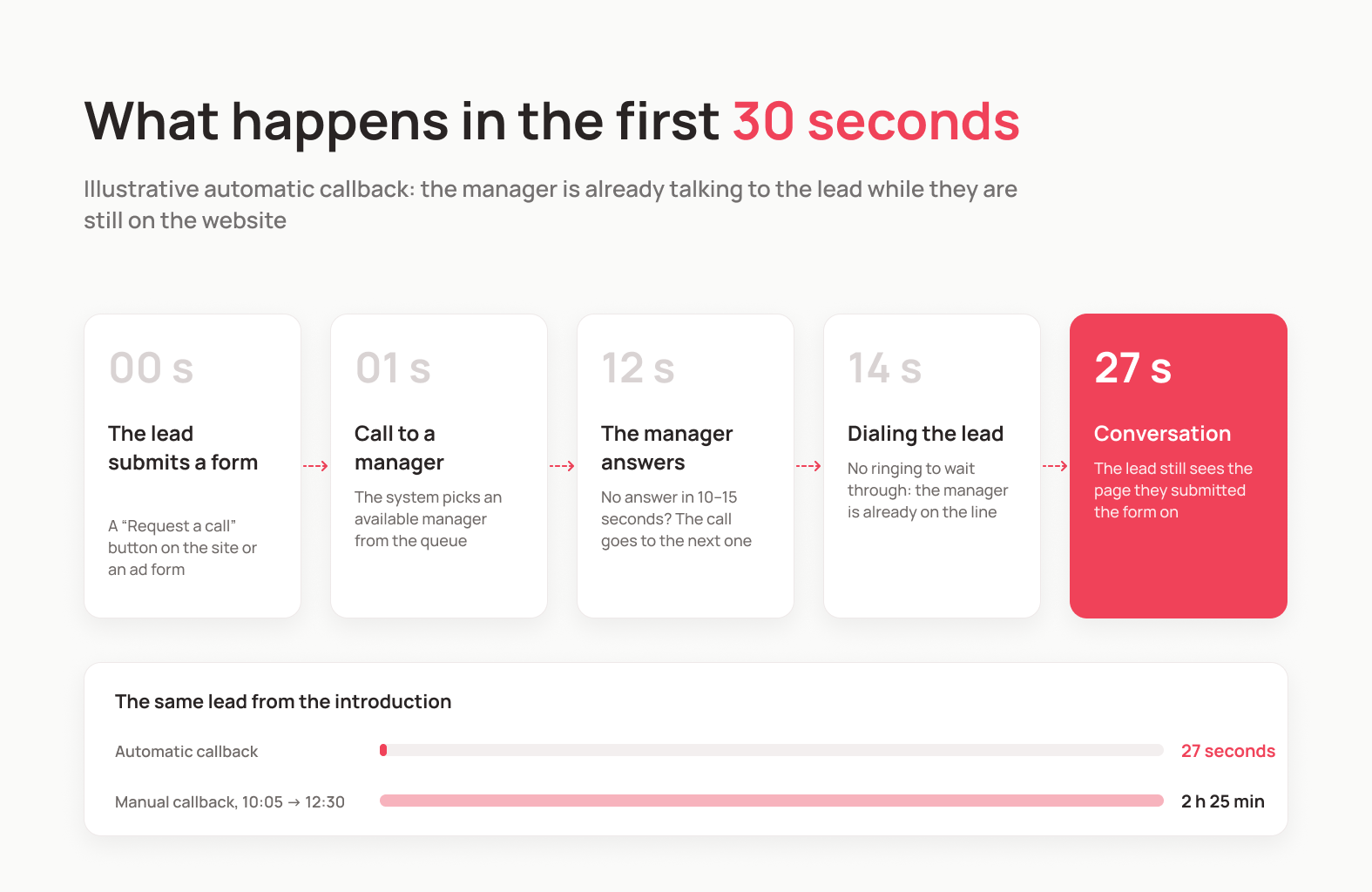
Why the manager first and then the customer? That way the customer does not listen to ringing or wait on the line until someone is free. They pick up and immediately hear a person who knows why they are calling.
Two tools are often confused here. A callback widget is a callback button or form on the website: the customer leaves a number, and the system starts the callback on its own. Click-to-Call is a one-click call from the customer card in the CRM: the manager clicks the number, and the phone system connects them with the customer without manual dialing. The first tool removes the wait for the customer; the second saves the manager’s time. Click-to-Call is useful for follow-up calls, when the customer asked to be called later or did not pick up the first time.
How it works in UniTalk: the Callback widget on the website connects the customer and the manager within 30 seconds and can capture requests from website forms. The event handler (available on all plans) and CRM event scenarios via webhooks let you trigger a call when a new lead appears in the CRM or its status changes.
How to set up an automatic call for website leads: step by step
A basic scenario needs three things: a phone system that can receive website requests, routing rules and a CRM. Set it up in this order:
- Connect a virtual PBX with a Callback widget or a calls API (an interface that lets your website or CRM start a call on its own).
- Install the callback widget on your website or set up a webhook that passes requests from your own form.
- Set up the manager queue: who takes these calls and in what order. For example, the sales team first, then a senior manager.
- Set timeouts: how many seconds to wait for a manager to answer before passing the call to the next one. A practical benchmark is 10–15 seconds.
- Configure retries to the customer if they do not pick up: for example, 3 attempts a few minutes apart.
- Connect your CRM so the request, the call and the recording land in the lead card together with UTM tags (link parameters that show which ad the customer came from).
- Test it: submit a test request from a colleague’s phone and measure the time from the click to the call.
Set working hours separately. Outside working hours, the UniTalk Callback widget collects requests instead of starting a call, so evenings and weekends need their own scenario. We cover it in the next section.
Repeat the test at different times: in the morning, at lunchtime and towards the end of the day. Peak hours are when you see whether there are enough managers in the queue.
At UniTalk, our support team can do the basic setup remotely: it works 24/7, with an average response time of 150 seconds.
What to do when every manager is busy or the lead arrives at night
You need a plan B for each of these cases. Without one, automatic callback only works under ideal conditions, and leads get lost again at the worst possible moment.
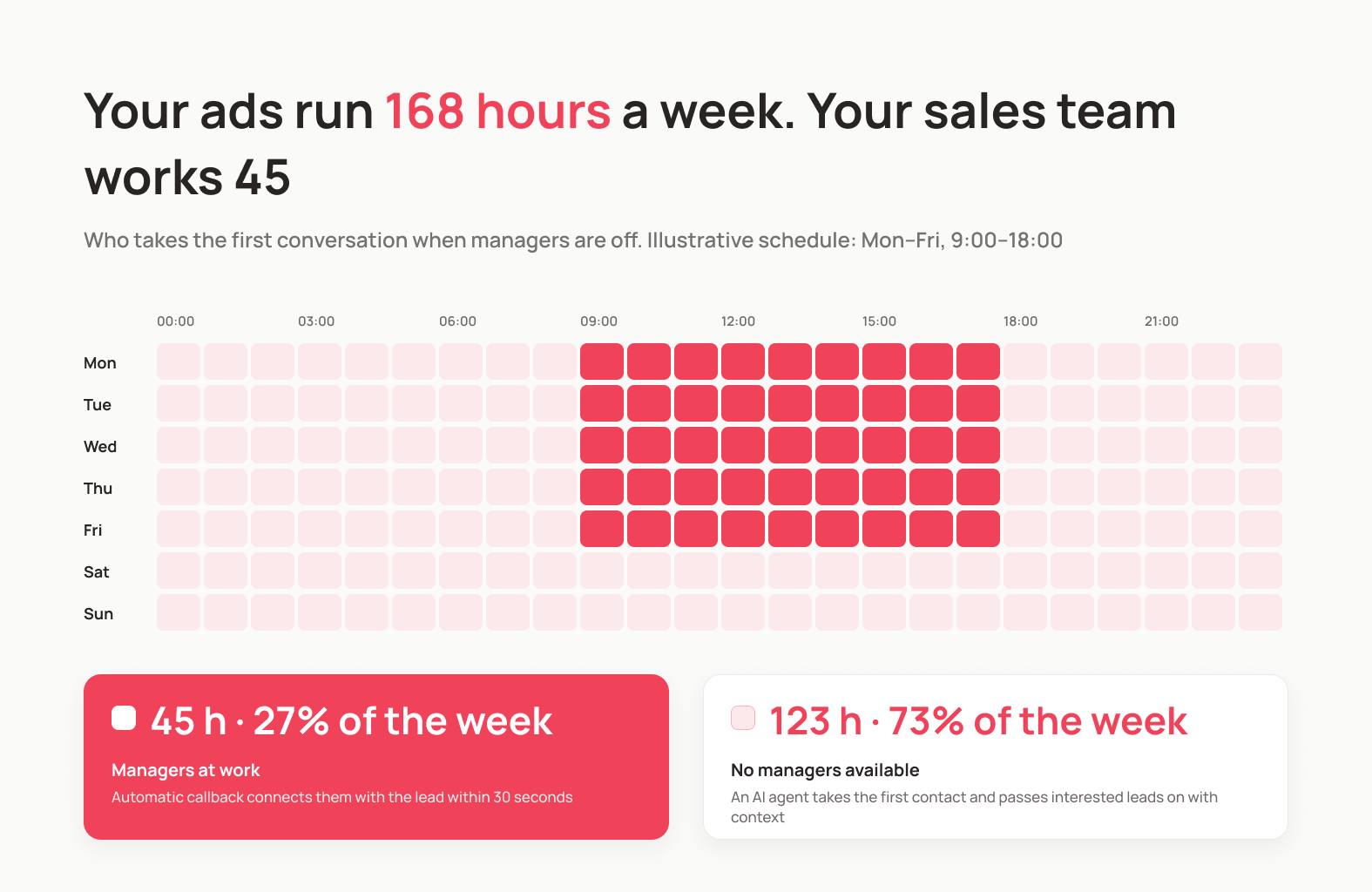
Four typical situations and what the system should do:
- All managers are on calls. The call joins the queue and goes to the first manager who becomes free.
- The manager did not answer. After the set timeout, the call moves to the next person in the queue.
- The customer did not pick up. The system retries and sends an SMS or Viber message such as “We’ve got your request and will call you back in a few minutes.”
- Evenings and weekends. An AI agent takes the first contact.
An AI agent for the first contact
The biggest gap in most setups is leads that arrive after 7 p.m. and at weekends. Ads run around the clock; the sales team does not. A customer who submits a request on Saturday evening will have talked to several companies by Monday.
The Voice AI Agent calls after a request comes in, qualifies the contact and passes interested customers on with context. In practice, the agent calls right after the request, asks the qualifying questions you have agreed on (budget, timing, needs), records the answers in the CRM and hands the interested customer over to a manager. The manager does not start from scratch: they can already see what the person wants and when it suits them to talk.
The AI agent does not replace the manager. It takes the first contact so that paid leads do not wait until morning.
Facebook and Instagram leads: how to call while the customer still remembers the request
Requests from ad forms should go to the CRM automatically and trigger the same callback scenario as website requests. While someone exports leads from the ads manager by hand, the customer forgets they filled anything in.
Facebook and Instagram leads are especially short-lived. The form opens right in the feed, people fill it in within 10 seconds between other things, and an hour later they may not remember the company’s name.
The working flow:
- An ad form on Facebook or Instagram.
- The request goes to the CRM through a direct integration or a connector service.
- A new lead appears in the CRM as an event.
- An automatic call: the manager first, then the customer.
Take care of UTM tags separately. Without them, you see the number of leads and the cost per lead, but not which campaigns bring leads that reach a conversation. Sometimes the cheapest campaign brings requests where half the numbers never answer.
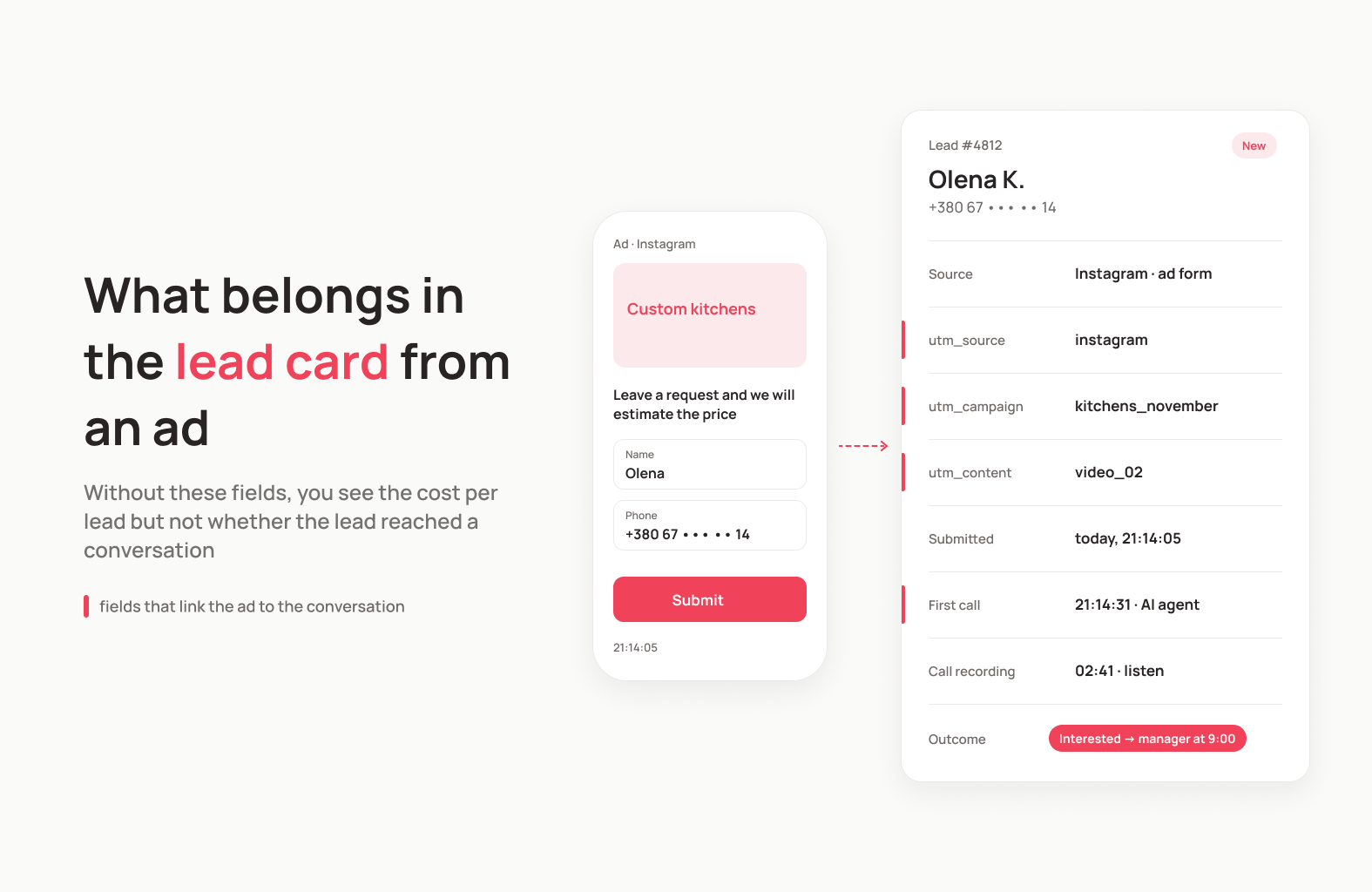
How it works in UniTalk: CRM event scenarios are triggered via webhooks, UTM tags and gclid are passed to the CRM, and ad channel tracking (Medium and Max plans) shows which ads lead to real conversations.
How to monitor speed to lead
You need to see speed to lead in numbers, or the scenario you set up will gradually fall apart: someone drops out of the queue, someone changes the form on the website. Five metrics are enough:
- Time from request to first conversation. The main indicator: it shows whether automatic callback is working.
- Share of leads reached within 5 minutes. Shows how many leads you catch while they are still hot.
- Number of leads with no conversation. These are leads you paid for that nobody handled.
- Share of ad leads that reached a conversation. Helps marketers compare campaigns by quality, not only by cost per lead.
- Conversation outcome. Whether a meeting, an order or a next step was agreed. You can see it from the recording or AI analytics.
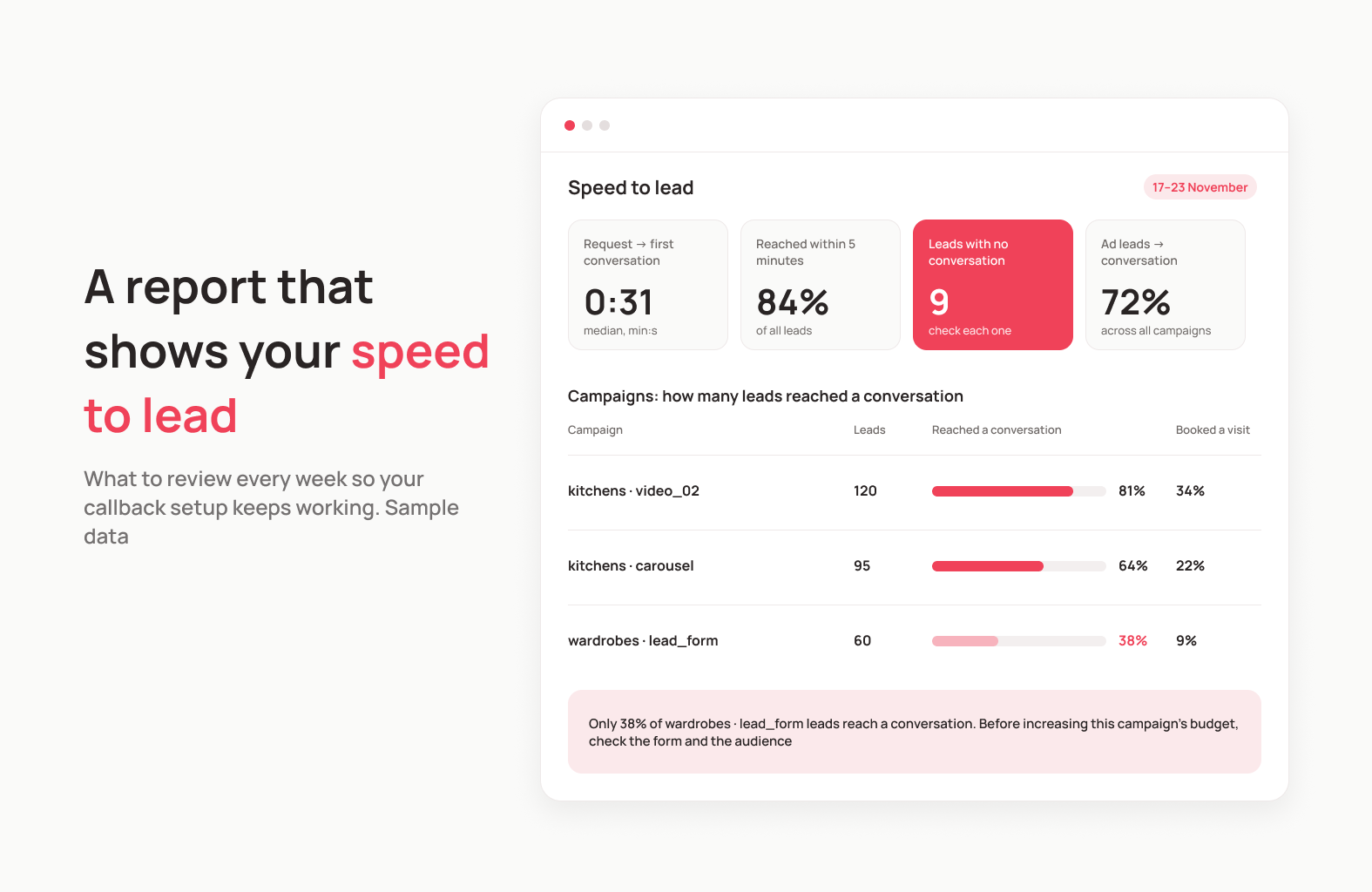
Review the first three metrics weekly, and the last two with marketing once a month when you plan the budget.
How it works in UniTalk: the manager dashboard and call recording are available on all plans, and Speech Analytics (Medium, Max) transcribes and scores calls, so managers do not have to listen to every recording.
How to choose an automatic callback service
Look at how the service behaves in awkward situations: when managers are busy, the customer does not answer or the lead arrives at night. Almost every phone system now offers a website callback button; the difference starts here.
Criteria to check before you sign up:
- A callback widget and the ability to trigger a call from your own form, not only from the service’s button.
- A queue and rules for routing calls between managers.
- Retries and a plan for when nobody answers.
- Phone system integration with the CRM, including UTM tags.
- First contact outside working hours, for example through an AI agent.
- SMS, Viber and chats in the same system, so you can message a customer who did not pick up.
- Launch without hardware, and a support team that helps you set up the scenario.
UniTalk is a single solution for managing customer communications. UniTalk Omni brings IP telephony, chats, SMS and Viber campaigns and CRM integration together in one system. For fast lead handling, it offers a Callback widget and an event handler (all plans), a routing queue (Medium and Max), REST API, webhooks and a calls API (Medium and Max), plus auto-dialing, an advanced routing scenario and the Voice AI Agent (Max). Call recording and the manager dashboard are available on all plans. No separate hardware is needed to get started.
In short: where to start
Leads do not go cold when the first call does not depend on whether a manager saw a notification. Start with a test: submit a request on your own website and time how many minutes it takes to get a call back. If it takes longer than 5 minutes, set up automatic callback this month.
Not sure where your leads get lost? We will show you how to set up a 30-second callback using your own website as an example.
Install a Callback widget on your website or pass requests from your own form to the phone system via a webhook. Then set up a queue: the system dials an available manager and, once they answer, the customer.
Yes. If there is an available manager in the queue and the answer timeout is 10–15 seconds, the connection fits within half a minute. The UniTalk Callback widget connects the customer and the manager within 30 seconds.
The call joins the queue and goes to the first manager who becomes free. If the customer could not wait, the system retries and can send an SMS or Viber message.
Yes, as long as requests from ad forms go to the CRM automatically. A new lead triggers the same call scenario as a website request.
Connect an AI agent for the first contact. It calls after the request, asks qualifying questions, records the answers in the CRM and passes interested customers to a manager.
No. The phone system integrates with the CRM you already use, through a ready-made integration or the API.