AI chat analytics in UniTalk Chat: quality control for customer conversations without manual reviews
On a Friday evening, a customer messages you on Instagram: the item arrived damaged, and here’s a photo. The agent replies with a template about the return policy and closes the chat. The manager hears about this conversation on Monday, when the customer leaves a Google review. Had someone read the chat right away, the customer could still have been saved. But when agents close hundreds of chats a day, a manager physically can’t read every one.
UniTalk Chat now has AI chat analytics. It reviews conversations against the quality criteria you set and sends an alert when it finds a problematic one. Below, we explain how it works, what it costs, and how to get started.
What is AI chat analytics and why does your business need it
UniTalk Chat brings all customer messaging into one window: website live chat, Telegram, Instagram, Viber and email. Agents work in a single interface, the conversation history with each customer is saved, and chats are routed to managers according to rules you configure. In other words, requests no longer get lost. Now you can also check how well your team actually answers them.
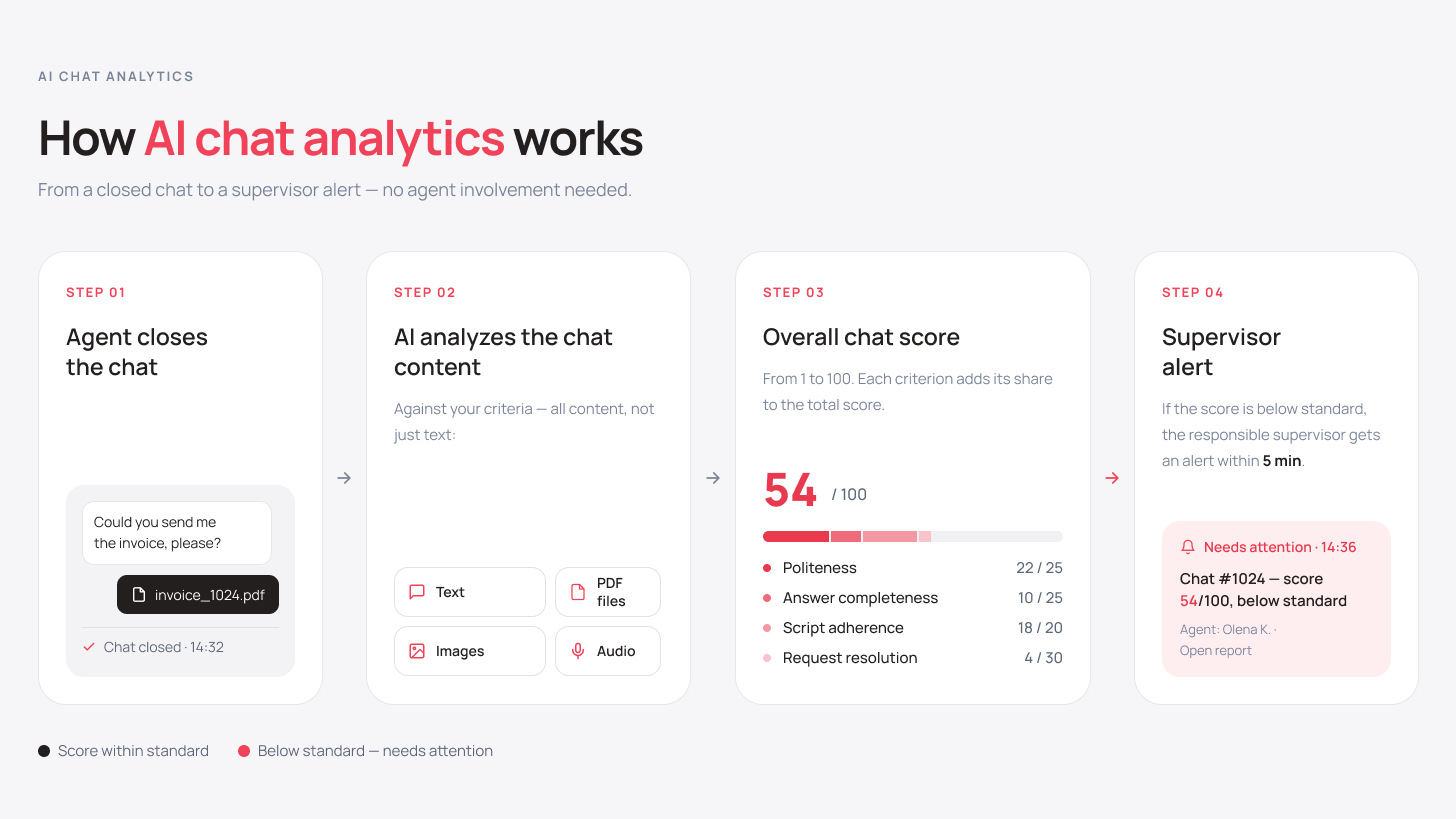
AI chat analytics reads your agents’ conversations with customers and scores them against the criteria you define. You decide what a good answer looks like for your company, and the system checks every conversation against those rules and highlights the ones a manager should look at.
Chat analysis runs around the clock and understands 100+ languages, so it also works for teams that serve customers in different countries.
Why manual chat review doesn’t scale
Take an online store’s support team: 8 agents, each closing an average of 60 chats per shift. That’s 480 conversations a day. If reviewing one chat takes just 2 minutes, a manager would need 16 hours to read them all. So reviews are done selectively, 10–20 chats a week.
The chats that make it into the sample are usually the ones customers already complained about. So the manager sees conflicts that have already happened and misses quiet dissatisfaction: a customer got a formal reply, didn’t respond, and never came back. Reports don’t show that conversation.
As a result:
- an agent’s score depends on which conversations happened to be reviewed;
- a new hire repeats the same mistake for months because nobody noticed it;
- as chat volume grows, the share of reviewed conversations keeps shrinking;
- the manager learns about a conflict from a review, when it’s already hard to fix.
New UniTalk tools often grow out of our own teams’ needs, and AI chat analytics is one of them: our support team faced exactly the same problem. Here’s how quality control looked before the analytics launched, in the words of Dmytro Shypilov, Head of Technical Support at UniTalk:
“When a team handles more than 3,000 requests a month and reviewing one chat takes 2–3 minutes, full quality control eats up 100 to 150 hours a month. Even then, I sometimes only found out a customer was unhappy when they came to me with a complaint. With AI analytics, I focus on the requests that really need my attention, and the time I get back goes into developing the team and improving service.”
Dmytro Shypilov, Head of Technical Support, UniTalk
What changes with AI chat analytics:
| Before | With AI chat analytics |
|---|---|
| a sample of 10–20 chats a week | analysis of every conversation you need: from specific channels, individual departments or agents, or all of them at once |
| complaints surface through reviews | an alert about customer negativity via Telegram or email within 5 minutes after the conversation ends |
| scores depend on the manager’s impression | the same criteria for every agent |
| to score a chat, the manager separately opens photos, listens to voice messages and checks PDFs | AI factors attachment content into the chat score |
| quality across channels is unknown | comparison of Instagram, Telegram, Viber, email and website chat |
How AI chat analytics works in UniTalk Chat
Standard and custom metrics, profiles and analytics scenarios
A metric is a criterion or a specific question the AI answers for every conversation. For an online store, it could be:
- did the agent confirm the order number;
- did they offer an alternative if the item was out of stock;
- did the customer get an answer to their question;
- was the tone of the reply polite.
The system includes a library of standard metrics, and you can create custom ones for your business.
A profile groups several metrics for a typical task, such as “support quality control”, so you can start using analytics without lengthy setup. A scenario defines which chats a given profile applies to. That way, you can score your sales team on objection handling and your support team on whether the customer’s request was resolved.
Which chats to analyze: sampling filters
You don’t have to analyze everything. Filters decide which chats get reviewed:
- by agent or department (just like in Speech Analytics for calls);
- by source and source type: Instagram, Telegram, Viber, email, website chat;
- by minimum and maximum number of messages, to skip conversations that are just a single “thank you”;
- by conversation language.
The source filter lets you set up a separate scoring profile for each channel. For example, on Instagram you talk to customers and want to know how your agents perform, while email is where you correspond with suppliers, and that correspondence needs different criteria. The filter also helps compare channels: if Telegram scores are consistently higher than Instagram’s, it’s worth finding out why.
Attachment analysis: images, audio and PDF
In the damaged-item example, the core of the problem was in the photo. That’s why AI chat analytics also analyzes attachments, so no part of the conversation’s context is lost:
| Attachment type | Formats | What the AI does |
|---|---|---|
| Images | JPG, JPEG, PNG, WEBP, GIF, BMP | analyzes the image content |
| Audio | MP3, WAV, OGG, M4A, AAC, FLAC | transcribes it into text and includes it in the analysis |
| Documents | analyzes the file content |
Trigger-based alerts
The AI scores every chat on a scale from 1 to 100, and you decide what counts as a low score. The most common alert trigger is exactly that, a low score: for example, you get a Telegram or email alert for every chat scored below 60. You can also set a trigger on other events, such as chats that didn’t end in a sale or negative undertones in the customer’s messages. In the damaged-item case, the manager would have known within 5 minutes after the conversation ended.
What AI chat analysis gives your business
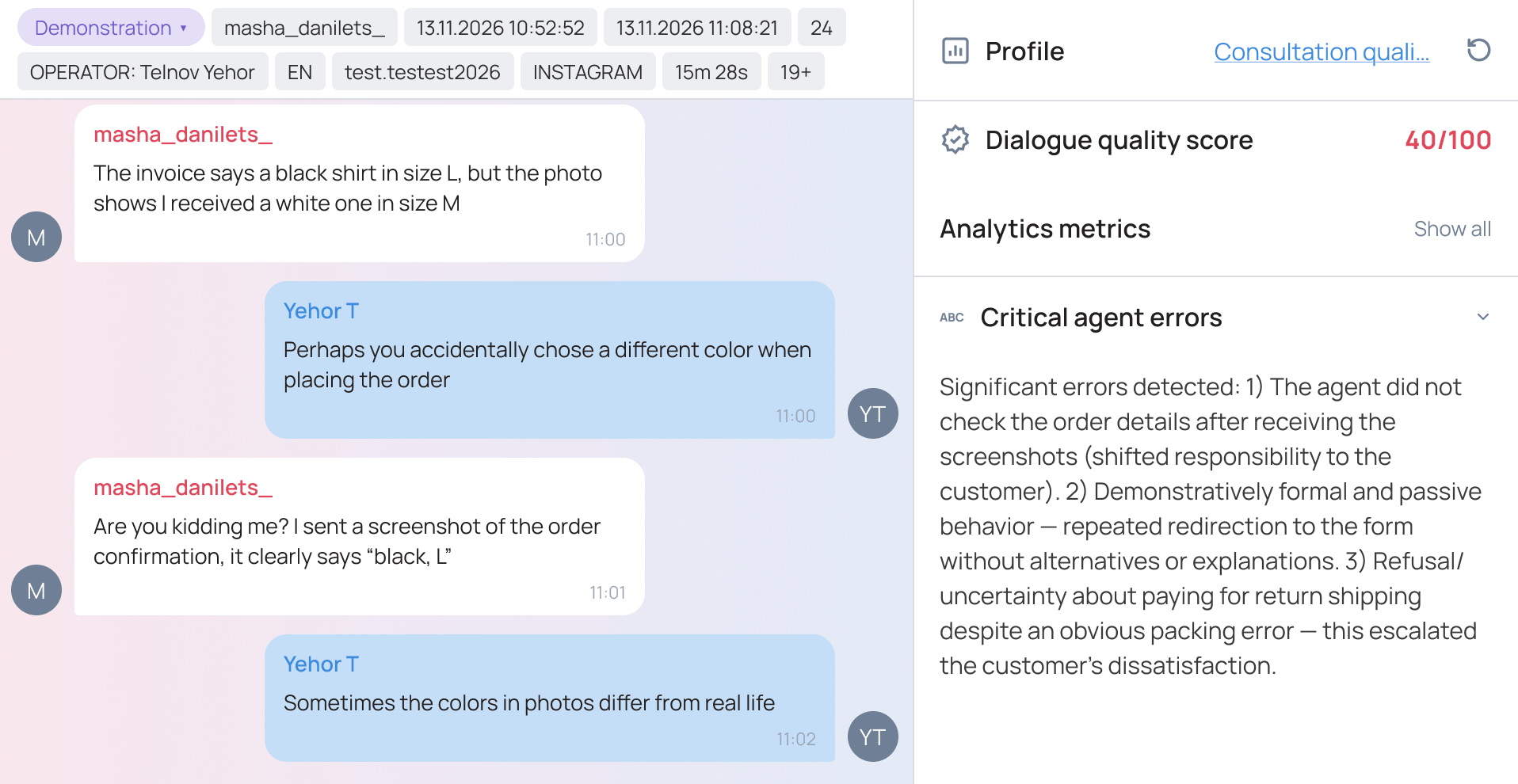
Managers no longer have to guess which conversations to read. The AI reviews chats against your rules and surfaces conflicts, complaints and agent mistakes, so time goes into working through specific conversations.
You learn about customer negativity within 5 minutes after the conversation ends. An alert about a low score or negative undertone lets you reach out to the customer before they leave.
Every agent is scored on the same criteria across all of their analyzed conversations. You can even build a team KPI system on top of these scores. The team sees that scores don’t depend on the manager’s mood, and the manager gets concrete examples for training, bonus discussions or reviewing mistakes.
Telegram, Viber, Instagram, email and website chat are all checked against a single company standard. If reply quality drops in one channel, it shows up in the analysis results.
Who AI chat analytics is for
First and foremost, managers who are responsible for service quality and don’t have time to read every conversation:
| Role | What they control | How AI chat analytics helps |
|---|---|---|
| Head of Support | complaints, conflicts, politeness, first response time | highlights problematic chats and standard violations without a full manual audit |
| Chief Operating Officer (COO) | service standards while scaling | provides a quality control system based on data from every analyzed chat |
| Head of Sales | script adherence, objection handling | shows at which stage customers stop responding |
The feature is most useful where chat volume is high:
- contact centers and support teams: IT and SaaS, platforms, logistics;
- e-commerce and online retail;
- services, private healthcare and EdTech, where consultations and bookings happen in messengers.
If you have one agent and a few dozen chats a week, manual review is still realistic. AI analytics makes sense once there are so many messages that nobody reads them all.
Chat and call analytics in one system
Many companies talk to customers both by phone and in messengers. If you already analyze calls with Speech Analytics, you can now analyze chat messages in the same tool. All you need is UniTalk Chat connected, since that’s where the analytics gets the conversations from. In UniTalk Omni, calls, chats and AI analytics live in one workspace, so managers see how the team performs across every channel.
Pricing and plans
AI chat analytics is available on the same plans as AI call analytics: Omni Medium, Omni Max, UCC Base and UniTalk Chat.
Analyzing one chat costs $0.04 or €0.04 (UAH 1), the same on every plan. Setup is free and there’s no separate subscription fee for analytics, so you only pay for chats that have been analyzed.
Back to the 480-chats-a-day example. Analyzing every conversation would cost about $19.20 a day, while reviewing the same volume manually would take a manager 16 hours. If you set up filters and analyze only some chats, for example long conversations or a single channel, the cost goes down further.
How to get AI chat analytics
If you already work with UniTalk, contact your account manager: they’ll enable AI chat analytics and help you set up criteria for your team. If not yet, request a consultation, and our team will set up the analytics for your needs free of charge.
Conclusion
UniTalk Chat already helped you avoid losing requests across channels. With AI chat analytics, you also see how good every reply was, and you review every conversation instead of a random 10–20 a week. You set the quality criteria and choose which chats to analyze, and attachments are taken into account automatically. You only pay for analyzed chats, and setup is free.
Not sure which quality criteria to set for your team? We’ll help you build metrics using your own chats as examples.
$0.04 / €0.04 (UAH 1) per analyzed chat. The price is the same on every plan, and setup is free.
Images (JPG, JPEG, PNG, WEBP, GIF, BMP), audio files (MP3, WAV, OGG, M4A, AAC, FLAC) and PDF documents. Audio is transcribed into text first.
Omni Medium, Omni Max, UCC Base and UniTalk Chat.
You set the scoring criteria, so the AI checks exactly what matters to your company. A manager can always open and read a disputed chat themselves.
A lot depends on how you introduce it to the team. Analytics works best as a training tool: agents know the criteria they’re scored on and get concrete examples to review instead of general remarks. The same rules for everyone also remove the feeling that scores depend on the manager’s mood.
AI analytics understands 100+ languages, and you can filter chats by conversation language.