Why Operators Are Overwhelmed While Customers Still Wait
Your team has the right headcount, the schedule is set, nobody’s on vacation. And the call queue keeps growing anyway, with customers complaining about long wait times. Sound familiar? The problem almost never comes down to people, it’s how calls get distributed among them. Let’s walk through a typical shift and see exactly where the gap opens up between how many agents are “on the line” and how many customers actually get a fast answer.
Full Staff, Calm Morning
Picture a contact center for an electronics online store. 12 agents, two lines: sales and support. The shift started at 9 AM, the schedule is fully covered, nobody’s out sick or running late. On paper, it’s a perfect day: full staff, no surprises, a standard call forecast for the next few hours.
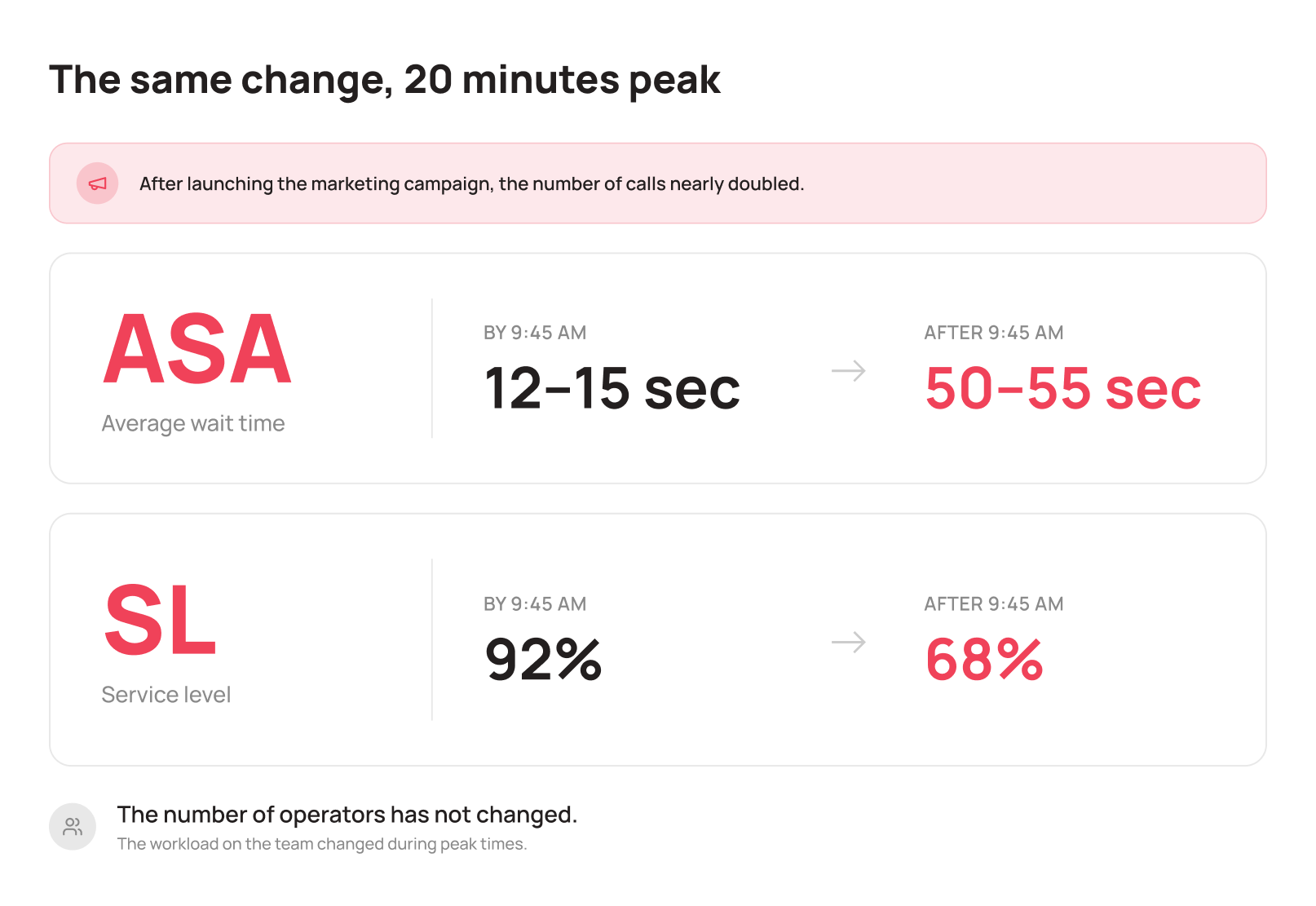
Until 9:40, everything’s calm. Calls come in evenly, each agent works at a comfortable pace, with small gaps between calls. Average speed of answer (ASA) sits around 12–15 seconds, service level (SL) is on target: 92% of calls answered within 20 seconds. The contact center manager looks at the dashboard and sees no reason to worry. If these abbreviations sound unfamiliar, we broke them down in our article SL, ASA, AHT: Key Call Center Metrics.
At 9:45, marketing sends out a discount email for laptops. A large share of recipients open it right away, and some call in immediately to ask questions or place an order over the phone. Within 20 minutes, call volume doubles: instead of 18–20 calls per 15 minutes, 38 come in. And that’s where it gets interesting.
The Queue Grows Even Though the Team Is Fully Staffed
Calls are routed in order. The next call goes to whichever agent became available first. It sounds logical and fair. But in practice, this logic doesn’t work as simply as it seems.
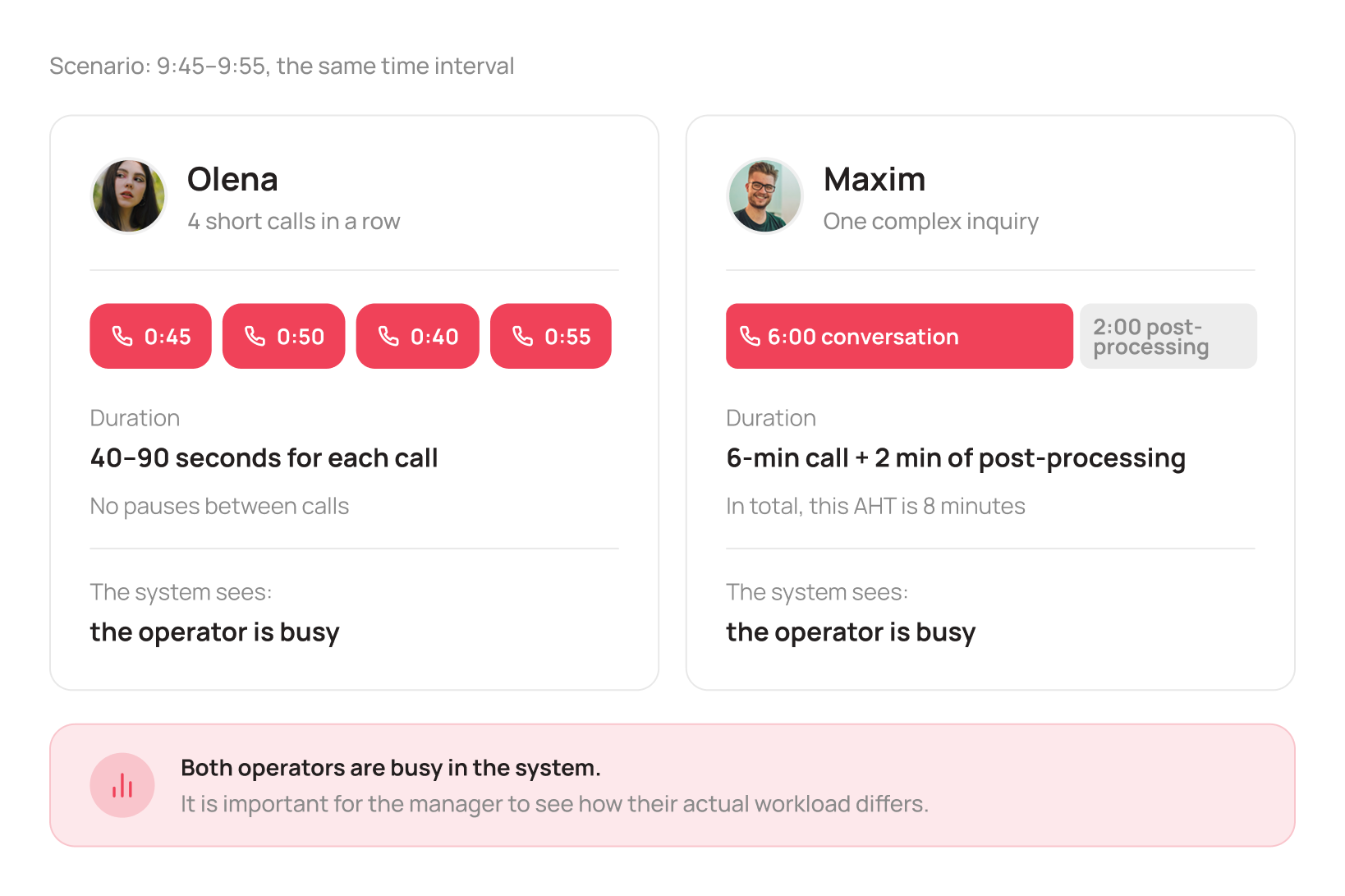
Over 10 minutes, Olena handled four short consultations back to back, 40–90 seconds each: customers just wanted to check stock or delivery times. Maksym, at the same time, was working a complex return request: the call itself ran 6 minutes, plus another 2 minutes of paperwork afterward. Together, that’s AHT, average handling time. While Maksym is tied up with the complex case, the system correctly takes him out of the routing pool for new calls. But the standard algorithm doesn’t account for the fact that this one call already cost him far more time and effort than his colleagues’ short consultations.
Technically, the system is working exactly as designed: every available agent gets calls according to the configured routing logic. But that creates a different problem for the manager: workload across the team is already substantially uneven, even though the standard metrics don’t show it yet.
Because call duration varies so much, some agents end up working almost without a break, while others get a lighter load. Over the course of the shift, this drives up average wait time and degrades service metrics even when the team is fully staffed. Within these 20 minutes, ASA climbs to 50–55 seconds and SL drops below 70%, not because anyone was sitting idle, but because nobody saw the workload gap forming in real time.
Note: no agent in this scenario performed poorly. Olena handled calls quickly, Maksym worked through a complex case well. The problem isn’t the people, it’s that the workload gap stays invisible until it shows up as a longer queue.
What This Actually Costs the Business
To a contact center manager or supervisor, this looks like “a slightly longer queue in the morning.” To a COO or business owner, it looks different once you translate it into money.
Say the company loses 8–10% of calls during the peak: customers hang up before getting an answer. If the average order value from a phone call is 3,000–4,000 UAH, and 150–200 people call per hour during a campaign like this, even a 10% drop rate means 15–20 lost orders, or 45,000–80,000 UAH in revenue within a single peak hour.
And that’s just the direct lost sales. On top of that comes the cleanup work: repeat calls from frustrated customers, negative reviews about long wait times, extra load on the same contact center that’s already behind. Chaos in call distribution doesn’t stay an operational issue, it hits revenue directly.
Where Managers Lose Control Over Workload
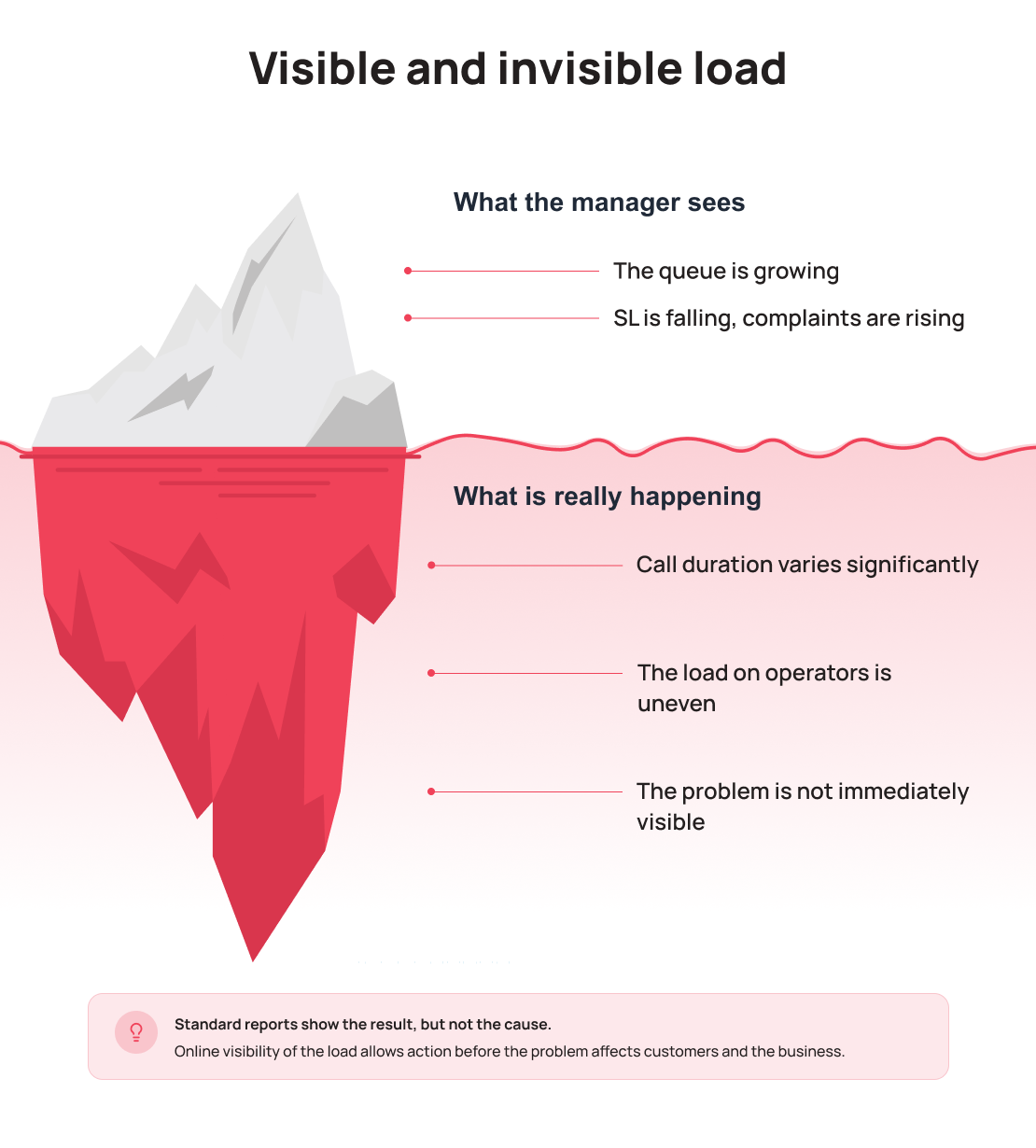
Breaking down the scenario above, there are four points where managers lose visibility into what’s actually happening with the team’s workload.
Calls Are Routed in Order
The classic “whoever finished first gets the next call” logic doesn’t account for how many complex conversations an agent has already handled in the past hour, how tired they are after a string of tough calls, or whether they could use a short break. It only looks at the moment an agent becomes free, not the workload they’ve built up over the shift.
The Problem Only Shows Up After a Customer Complains
In most teams, the manager learns about an imbalance not from a real-time dashboard, but from a “we’ve got a queue” message in chat or a customer complaint. By that point, the overload has already happened, and you can’t fix it after the fact, only limit the damage for whoever’s still waiting.
Different Requests Create Different Workloads
A question about product availability and a complex refund conversation look identical to the routing system: both are just “a call in the queue.” But in terms of workload on the agent, they’re completely different tasks. That’s why it matters to track not just call volume per agent, but actual call duration, queue-level load, and team performance broken down by call type. Without that visibility, an agent who just wrapped up a tough case can get handed another one right away simply because of how the queue lined up, and nobody notices until average wait time climbs.
Metrics Show the Average, Not the Peak
A daily report will show an average ASA of 22 seconds, and the manager will conclude everything’s fine. But that number hides the 20 minutes when ASA hit 55 seconds, and those are exactly the 20 minutes customers remember most. Averaged metrics mask the spikes that actually cost the business customers.
Important: none of these causes are about headcount. A team of 12 agents and a team of 20 agents running the same routing logic will both hit peak imbalances, just at a different scale.
Why Hiring More People Doesn’t Fix It
When the queue grows, a manager’s first instinct is to hire more people. The logic makes sense: more hands, less waiting. But if the problem isn’t headcount, it’s that nobody can see how workload builds up during a shift, hiring just masks the symptom and adds cost.
Look at utilization: the share of a shift an agent actually spends talking to customers. In a typical 8-hour shift, active call time often adds up to just 3–4 hours, the rest goes to waiting, gaps between calls, and situations where the queue “doesn’t reach” an agent because of uneven distribution. That’s paid time with no direct output.
Add three more agents to a team running the same sequential routing logic, and you don’t get a more even distribution, just more people falling into the same imbalances: some still “burn out” during peaks, others still sit idle between calls. On top of that come hiring costs, training time, and the supervisor’s time spent onboarding. Payroll goes up while ASA and SL barely improve, if at all, because the root cause never went away, it just got more people caught up in it.
Hiring solves a shortage of hands. It doesn’t solve the lack of logic behind how those hands get used. We covered this in more depth in our article Hiring More Won’t Fix It: Why More Operators ≠ Better Results.
What Managed Workload Distribution Actually Means
Before looking for a fix, it’s worth understanding what’s actually missing from the typical “call goes to whoever’s free” setup: not a smarter algorithm, but visibility into what’s happening with workload during a shift.
- Real-time workload visibility. A supervisor sees not just an agent’s current status, but the number of calls handled, call duration, after-call work time, and workload level throughout the shift. That makes it possible to step in before the queue grows, not after.
- Visibility into workload differences between agents. A manager sees not just call counts per agent, but actual duration and complexity, so an imbalance gets caught before it shows up in the queue.
- Predictable peaks. A marketing campaign, a promotion, or seasonal demand isn’t a surprise, it’s an event you can plan for and prepare the team for before call volume actually rises.
- Acting before the complaint, not after. A growing queue or an overloaded agent shows up on the dashboard in the moment, while it’s still fixable, not through a support chat complaint or a bad review.
The problem is rarely that there aren’t enough agents. Far more often, the manager simply can’t see how workload is forming during the shift. By the time the queue has grown and SL starts dropping, it’s already too late to react. That’s why a modern contact center needs more than queues and call routing, it needs real-time monitoring, workload control, and operational service management tools.
Signs of an Overloaded Team
Before changing anything about your process, check whether these situations sound familiar. If at least three of them happen regularly, a workload imbalance is already affecting your numbers.
- The same agents complain daily that they “never get a break between calls,” while others ask why they’re not getting enough calls.
- The queue noticeably grows at predictable moments, after a campaign, during lunch, in the first 30 minutes of a shift, but each time it gets treated as a one-off glitch rather than a pattern.
- The supervisor finds out about overload from a chat message or a customer complaint, not from their own dashboard.
- Your fastest agents keep getting the most calls because they’re the ones who become free first, gradually burning out your strongest people.
- Daily reports look fine, but customers keep complaining about long wait times.
Any one of these on its own might look minor. Together, they paint a picture of a team running at the edge, even though headcount is fine.
Check Your Contact Center
If you recognized your team in this scenario, it’s worth checking not the shift schedule, but how well you can actually see what’s happening with agent workload right now. Ask your supervisor: can they see each agent’s workload in real time, or do they only find out about an imbalance once the queue has already grown? How much of a shift do agents actually spend talking to customers, versus waiting or sitting idle between calls?
These three questions alone will show you where the gap between headcount and service quality is hiding in your team.
We regularly break down scenarios like this from real contact center operations on the UniTalk blog: where the losses hide, why AHT and ASA climb, and how that hits company revenue before anyone starts counting the damage. Follow along if you want to see your contact center not as a group of people answering phones, but as a process you can actually manage.
UniTalk: Manage communications. Drive results.