A customer calls for the third time with the same question: what FCR is and why a fast answer doesn’t guarantee a resolution
The agent picked up in 10 seconds, was polite, and wrapped up the call in three minutes. An hour later, the same customer calls again. The report looks fine: answers are fast, calls are short. But the issue is still open, the customer is annoyed, and the line is taken up by a call that didn’t need to happen. FCR is the metric that shows this problem. Below: how to calculate it, where the “first call” gets lost, and what to change so customers stop calling back.
FCR in plain terms: how many issues get resolved on the first call
FCR (First Call Resolution) shows the share of requests resolved within the first contact. The customer didn’t have to call again about the same issue, and it doesn’t matter whether the first agent answered or a specialist the call was transferred to during the same conversation. What counts is that the customer hangs up with an answer.
There’s a catch: if a customer never called back, that doesn’t prove the issue was resolved. They may have dropped the purchase or gone to another company. So what counts as “resolved” depends on how you measure it. We cover the methods in the section “How to calculate FCR in your contact center.”
Here’s how it’s calculated. Say 1,000 customers contacted you in a week, and 700 of them didn’t call again about the same issue:
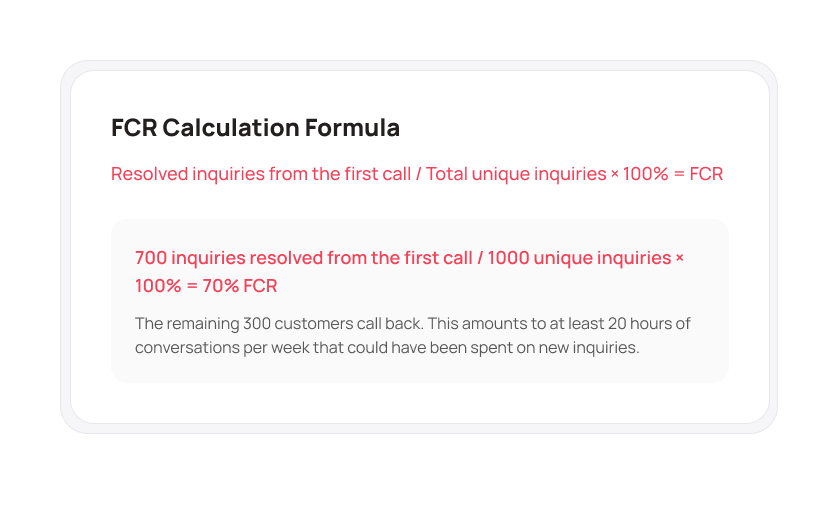
This is a rough estimate: some of those 700 may have called back from a different number. And here’s where the 20 hours come from: even if each of the 300 customers called back only once and the call lasted 4 minutes on average, that’s almost three full shifts for one agent. All that time, new customers are waiting in the queue.
Note. You’ll sometimes see FCR spelled out as First Contact Resolution. The logic is the same, it just counts requests from other channels as well as calls.
Why a fast answer doesn’t help if the customer calls back
Contact center managers usually look at speed first. ASA (average speed of answer, how long a customer waits) and AHT (average handle time per call) are easy to calculate and show in a report. We covered them in detail in our article on SL, ASA, and AHT.
The trouble is that these metrics don’t know how the call ended. An agent who says “we’ll look into it and call you back” in two minutes looks more efficient than one who spends seven minutes and solves the issue. Yet it’s the first agent’s customer who will call again.
Low FCR hurts the very speed you’re trying to protect:
- Repeat calls join the same queue as new ones.
- The queue grows, wait times go up, and some customers hang up (that’s Abandon Rate).
- The manager sees overload and thinks about hiring, although part of that load was created by the team itself.
According to SQM Group, a research firm that measures FCR in contact centers, every 1% gain in FCR brings on average a 1% gain in customer satisfaction and a 1% cut in operating costs. That’s an average across their research, and your numbers may differ. The logic holds, though: fewer repeat calls means less work for the same team.
Important. Speed and FCR don’t compete. When issues get resolved the first time, the queue gets shorter and ASA improves on its own.
What FCR counts as normal, and why these benchmarks are only a guide
According to SQM Group, the average FCR in contact centers is about 71%. That means almost one customer in three calls back about the same issue. Researchers consider 70–79% a good level, and only 5% of contact centers reach 80% or higher. Industry averages for 2026:
| Industry | Average FCR |
|---|---|
| Retail | 77% |
| Insurance | 75% |
| Tech support | 64% |
| Telecom | 56% |
Even within one industry the spread is wide. In the same research, contact center FCR in health insurance ranges from 51% to 91%, and in finance from 53% to 90%. So the industry average won’t tell you whether your own team is doing well.
The difference most likely comes down to the type of requests:
- questions like “where’s my order” usually get closed in one call, so retail has a higher average FCR;
- in tech support and telecom, some cases go to engineers or need an equipment check, so averages there are noticeably lower.
That’s why it’s more useful to track FCR by contact reason and compare it with your own numbers from last month. If you’re at 85% on “payments” and 50% on “returns,” you already know where to look.
How to calculate FCR in your contact center
There are three common methods. None is perfect, so in practice teams often combine them.
Repeat calls from the same number
The simplest option. You set a window, say 48 hours or 7 days, and check how many customers called again within it. The data is already in your call log, no surveys needed.
Weak spot: the customer may have called from another phone or about something else entirely.
A short post-call survey
One question by SMS or through an automated voice menu: “Was your issue resolved?” This way you hear it from the customer.
Weak spot: only some customers reply, and they tend to be either very happy or very angry.
The agent’s mark in the call card
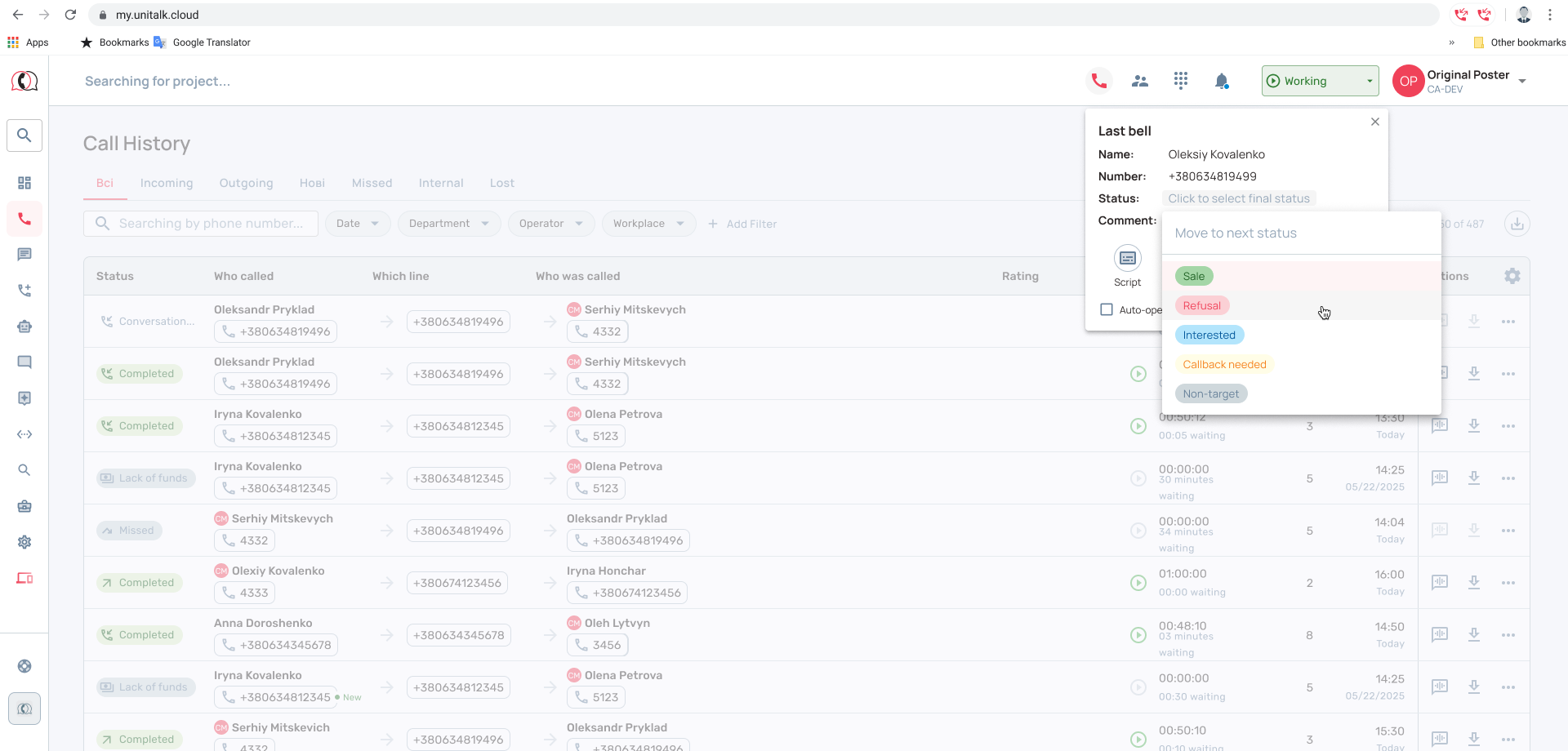
After the call, the agent picks an outcome: “resolved,” “escalated,” “callback needed.” Along with the percentage, you see the reasons right away.
Weak spot: the agent judges the call from their side and doesn’t always know whether the customer actually got what they needed. So it works best combined with repeat-call data.
When FCR is misleading
- The call was transferred to another specialist who solved the issue. For the customer it’s still one call, but for you it’s a sign the call first went to the wrong place.
- The customer didn’t call back, and you don’t know why. Maybe the issue was solved, maybe they went to another company. In the report, both look like a success.
- The repeat call was planned: the customer agreed to call once they received their documents. It’s better to leave such calls out of the calculation.
Tip. Start with a log of repeat calls over 7 days and add a reason field to the call card. These two sources are enough to see within a month which topics make your contact center lose the “first call.”
Where the “first call” gets lost: 5 reasons for low FCR
Low FCR usually comes down to how the whole team’s work is organized: how calls are routed, and what tools and authority agents have.
1. The call reaches the wrong agent
A customer asking about a refund ends up with a sales manager. The manager doesn’t know the answer and promises to pass the question on to the colleagues who handle refunds. If requests aren’t routed by topic, some calls are doomed before an agent even picks up.
2. The agent doesn’t have the answer at hand
They search three tabs and ask a colleague in chat, while the customer hears “one second, let me check.” Expecting agents to keep everything in their heads isn’t an option either.
3. The agent doesn’t have the authority
They know how to help but can’t approve a refund, a discount, or a new appointment time on their own. Almost every “I need to check with my manager” turns into a second call.
4. Pressure from a call-length target
If agents are judged mainly on AHT, they rush to end the call even when the issue isn’t closed yet. Short AHT and low FCR often go hand in hand.
5. Call outcomes aren’t recorded anywhere
The customer calls a second time, and the new agent starts from scratch: “Could you tell me what happened?” The second call takes longer than the first, and the customer is in a worse mood.
What to change so customers don’t call back
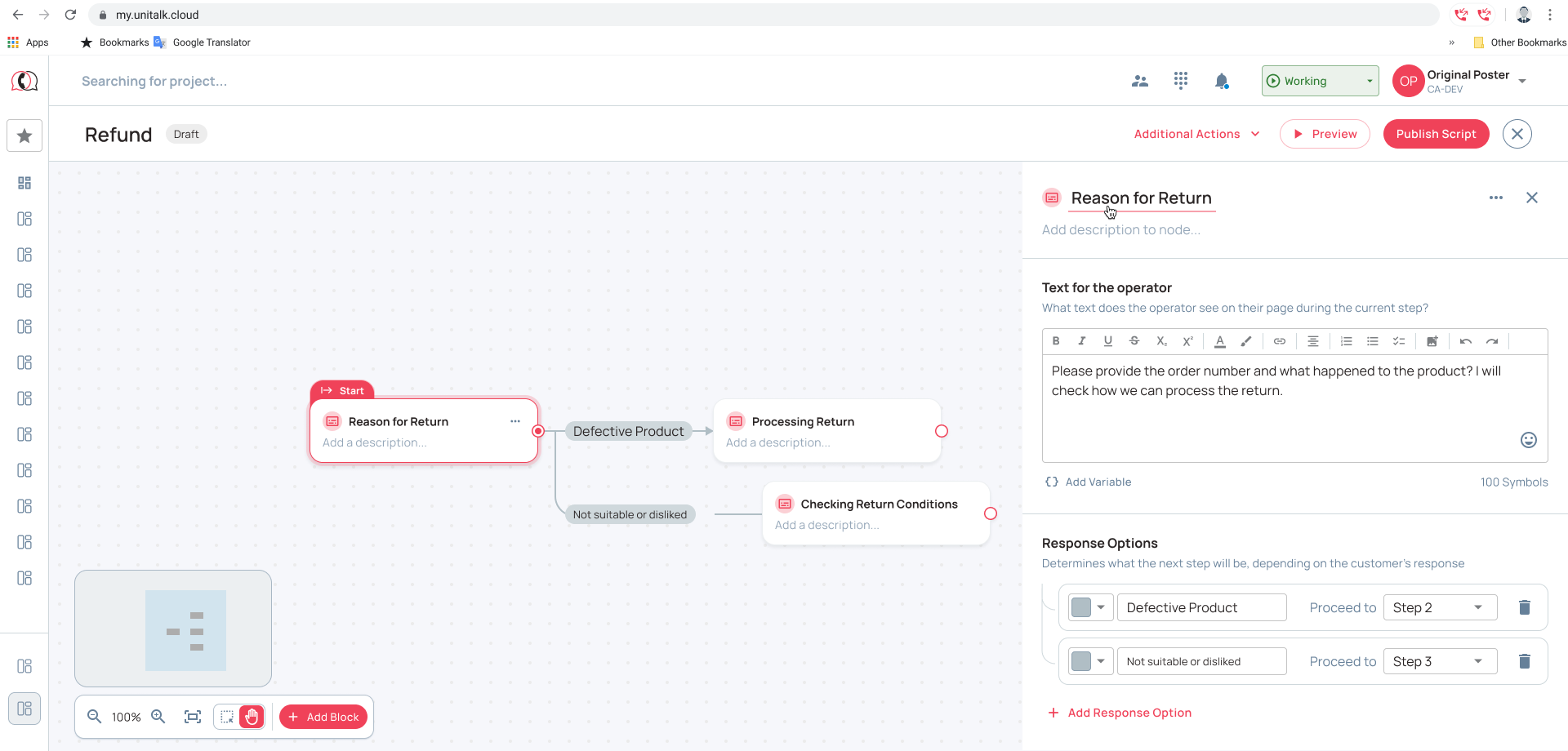
All five reasons are about process, so the fix lies in how the contact center’s work is organized. This is where UniTalk Contact Center (UCC) helps. It’s a system for managing contact center operations that sets the rules your team follows on every call.
| Where FCR gets lost | What to change | How it works in UCC |
|---|---|---|
| The call reaches the wrong agent | Route requests by topic right at the entry point | Voice menu, queues, and routing rules: a refund call goes to the people who handle refunds |
| The agent doesn’t have the answer | Give them a prompt during the call | Branching scripts: the agent sees the next step based on the customer’s answer |
| Outcomes aren’t recorded | Record how every call ended | Forms in the agent workspace capture the outcome, and in the History tab the next agent sees the customer’s previous requests instead of asking everything again |
| The manager doesn’t see repeat calls | Review the topics with the lowest FCR once a week | Statistics on calls and each agent’s work, plus the interaction history with every customer. Dashboards show call and agent analytics |
Two things no system will fix for you:
- Decide which calls agents can make on their own, without a manager: refunds up to a set amount, rescheduling, product replacement.
- Don’t judge agents on AHT alone. Look at call time together with the share of repeat calls.
When you shouldn’t push FCR up at any cost
Sometimes a planned second call beats a rushed “resolved.” If the answer needs checking, agree on a callback at a specific time and keep that promise. The customer will remember that you did. Planned calls like these shouldn’t count against the agent.
Where to start improving FCR
- Export last month’s calls and count how many numbers called again within 7 days. Subtract that share from 100%, and you have your first rough FCR.
- Take 20 repeat calls and listen to the first conversation in each case. Note which of the five reasons was at play.
- Find the 2–3 topics customers call back about most often. Start with those.
- Add a required “call outcome” field to the call card. In a month, you’ll see which topics most often end in a repeat call.
Not sure how many calls in your queue come from customers calling for the second time? We’ll help you count them and show you how to organize your team’s work so issues get resolved the first time.