Myths About Contact Centers. Myth #2: A Contact Center Is Only for Big Companies
You have 7 agents. All of them are busy. Calls are piling up, some customers give up waiting, and you only hear about it after a complaint. But the moment “contact center” comes up, the same thought follows: “We’re not ready yet, we’re not a bank with hundreds of agents.” That’s exactly where the myth kicks in. The real question isn’t team size. It’s how many conversations flow through your team and how hard they are to manage.
A Contact Center Doesn’t Start at 100 Agents
That’s no coincidence. For years, contact centers were something banks, telecoms, and insurance companies had, places with hundreds of agents on the floor. That’s why the idea stuck: this is a tool for “big” companies.
But company size alone doesn’t tell you whether you need one. The real question isn’t “how many agents do we have,” it’s “how do we handle the flow of requests.”
A team of 10 agents handling hundreds of calls, chats, and tickets a day can run a far more complex process than a team of 30 with light call volume. Headcount matters, but it’s not what determines whether you need a contact center.
Signs Your Phone System Isn’t Enough Anymore
Here are the concrete signs:
- customers wait in queue;
- some calls go unanswered;
- requests need to be routed across several departments;
- workload is distributed unevenly between agents;
- your team handles inbound and outbound at the same time;
- agents work from scripts, and someone needs to check they’re actually following them;
- managers can’t see team metrics in real time;
- there’s no quality control on customer interactions;
- the business regularly works with large lists for outbound calling.
For example: two agents are free while three others can’t keep up with incoming calls. The manager only finds out after the fact, even though a system could have rebalanced the load instantly.
The question isn’t team size anymore. It’s how much longer you’re willing to manage this by hand.
When You Genuinely Don’t Need a Contact Center
Not every business needs a contact center, and that’s fine.
If you have 2-3 managers, call volume is low, there are no queues, no complex routing, no outbound campaigns, and you don’t need to track SLA or other team performance metrics, regular phone service is enough.
A contact center becomes necessary once you have a process that actually needs managing.
Example: A Small Online Store That Can’t Keep Up
A small online store runs support with 7 agents. They handle order calls, confirm purchases, answer delivery questions, call customers back, and process returns.
The team is small, but the workflow is already complex. If a lot of calls come through every day, you need queues, call routing (automatically distributing calls to available agents), reporting, and visibility into missed calls.
What Happens When a Business Grows From 5 to 15 Agents
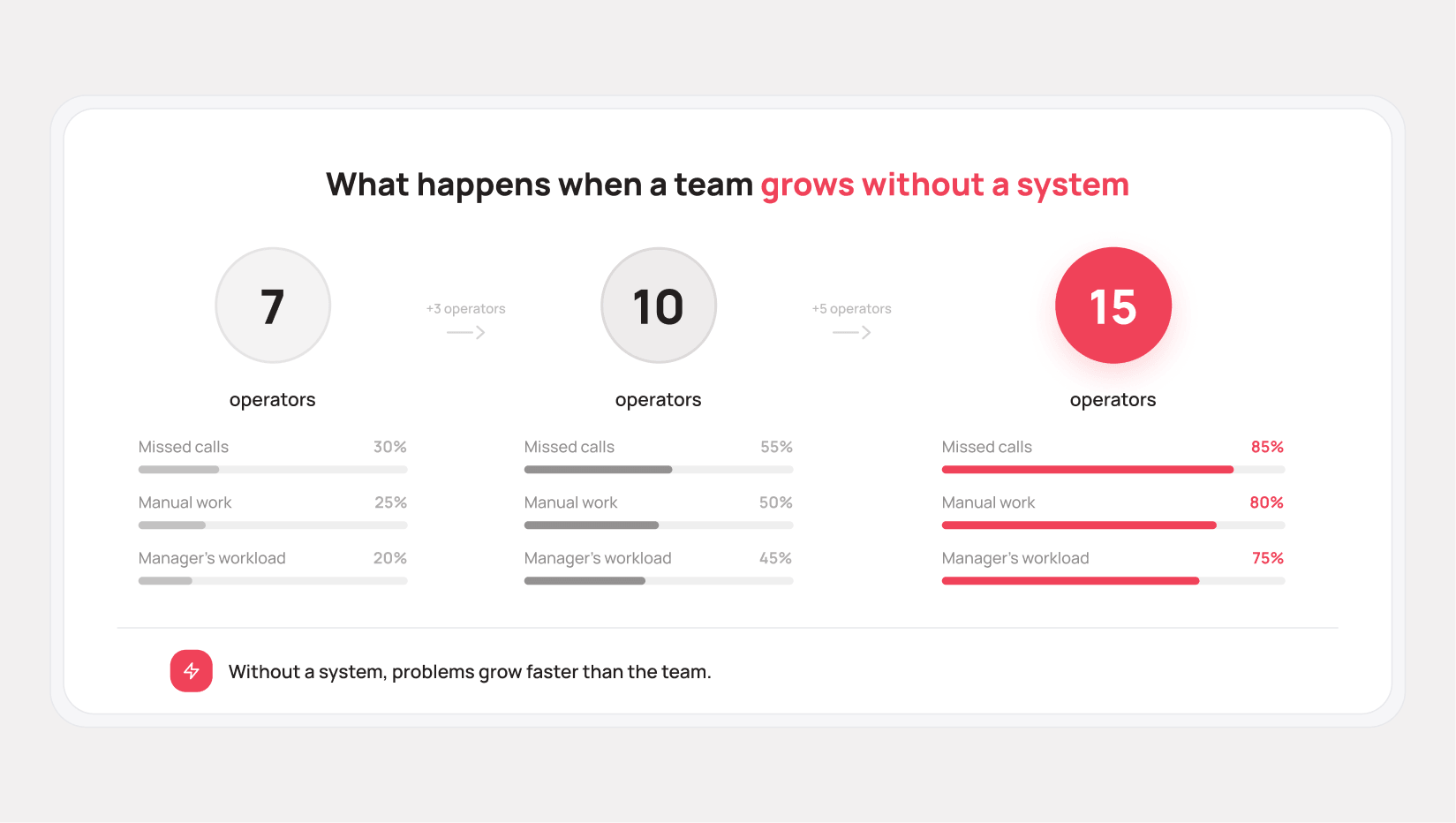
The team grows: 7 agents, then 10, then 15.
Businesses usually respond to growing workload the same way: they hire more people. Call volume rises, the team gets overloaded, so the business hires another agent. Things ease up for a while, then the workload grows again and the same problem returns. The cycle repeats because the issue was never headcount, it’s how requests get distributed.
If the real problem is queues, call distribution, peak hours, or missed calls, hiring one more agent won’t necessarily fix it. Manual work keeps piling up, it gets harder for managers to spot the actual bottleneck, and the number of processes they have to control by hand grows right along with the team.
A contact center becomes necessary when your old way of managing things can no longer keep up with a bigger operation.
In a Small Team, Every Agent Counts
A large contact center has room to absorb shocks. If one agent out of 50 misses a shift, the system rebalances easily and the customer never notices.
In a team of 7, one absence takes out more than 14% of your capacity. A missed shift, a sick day, or just an unlucky distribution of calls shows up immediately in the team’s results.
For a small team, this translates into practical things: customers reach the right agent faster, calls don’t pile up in one place, missed requests are visible right away, and managers can see exactly where the team is overloaded.
We covered the specific tasks phone systems can’t handle in more detail in our article “Why Phone Systems Aren’t Enough Anymore: 6 Tasks Only a Contact Center Can Solve”.
Phone Systems Show You Calls. A Contact Center Shows You the Process
When a team is small, it’s easy to assume managers already see everything. But without proper analytics, it’s hard to answer basic questions: how many customers gave up waiting, when peak hours actually hit, how long customers really wait on hold, how loaded each agent is, how many requests the team handles per day, and where exactly delays happen in the process.
The core question analytics answers:
Do you actually need more people, or is the workload just unevenly distributed?
You can estimate real losses with three numbers: total requests, the share that go unanswered, and the average value of a single request. For example:
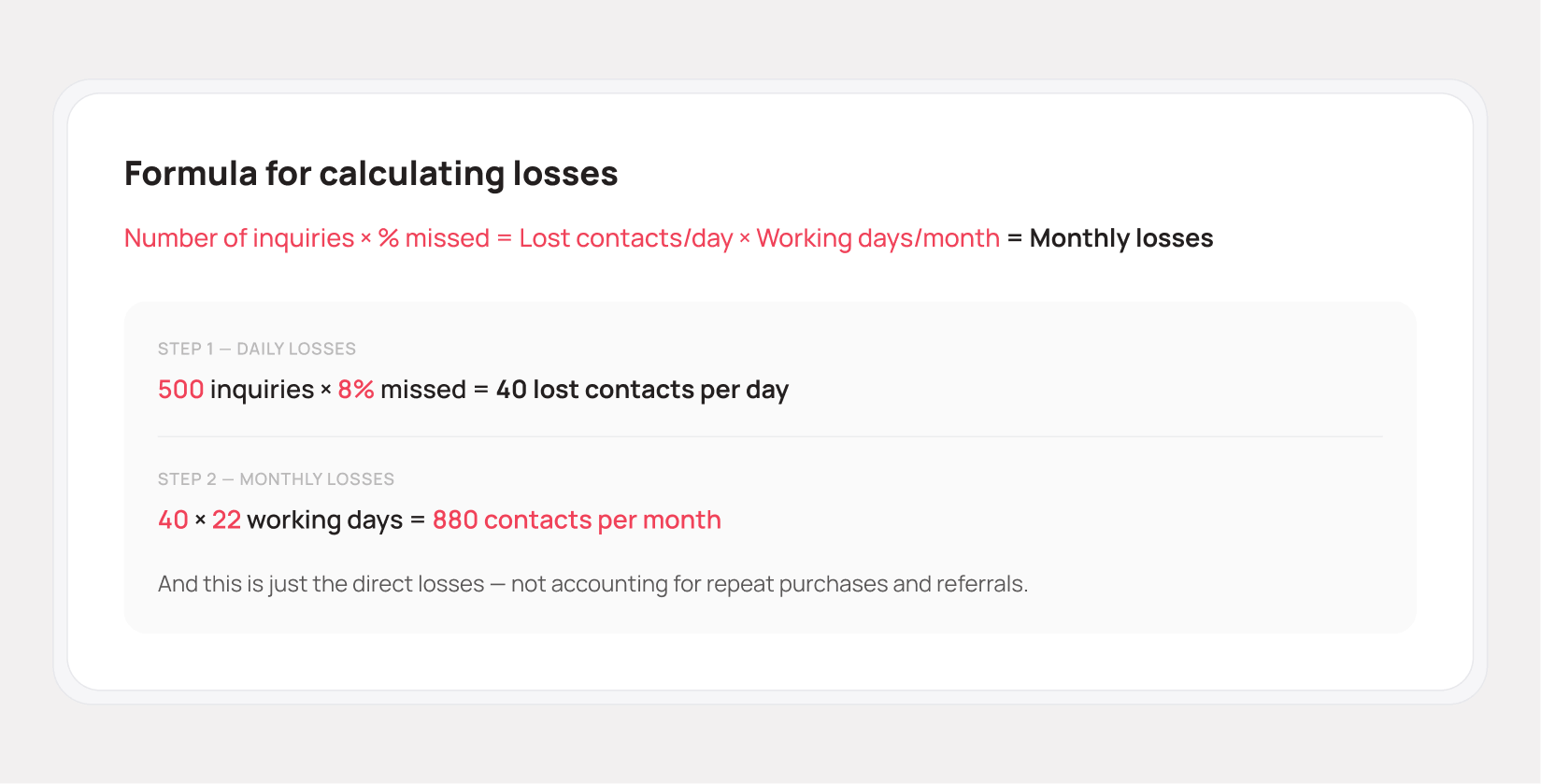
From there, plug in your own conversion rate or lead value to see what that adds up to over a month.
| Phone Only | With a Contact Center |
|---|---|
| Managers rely on a gut feeling that “the team seems to be managing” | Managers see real workload and missed calls |
| Problems surface after customer complaints | Problems are visible before they reach customers |
| Hiring decisions are made by guesswork | Decisions are based on data |
We wrote in detail about the metrics managers should check daily in our article “7 Things a Contact Center Manager Should See Every Day”.
You Don’t Need to Roll Out Everything at Once
One reason small teams put off the contact center decision is the fear that they’ll have to build out a complex system with dozens of scenarios from day one.
In reality, you can start with whatever is costing your team the most time: call distribution, missed-call tracking, and basic reporting.
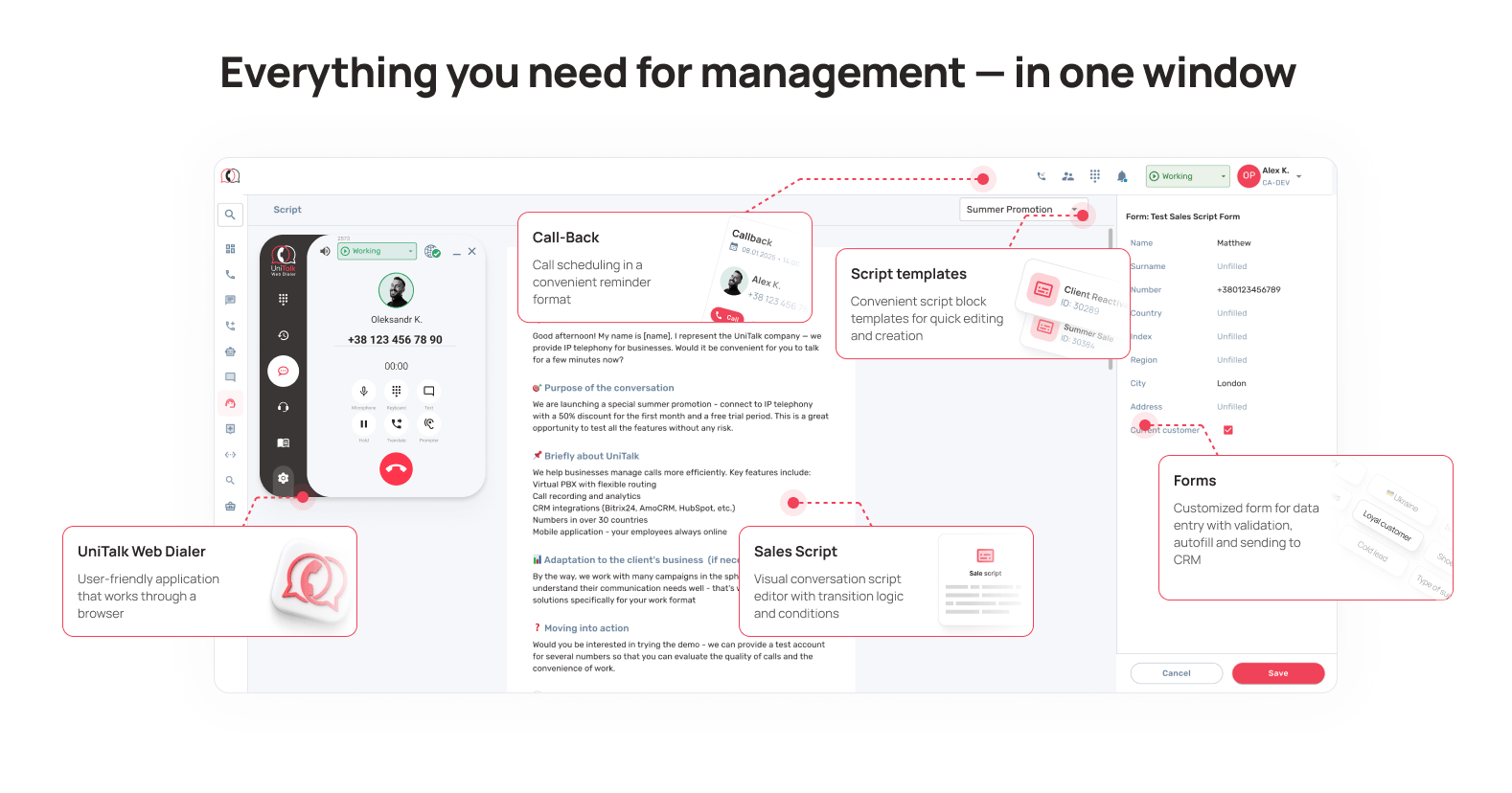
Once that’s stable, you can add outbound campaigns, call scripts, deeper analytics, or automation for parts of the workflow. A contact center doesn’t need to be implemented all at once. It can grow alongside your team.
The Bottom Line
A contact center isn’t about automating everything for its own sake. It’s about giving your team a way to manage communication with customers systematically.
For a team of 5-10 agents, this can matter just as much as it does for a 100-person contact center.
If this sounds like your team, you can read more about what UniTalk Contact Center offers on the product page.
For more on the difference between a call center and a contact center, a mix-up that often makes it hard for businesses to judge their own needs, see the first myth in this series: “Are a Call Center and a Contact Center the Same Thing?”.
UniTalk: Manage Communication. Manage Results.