The Agent Was Polite, but the Customer Still Left Unhappy: What Shapes CX in a Contact Center
The customer got through on the third try, waited a long time in the queue, and had to explain the problem twice after being transferred. The third agent handled the call well and promised a callback by the end of the day, but it never came. By the QA checklist, that call scores 10 out of 10. The customer, though, judges the whole story, from the first ring to the callback that never happened, and their score will be much lower. Below are the stages that make up customer experience (CX) in a contact center, and the ones a manager can influence systematically.
For the customer, the conversation started before “Hello”
In contact center reports, an interaction usually starts when the agent picks up. That’s when the talk timer starts, and that’s where QA starts listening to the recording.
The customer sees their journey differently:
- Decided to get in touch and dialed the number.
- Listened to the voice menu (IVR, the familiar “press 1 if…” recording).
- Picked an option, sometimes at random.
- Waited in the queue.
- Got an answer. Or didn’t, and called again.
If the customer waited a long time at step four, the agent gets someone who is already irritated. No greeting script can fix that: whatever happened before the answer is outside the agent’s control. It is, however, entirely within the manager’s.
That’s why it helps to look at customer experience in a contact center as a chain of stages. Scoring a single call shows you only one link.
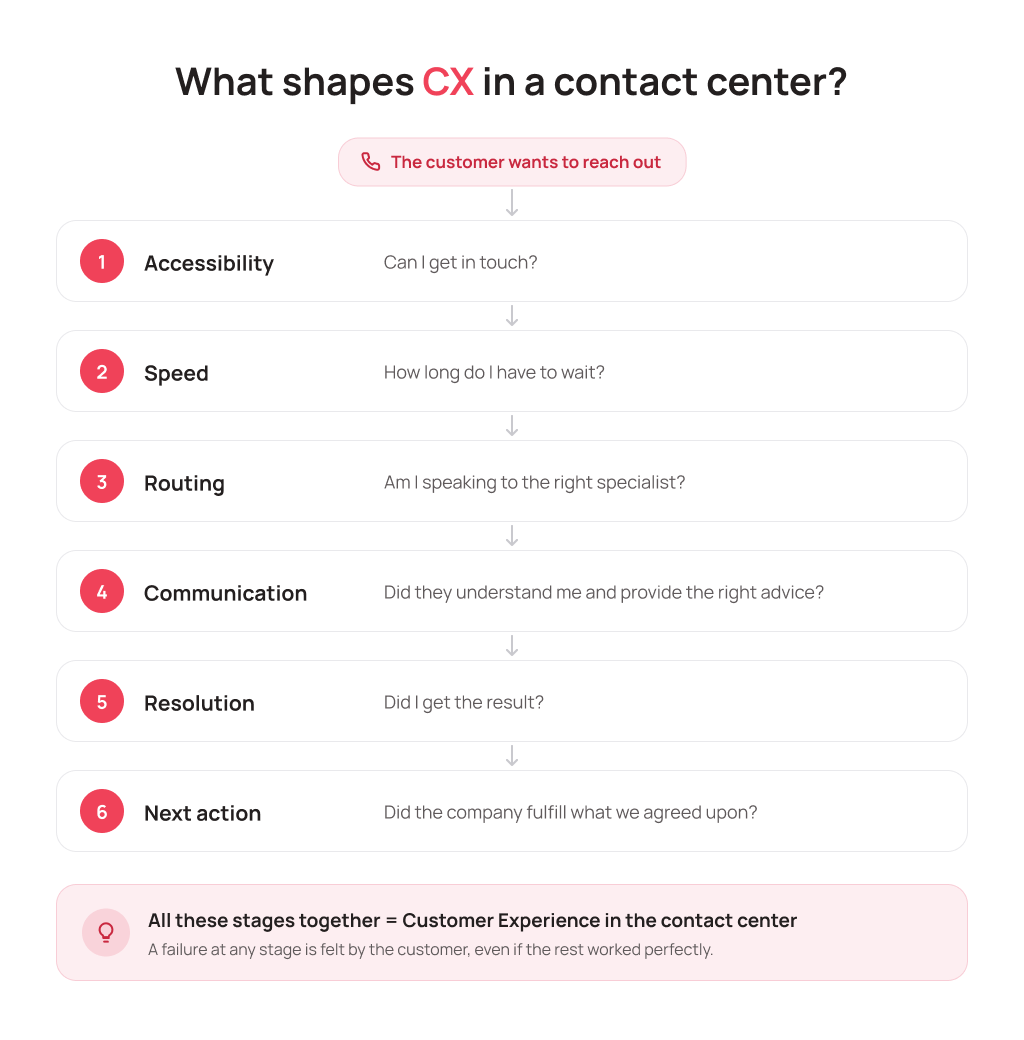
There are six stages:
- Accessibility: Can I reach them?
- Speed: How long do I have to wait?
- Routing: Did I get to the right person?
- Communication: Did they understand me and give me the right advice?
- Resolution: Did I get a result?
- Next step: Did the company do what we agreed on?
We’ll go through them in the order the customer does, from the first ring to the kept promise.
Stage 1. Accessibility: can the customer reach you at all?
Before judging the quality of the answer, make sure the customer can get an answer in the first place. It sounds obvious. Yet this is exactly where some requests get lost without the company ever finding out.
To assess accessibility, answer four questions honestly:
- Can customers call or message you the way they prefer, and does every one of those requests reach an agent?
- Does the line hold up during peak hours?
- Do your contact center’s hours match when customers actually get in touch?
- Can a customer get an answer to a routine question (“Where’s my order?”, “What time do you close?”) without waiting for an agent?
Tip. Pull last week’s missed-call stats and break them down by hour. If the peak falls at 8:30–9:00 a.m. or over lunch, your agents aren’t the problem. Your schedule is.
UniTalk Contact Center (UCC) runs at 99.8% uptime, so the line is available almost all the time. Every missed call lands in the stats, and the team can call back. Routine requests can be automated, so agents don’t spend time on questions that don’t need a person.
Stage 2. Speed: how long did the customer have to wait?
The next thing the customer remembers is how many minutes of hold music they sat through. That time depends on call volume, how many agents are free, and how their work is organized. A familiar picture: Monday morning, calls are piling up in the queue, and two agents have just gone on break because that’s what the schedule says.
To keep the conversation about speed grounded in more than a feeling that “people seem to wait a long time,” contact centers track a few metrics:
- Service Level (SL): the share of calls answered within a target time, for example 80% in 20 seconds;
- ASA (Average Speed of Answer): how long a customer waits for an answer on average;
- abandoned calls: how many people gave up and hung up.
We covered how to calculate these metrics and what values count as normal in our article on SL, ASA, and AHT.
Important. Faster isn’t always better. If agents are pushed to wrap up calls as quickly as possible, the queue gets shorter, but the customer calls again tomorrow because the issue was never resolved. The goal at this stage is to remove unnecessary waiting. There’s no need to cut the conversation itself short.
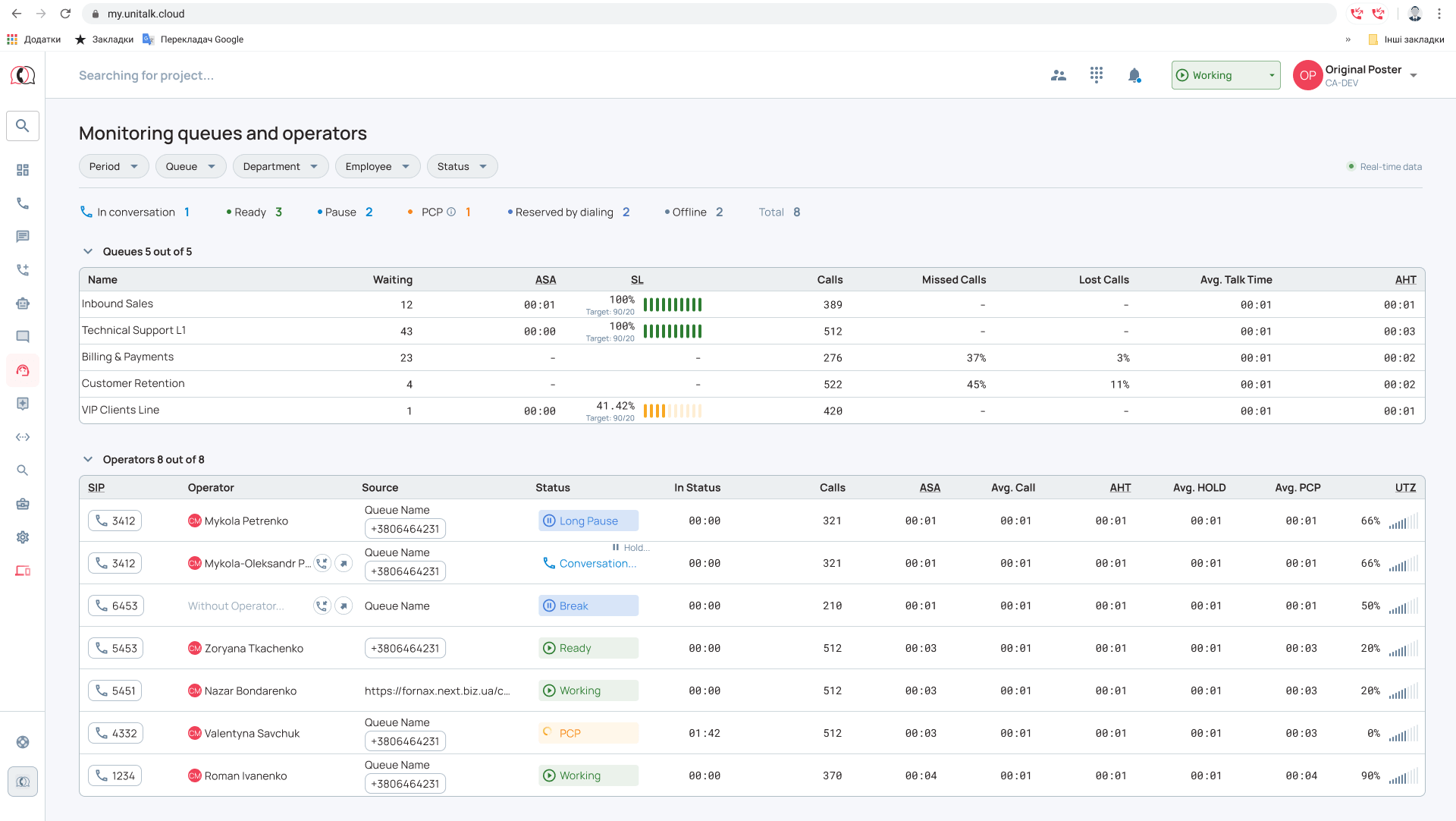
Queues with distribution rules help here: each call goes to an available agent, and the load doesn’t pile up on two people. Real-time monitoring in UCC shows the manager how many people are in the queue right now. That way you can react while customers are still waiting, not the next day when the report comes in.
Stage 3. Routing: did the customer reach someone who can help?
A fast answer guarantees nothing on its own. Here’s a scenario anyone who has ever called a bank or a delivery service will recognize:
The customer calls, and the agent picks up within 10 seconds. But the first thing the customer hears is “That’s not our department.” They get transferred, explain everything again, and a minute later get transferred once more.
In the report, this call looks great: answered on time, just as the standard requires. The customer remembers something else: they told the same story three times. And that’s common. According to Salesforce’s State of the Connected Customer research, 56% of customers say they often have to repeat or re-explain information to different representatives.
Customers don’t care how your company is structured or which department handles what. They just don’t want to hunt for the person who can solve their problem. That’s what these are for:
- a voice menu written in the customer’s language: “Delivery questions” instead of “Logistics department”;
- separate queues for different types of requests;
- routing logic that takes into account the topic, the language, or the agent’s skills;
- a transfer rule: if a transfer can’t be avoided, the colleague gets the gist of the issue along with the call.
Tip. Count what share of last week’s calls ended in a transfer. If there are a lot, review the routing: right now your agents are paying for mistakes in the voice menu and queue setup.
In UCC, the voice menu, queues, and routing logic are set up around your scenarios, so you can adjust the routing as your products or request topics change. For tips on building a convenient menu, see our article on IVR menus for business.
Stage 4. Communication: did the agent understand the customer and give the right answer?
Only now does the agent take the stage. And here’s the most common trap: judging a call by whether the agent used the standard greeting and said thank you at the end. An agent can be perfectly polite and still get the return policy wrong.
A good conversation looks like this. The agent:
- understood the real reason for the call, not just the customer’s first sentence;
- asked the right follow-up questions;
- gave accurate information;
- didn’t skip required steps: verified the details, explained the terms, recorded what was agreed;
- clearly explained what happens next.
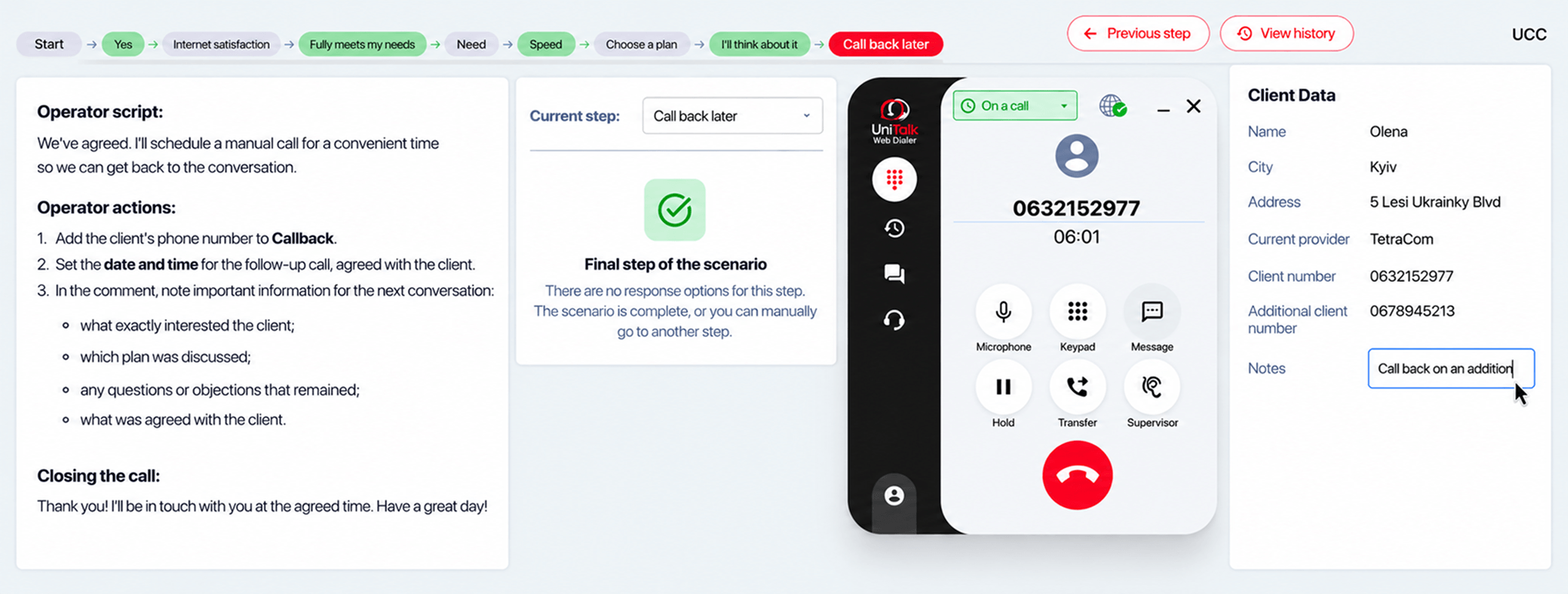
To get every agent working this way, not just the most experienced one, you need work standards: call scripts, forms for capturing information, training, and quality control. Here a script works like a pilot’s checklist. Agents don’t have to read it word for word; it’s there so they don’t skip an important step when a dozen people are still waiting in the queue.
But a linear script only helps until the customer gives an unexpected answer. For complex requests, branching scripts work better: the next step depends on how the customer answered, and the agent sees only the step they need right now. The manager sets up the options in advance, so a new hire doesn’t have to keep the whole process in their head. We cover this in detail in “Branching Scripts in UniTalk Contact Center: Operators See the Right Step at the Right Time”.
In UCC, the script and the form open in the agent’s workspace right during the call. And Speech Analytics helps you find calls where something went wrong without listening to hundreds of recordings by hand.
Stage 5. Resolution: will the customer have to call again tomorrow?
A company can answer quickly and handle the call flawlessly. But if the customer calls back tomorrow with the same problem, their journey isn’t over: they called for a solution and got only a conversation.
FCR (First Contact Resolution), the share of requests resolved on the first contact, helps you measure this stage. Say you had 1,000 requests in a week and closed 720 right away: FCR = 72%. The other 280 people will be back, and every repeat call ties up an agent again and wears down the customer’s patience a little more. According to SQM Group, every 1% improvement in FCR brings roughly a 1% improvement in customer satisfaction.
Why don’t issues get resolved the first time? Usually the cause is the process, not the person:
- the agent lacks access to the information or authority they need;
- the issue needs another department, and the handoff happens by word of mouth;
- the previous contact wasn’t recorded anywhere, so the new agent starts from scratch.
In UCC, the outcome of every call is recorded in a form, and thanks to CRM integration the next agent can see what happened before and doesn’t ask for things that are already known.
Stage 6. Next step: did the company keep its “we’ll call you back” promise?
The agent hangs up, but the customer experience goes on. If the company said “we’ll call you back,” “we’ll pass this on to our colleagues,” or “we’ll get back to you by the end of the day,” that’s exactly what the customer is waiting for. And they’ll remember whether it happened.
A “we’ll call you back” that nobody wrote down turns into a polite way of saying goodbye.
For a promise to be kept, it has to become a task: record the outcome of the contact, the next step, who’s responsible, and the deadline. And the details have to reach whoever does the task without being retold in a messenger chat.
In UCC, callbacks don’t depend on an agent’s memory, the call outcome is recorded in a form, and CRM integration passes the data on to where it’ll be used next.
Why good CX can’t rely on one “star” agent
Almost every contact center has an agent customers thank and write reviews about. The problem is that reaching that particular agent is a lottery for the customer. If the experience depends on who picks up, there’s no system yet.
What needs standardizing is the process. Agents can keep their personality and their own words, but the path every request takes should be the same for everyone:
- how a request is received;
- where it’s routed;
- how it’s handled;
- what data is recorded;
- how it should end.
Once the process is documented and built into the system, a new agent works by the same logic in their first week as a “star” with three years on the job. And the manager stops picking apart individual calls and starts managing the customer journey through the contact center.
One weak link spoils the whole customer experience: what it means for managers
Strong stages don’t make up for a weak one. A flawless conversation won’t save the day if the promised callback never happens. A 10-second answer is worth little if it’s followed by three transfers.
That’s why spot-checking call recordings isn’t enough for a manager. You need to see the entire request-handling process: where customers get lost, where they wait, and where they come back again.
UCC’s statistics and real-time monitoring give you that view across every stage. And we’ve collected the metrics worth keeping an eye on every day in “7 Things Every Contact Center Manager Should See Every Day”.
Where to start: look at your contact center through your customers’ eyes
- Call your contact center during peak hours with a routine question and time how long it takes to get to the actual conversation.
- Break down last week’s missed calls by hour.
- Calculate the share of calls that ended in a transfer.
- Check how many customers came back with the same question within a few days.
- Take 10 callbacks promised last week and check how many happened on time.
Chances are at least one of these will surprise you. That’s where to start.
Not sure at which stage your customers’ journey breaks down most often? We’ll show you how to see the entire request-handling process in UCC, using your own contact center as an example.